Switching and Network Access · Topic 6 of 6
Rapid PVST+
Configure Rapid PVST+, set the root bridge with primary and secondary, read port roles and states, and use PortFast, root guard, loop guard and BPDU guard.
- 6 min
- Includes a diagram
- The lowest bridge ID, priority then MAC address, becomes root.
- The default priority is 32768, plus the VLAN number. Steps are 4096.
root primarysets 24576 or lower.root secondarysets 28672.
What it is
Spanning Tree blocks the redundant ports that would otherwise create a switching loop.
Ethernet frames have no hop count, so a broadcast can circle a loop forever. Spanning Tree Protocol picks a loop-free path and blocks the rest. If an active link fails, a blocked port takes over.
Rapid PVST+ is the Cisco version built on rapid spanning tree, 802.1w. It converges in a few seconds and runs a separate instance for each VLAN, so each VLAN can have its own root and its own blocked links.
How it works
The switches elect a root, each port takes a role, and guard features protect the edges.
Electing the root bridge
The root bridge is the switch with the lowest bridge ID. The bridge ID is the priority, the VLAN number (the extended system ID) and the MAC address. Priority is compared first and MAC address breaks a tie.
The default priority is 32768, so VLAN 10 shows 32778. If you do nothing, the switch with the lowest MAC address wins, which is often the oldest. Choose the root yourself.
spanning-tree mode rapid-pvst
spanning-tree vlan 10 root primary
spanning-tree vlan 10 root secondary
root primary sets the priority to 24576, or lower if needed to beat the current root. root secondary sets 28672. You can also set the priority in steps of 4096.
spanning-tree vlan 10 priority 4096Port roles
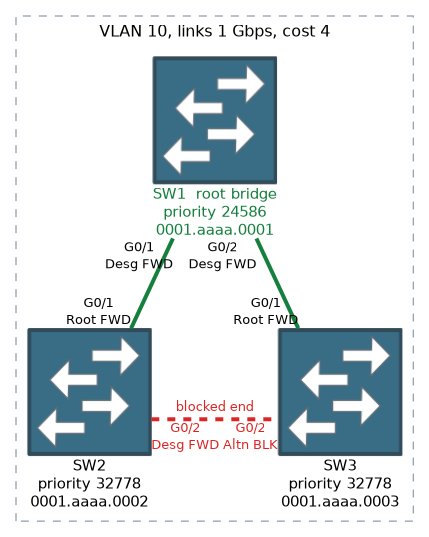
- Root port: the best path from a non-root switch to the root bridge. Each non-root switch has one per VLAN.
- Designated port: the best path on a segment, away from the root. All ports on the root bridge are designated.
- Alternate port: a backup path to the root through another switch. It takes over if the root port fails.
- Backup port: a backup to a segment the same switch already reaches. It is rare.
The best path has the lowest path cost. Cost follows link speed, and the short method values are 100 for 10 Mbps, 19 for 100 Mbps, 4 for 1 Gbps and 2 for 10 Gbps. If costs tie, the lowest sender bridge ID decides, then the lowest port priority (default 128).
These short values match the sample output below. Some platforms and releases default to the long method instead, where 1 Gbps costs 20000, so check the costs in show spanning-tree. The method is set with spanning-tree pathcost method long or short.
Port states
Rapid PVST+ has three states: discarding, learning and forwarding. Discarding replaces the older blocking and listening states, and it appears as BLK in show output. Classic STP takes 30 to 50 seconds to react. Rapid PVST+ uses a proposal and agreement handshake, so it recovers within seconds.
Reading the output
SW2# show spanning-tree vlan 10

VLAN0010
  Spanning tree enabled protocol rstp
  Root ID    Priority    24586
             Address     0011.2233.4455
             Cost        4
             Port        1 (GigabitEthernet0/1)
             Hello Time   2 sec  Max Age 20 sec  Forward Delay 15 sec

  Bridge ID  Priority    32778  (priority 32768 sys-id-ext 10)
             Address     00aa.bbcc.ddee

Interface           Role Sts Cost      Prio.Nbr Type
------------------- ---- --- --------- -------- ------------------
Gi0/1               Root FWD 4         128.1    P2p
Gi0/2               Altn BLK 4         128.2    P2p
Gi0/5               Desg FWD 4         128.5    P2p Edge
The Root ID block describes the root, and the Bridge ID block describes this switch. The two differ here, so this switch is not the root. Gi0/1 is the root port, Gi0/2 is an alternate port in discarding, and Gi0/5 is an edge port. On the root switch the output says This bridge is the root and every port is Desg.
Protection features
| Feature | Command | What it does |
|---|---|---|
| PortFast | spanning-tree portfast | Moves an edge port straight to forwarding |
| BPDU guard | spanning-tree bpduguard enable | Err-disables a port that receives a BPDU |
| Root guard | spanning-tree guard root | Stops a port from accepting a better root |
| Loop guard | spanning-tree guard loop | Stops a port forwarding when BPDUs stop arriving |
PortFast is for ports facing end devices. Do not use it on a link to another switch. You can enable it on every access port with spanning-tree portfast default.
BPDU guard protects PortFast ports. Plug a switch into one and it goes err-disabled. Use spanning-tree portfast bpduguard default to enable it on all PortFast ports.
%SPANTREE-2-BLOCK_BPDUGUARD: Received BPDU on port Gi0/5 with BPDU Guard enabled. Disabling port.
%PM-4-ERR_DISABLE: bpduguard error detected on Gi0/5, putting Gi0/5 in err-disable state
Remove the switch, then run shutdown and no shutdown on the port to recover it.
Root guard goes on ports facing switches that must never become the root. If a better BPDU arrives, the port enters a root-inconsistent state and recovers when the better BPDUs stop.
%SPANTREE-2-ROOTGUARD_BLOCK: Root guard blocking port GigabitEthernet0/2 on VLAN0010.Loop guard protects against a one-way link, where a port stops receiving BPDUs and wrongly starts forwarding. It is enabled with spanning-tree guard loop on an interface or spanning-tree loopguard default globally.
To pick the root in a question, compare priority first and MAC address second. The lowest value always wins.
Common mistakes
Leaving the root to chance. The oldest switch can become root, so set root primary and root secondary.
PortFast on a switch to switch link. It can create a loop before STP reacts.
Mixing up root guard and BPDU guard. BPDU guard acts on any BPDU on a PortFast port. Root guard acts only on a superior BPDU.
Giving the root bridge a root port. All ports on the root bridge are designated.
The root bridge has no root port. An answer that gives the root a root port is wrong.
What to remember for the exam
- The lowest bridge ID, priority then MAC address, becomes root.
- The default priority is 32768, plus the VLAN number. Steps are 4096.
root primarysets 24576 or lower.root secondarysets 28672.- Port roles are root, designated, alternate and backup.
- Port states are discarding, learning and forwarding.
- PortFast is for edge ports. BPDU guard err-disables a PortFast port that hears a BPDU.
- Root guard blocks a superior BPDU. Loop guard handles a one-way link.
show spanning-tree vlan 10shows root, bridge ID, roles and states.
Check yourself
How is the root bridge chosen, and how do you set it?
The lowest bridge ID wins, comparing priority first and then MAC address. Set it with spanning-tree vlan 10 root primary or a lower priority.
How do root, designated and alternate ports differ?
A root port is the best path to the root. A designated port is the best path on a segment. An alternate port is a backup path to the root and sits in discarding.
What happens when a switch is plugged into a PortFast port with BPDU guard?
The port receives a BPDU and goes into the err-disabled state.
Topic 6 of 6 in Switching and Network Access
Test yourself on Switching and Network Access
The full Cisco CCNA 200-301 v2.0 question bank has 1,242 questions, with timed practice exams and an explanation for every answer.
This study guide is independent and is not affiliated with, endorsed by, or sponsored by Cisco. Vendor names, certification names and exam codes are trademarks of their respective owners and are used for identification only.