Network Services and Security · Topic 3 of 7
NAT and PAT
Configure static NAT, dynamic NAT with a pool and PAT overload on IOS XE routers, learn the four address terms, and read show ip nat translations to find faults.
- 6 min
- Includes a diagram
- Inside source NAT changes the source address of traffic leaving the inside network.
- Inside local is private. Inside global is public.
- Use
ip nat insideandip nat outsideon the interfaces.
What it is
NAT swaps one IP address for another as a packet crosses a router, and PAT lets many hosts share a single public address.
Private ranges, 10.0.0.0/8, 172.16.0.0/12 and 192.168.0.0/16, cannot be routed on the internet. The router replaces the private source address with a public one on the way out and reverses the change on the way back.
There are three styles:
- Static NAT: one fixed inside address maps to one fixed public address.
- Dynamic NAT with a pool: the router hands out public addresses from a range, one per host.
- PAT (overload): many hosts share one public address, told apart by port number.
How it works
Mark which interface faces the inside and which faces the outside. Then define what to translate.
The four address terms
| Term | Meaning |
|---|---|
| Inside local | The inside host's real private address |
| Inside global | The public address that represents the inside host |
| Outside local | The outside host's address as seen from inside |
| Outside global | The outside host's real address |
In everyday inside source NAT the two outside terms are the same address. Only inside local becomes inside global.
Mark the interfaces
interface GigabitEthernet0/0
 ip address 192.168.10.1 255.255.255.0
 ip nat inside
!
interface GigabitEthernet0/1
 ip address 203.0.113.1 255.255.255.0
ip nat outsideIf the LAN is marked outside and the internet link inside, nothing translates correctly. Check this first.
Static NAT
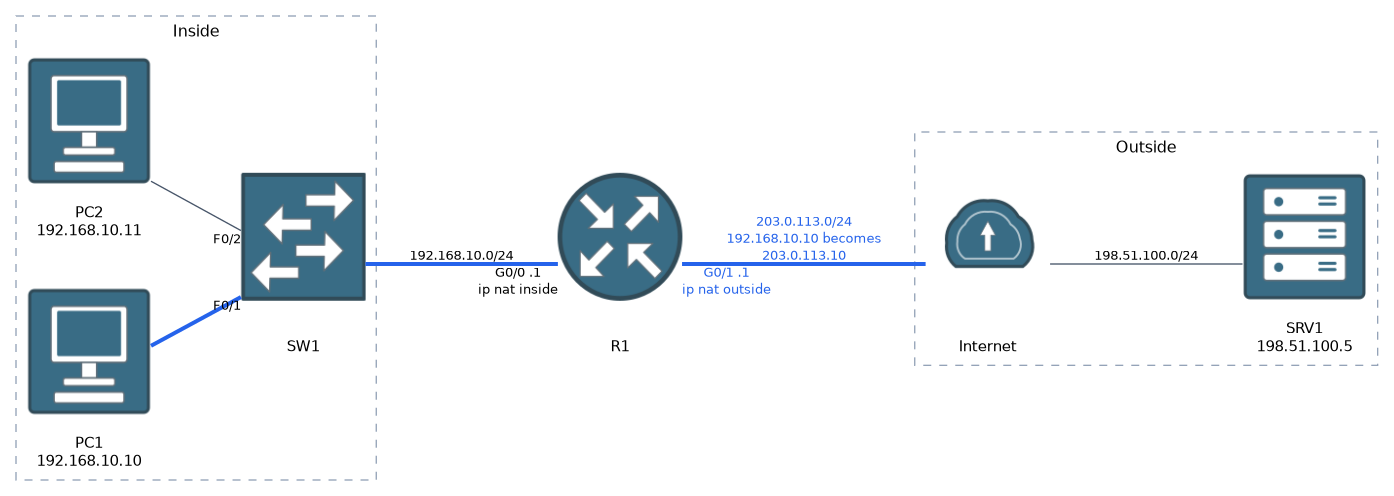
ip nat inside source static 192.168.10.10 203.0.113.10The inside local address comes first and the inside global second. The mapping is permanent and works in both directions, so an outside host can start a connection to 203.0.113.10. It is the usual choice for a server that must be reachable from outside.
Dynamic NAT with a pool
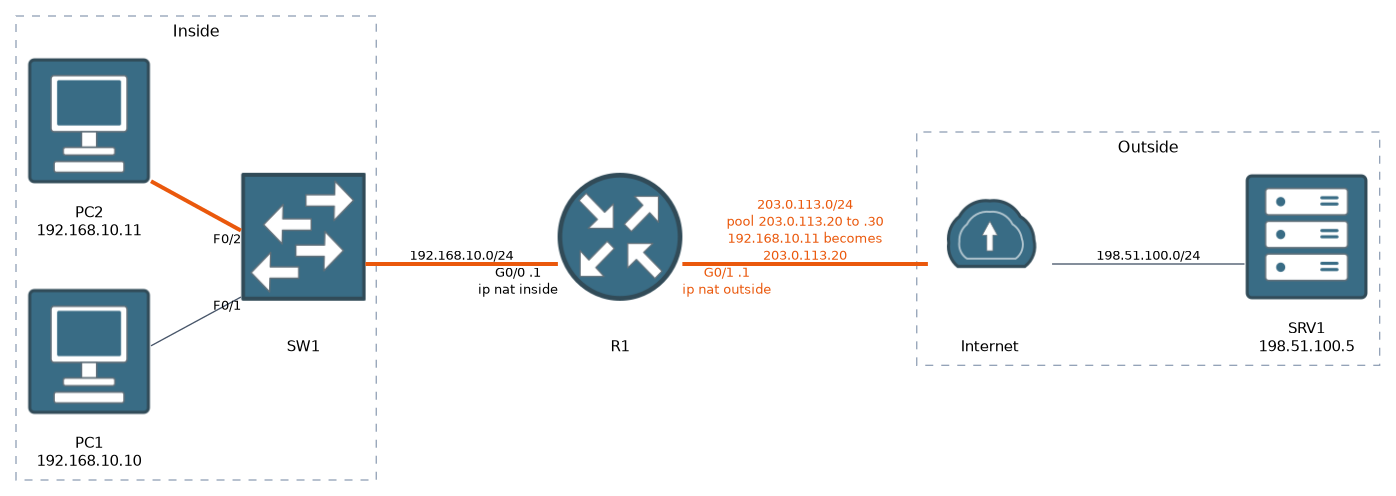
ip nat pool PUBLIC 203.0.113.20 203.0.113.30 netmask 255.255.255.0
access-list 1 permit 192.168.10.0 0.0.0.255
ip nat inside source list 1 pool PUBLIC
The access list is not a firewall. It only selects which source addresses may be translated. This pool has eleven addresses, so only eleven hosts can be translated at once. Idle dynamic entries time out after 24 hours by default.
PAT
PAT adds one word, overload. The router records the inside address and port together and keeps replies apart by translated port number.
! Share the address of the outside interface
ip nat inside source list 1 interface GigabitEthernet0/1 overload
! Or share the addresses in a pool
ip nat inside source list 1 pool PUBLIC overload
The interface form is the common choice when the provider gives you one public address.
Verify
R1# show ip nat translations
Pro Inside global      Inside local       Outside local      Outside global
tcp 203.0.113.1:1024   192.168.10.10:49152 198.51.100.5:80   198.51.100.5:80
tcp 203.0.113.1:1025   192.168.10.11:50211 198.51.100.5:80   198.51.100.5:80
Read each row left to right. Both hosts share inside global 203.0.113.1 and are told apart by the port, 1024 and 1025. The Outside columns are the server, unchanged.
R1# show ip nat statistics
R1# clear ip nat translation *
R1# debug ip nat
show ip nat statistics lists the inside and outside interfaces, active translations and the hits and misses counters. clear ip nat translation * removes dynamic entries so you can test again. debug ip nat prints a line per translated packet, so use it briefly and then undebug all.
Troubleshooting order
An empty translation table with working pings to the router itself usually means a wrong ip nat inside or ip nat outside, or an ACL that does not match the source.
Common mistakes
Swapping inside and outside. The LAN is inside and the internet link is outside.
Writing the static command backwards. The private address comes first.
Treating the ACL as a firewall. A host the ACL does not permit is not translated. Its private address leaves the router unchanged and is dropped upstream.
Wrong pool mask. The netmask or prefix-length must match the subnet of the pool addresses.
Pool too small without overload. Once all pool addresses are in use, new hosts get no translation.
Forgetting routing. NAT does not replace routing. The router needs a route out, and the upstream network needs a route back to the public addresses.
What to remember for the exam
- Inside source NAT changes the source address of traffic leaving the inside network.
- Inside local is private. Inside global is public.
- Use
ip nat insideandip nat outsideon the interfaces. ip nat inside source static INSIDE_LOCAL INSIDE_GLOBALis a permanent one to one mapping.- A pool needs
ip nat pool, an ACL andip nat inside source list N pool NAME. overloadturns it into PAT, and many hosts share one address.show ip nat translationsshows the entries.clear ip nat translation *resets dynamic ones.- The ACL selects who is translated. It does not block anyone.
Check yourself
What is the difference between inside local and inside global?
Inside local is the host's real private address. Inside global is the public address that represents it, and it is the one an outside host sees.
Which command makes many inside hosts share the address of the GigabitEthernet0/1 interface?
ip nat inside source list 1 interface GigabitEthernet0/1 overload. Theoverloadkeyword turns NAT into PAT.show ip nat translationsis empty although the LAN has internet routing. What do you check first?Check that the
ip nat insideandip nat outsideinterfaces are not swapped, then that the ACL permits the source addresses.
Topic 3 of 7 in Network Services and Security
Test yourself on Network Services and Security
The full Cisco CCNA 200-301 v2.0 question bank has 1,242 questions, with timed practice exams and an explanation for every answer.
This study guide is independent and is not affiliated with, endorsed by, or sponsored by Cisco. Vendor names, certification names and exam codes are trademarks of their respective owners and are used for identification only.