Network Infrastructure and Connectivity · Topic 9 of 9
Troubleshooting DHCPv4
Troubleshoot DHCPv4 on IOS: DORA, server pools and excluded addresses, ip helper-address relay, client interfaces, and show ip dhcp binding and conflict.
- 6 min
- Includes a diagram
- DORA: Discover, Offer, Request, Acknowledge. Discover and Request are broadcasts. Server UDP 67, client UDP 68.
- A router does not forward broadcasts, so a server on another subnet needs
ip helper-address. ip helper-addressgoes on the client-facing interface, and the router fills in the gateway address so the server chooses the pool.
What it is
DHCP gives a device its address, mask, default gateway, DNS servers and a lease time. A Cisco IOS device can play three roles: the server that hands out addresses, the relay that forwards requests to a server on another subnet, and the client that asks for its own address.
Troubleshooting means finding which role is broken. The tools are show commands on the router and the client's address, which tells you how far the exchange got.
How it works
The client sends a broadcast, a server answers, and a relay bridges the two when they are on different subnets.
DORA
A host with no address follows four steps.
The Discover and the Request are broadcasts, sent from 0.0.0.0. The server listens on UDP port 67 and the client on UDP port 68. A router does not forward broadcasts, which is why a server on another subnet needs a relay.
A client that hears nothing falls back to a 169.254 address. How far the exchange got tells you where to look: no address means Discover or Offer failed, while an address with no gateway or DNS means the pool is missing options.
The IOS DHCP server
ip dhcp excluded-address 192.168.10.1 192.168.10.20
ip dhcp pool LAN10
 network 192.168.10.0 255.255.255.0
 default-router 192.168.10.1
 dns-server 8.8.8.8
 lease 7
The excluded range keeps addresses fixed for the router, servers and printers. The lease value is in days. The DHCP service is on by default; no service dhcp turns it off.
When the server and the clients are on the same router, the server picks the pool whose network matches the interface that received the request. When a relay forwarded it, the server uses the relay's address in the request to pick the pool.
The relay
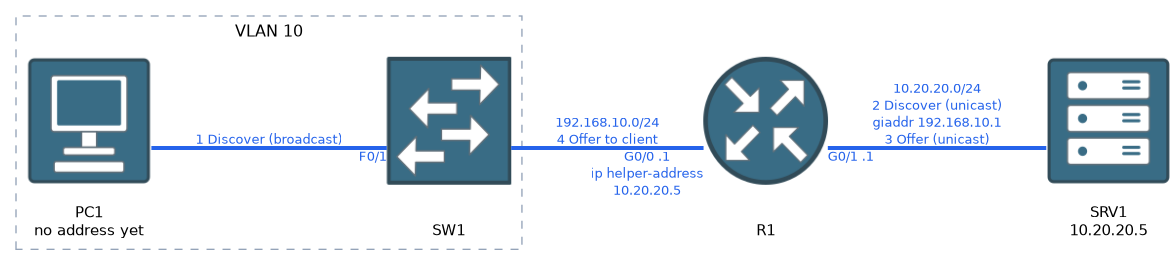 The
ip helper-address command goes on the interface that faces the clients:
interface GigabitEthernet0/0
 ip address 192.168.10.1 255.255.255.0
ip helper-address 10.20.20.5The router writes its own interface address into the gateway address field of the request. The server uses that field to choose the matching pool, so the pool must exist for the client's subnet. The server also needs a route back to that subnet.
Put ip helper-address on the client-facing interface. On the server-facing interface it never sees the hosts' broadcasts.
On a Layer 3 switch, the client-facing interface is usually the SVI of the client VLAN.
The IOS DHCP client
An interface can ask for its own address:
interface GigabitEthernet0/1
 ip address dhcp
 no shutdown
show ip interface brief shows DHCP in the Method column once it has an address. If the server supplies a default router, the interface installs a default route with an administrative distance of 254.
Verification commands
show ip dhcp binding
show ip dhcp pool
show ip dhcp conflict
show ip dhcp server statistics
show ip dhcp binding lists the addresses currently leased:
Router# show ip dhcp binding
Bindings from all pools not associated with VRF:
IP address       Client-ID/              Lease expiration        Type
                 Hardware address/
                 User name
192.168.10.21    0100.5056.aabb.cc       Nov 20 2026 08:00 AM    Automatic
Newer releases add State and Interface columns to the right.
The Client-ID is the MAC address with 01 in front. An empty table means no client reached the server.
show ip dhcp pool summarizes each pool, including total addresses and leased addresses. If leased equals total, the pool is exhausted and new clients get nothing.
show ip dhcp conflict lists addresses the server will not give out, because it found another device already using them:
Router# show ip dhcp conflict
IP address        Detection method   Detection time          VRF
192.168.10.50     Ping               Nov 19 2026 10:12 AM
Before offering an address the server pings it, and a reply means a conflict. A fixed device inside the pool, not covered by an exclusion, is the usual cause. Fix it by excluding the address, then clear the list with clear ip dhcp conflict *.
To watch the exchange live, use debug ip dhcp server packet and debug ip dhcp server events. Remember to turn debugging off with undebug all.
Fault patterns
| Symptom | Likely cause |
|---|---|
| Client has 169.254, binding table empty | Link or VLAN fault, relay missing, helper on the wrong interface, or server unreachable |
| Client on another subnet gets nothing | No ip helper-address, wrong helper IP, or no route back to the relay |
| Client gets an address from the wrong subnet | Pool network does not match, or the client is in the wrong VLAN |
| Client gets an address but no internet | default-router or dns-server missing or wrong in the pool |
| Some clients fail after a while | Pool exhausted, lease too long, or addresses in conflict |
| Two devices with the same address | Address inside the pool but not excluded |
| Offers never reach the client | A DHCP snooping untrusted port facing the server |
| Server does nothing | no service dhcp configured |
Work from the client toward the server: link, VLAN, relay, route to the server, pool, exclusions and conflicts.
Common mistakes
Helper on the wrong interface. It belongs on the interface facing the clients.
No pool for the client's subnet. The server cannot choose an address.
No route back to the relay subnet. The Offer is lost.
Forgetting exclusions. The server may hand out the gateway or a printer's address.
Blaming DHCP for a link or VLAN fault. Check the physical and VLAN path first.
What to remember for the exam
- DORA: Discover, Offer, Request, Acknowledge. Discover and Request are broadcasts. Server UDP 67, client UDP 68.
- A router does not forward broadcasts, so a server on another subnet needs
ip helper-address. ip helper-addressgoes on the client-facing interface, and the router fills in the gateway address so the server chooses the pool.ip dhcp excluded-addressprotects fixed devices.ip dhcp poolholds network, default-router, dns-server and lease.ip address dhcpmakes an interface a DHCP client.show ip dhcp bindingshows leases.show ip dhcp conflictshows addresses withheld.show ip dhcp poolshows pool use.- A 169.254 client address means no answer reached it.
- Pool exhaustion, missing exclusions and a wrong helper address are the classic faults.
Check yourself
Why does a Discover from a client in another subnet need a relay?
A Discover is a broadcast, and a router does not forward broadcasts. The relay turns it into a unicast to the server.
What does
show ip dhcp conflictshow and what usually causes an entry?It lists addresses the server will not lease because another device already uses them, usually a static address inside the pool that was not excluded.
Clients get addresses but cannot reach anything beyond the subnet. Which pool lines do you check?
Check
default-routeranddns-server, because the pool is probably missing the gateway or DNS option or has a wrong value.
Topic 9 of 9 in Network Infrastructure and Connectivity
Test yourself on Network Infrastructure and Connectivity
The full Cisco CCNA 200-301 v2.0 question bank has 1,242 questions, with timed practice exams and an explanation for every answer.
This study guide is independent and is not affiliated with, endorsed by, or sponsored by Cisco. Vendor names, certification names and exam codes are trademarks of their respective owners and are used for identification only.