IP Routing · Topic 4 of 4
HSRP and VRRP Status
Interpret HSRP and VRRP status output: show standby brief, show vrrp brief, active and standby roles, priority, preempt, virtual IP and MAC, and a split group fault.
- 6 min
- Includes a diagram
- An FHRP gives hosts a virtual gateway that survives one router failing.
- HSRP is Cisco proprietary with active and standby. VRRP is an open standard with master and backup.
- The highest priority wins, and the default priority is 100 in both.
What it is
A first hop redundancy protocol (FHRP) keeps a host's default gateway working when one router fails.
Hosts have one gateway address configured. With an FHRP, two or more routers share a virtual IP address that hosts use as their gateway. One router answers for it, and another takes over if it fails, with no change on the hosts.
This page covers two protocols: HSRP, a Cisco protocol, and VRRP, an open standard. The exam asks you to interpret their status, so this page is about reading the output.
How it works
The routers in a group act as one virtual router, and a backup takes over when the forwarding router stops sending hellos.
The basic idea
The virtual router has a virtual IP address, which is the hosts' gateway, and a virtual MAC address, so the hosts' ARP entry stays valid after a failover. The routers exchange hellos to watch each other.
HSRP and VRRP side by side
| HSRP | VRRP | |
|---|---|---|
| Standard | Cisco proprietary | Open standard |
| Roles | Active and standby | Master and backup |
| Default priority | 100 | 100 |
| Preempt by default | No | Yes |
| Hello timers | Hello 3 s, hold 10 s | Advertisement every 1 s |
| Virtual MAC | 0000.0C07.ACxx (v1), 0000.0C9F.Fxxx (v2) | 0000.5E00.01xx |
The xx or xxx stands for the group number. The highest priority wins. On a tie, HSRP picks the highest real IP address.
Do not mix up the role names. HSRP uses active and standby. VRRP uses master and backup.
Configuring them
interface GigabitEthernet0/0
 ip address 192.168.10.2 255.255.255.0
 standby version 2
 standby 1 ip 192.168.10.254
 standby 1 priority 110
 standby 1 preempt
interface GigabitEthernet0/0
ip address 192.168.10.2 255.255.255.0
vrrp 1 ip 192.168.10.254
vrrp 1 priority 110Each router keeps its own real address. Only the virtual address and group number are shared. The VRRP commands shown are the classic form, and newer IOS XE releases can use a different style, so output columns may differ slightly.
Reading HSRP status
R1# show standby brief
                     P indicates configured to preempt.
                     |
Interface   Grp  Pri P State   Active          Standby         Virtual IP
Gi0/0       1    110 P Active  local           192.168.10.3    192.168.10.254
Read it column by column:
- Grp: the group number, which must match on both routers.
- Pri and P: this router's priority (110) and that it preempts.
- State: this router's own role, here Active.
- Active and Standby: who holds each role.
localmeans this router. - Virtual IP: the gateway address that hosts use.
The full command gives more detail:
R1# show standby
GigabitEthernet0/0 - Group 1 (version 2)
  State is Active
    2 state changes, last state change 00:10:22
  Virtual IP address is 192.168.10.254
  Active virtual MAC address is 0000.0c9f.f001 (MAC In Use)
  Preemption enabled
  Active router is local
  Standby router is 192.168.10.3, priority 100 (expires in 9.216 sec)
  Priority 110 (configured 110)
Notice the virtual MAC ends in f001, which is version 2 and group 1. A high state changes count means the group is unstable.
Reading VRRP status
R1# show vrrp brief
Interface          Grp Pri Time  Own Pre State   Master addr     Group addr
Gi0/0 1 110 3570 Y Master 192.168.10.2 192.168.10.254- State: Master or Backup, this router's role.
- Pre: Y means preempt is on, the VRRP default.
- Own: Y means this router owns the virtual address, and uses priority 255.
- Master addr is the master's real address, and Group addr is the virtual gateway.
show vrrp gives the full view, including the virtual MAC (0000.5e00.0101 for group 1) and the master.
Failover and preempt
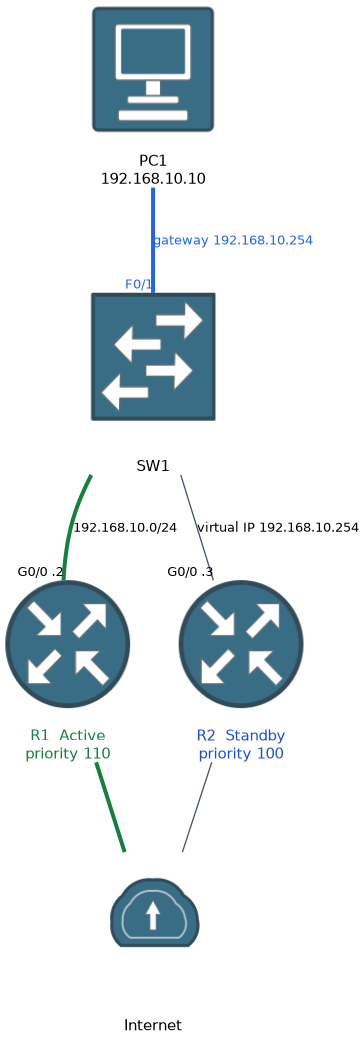
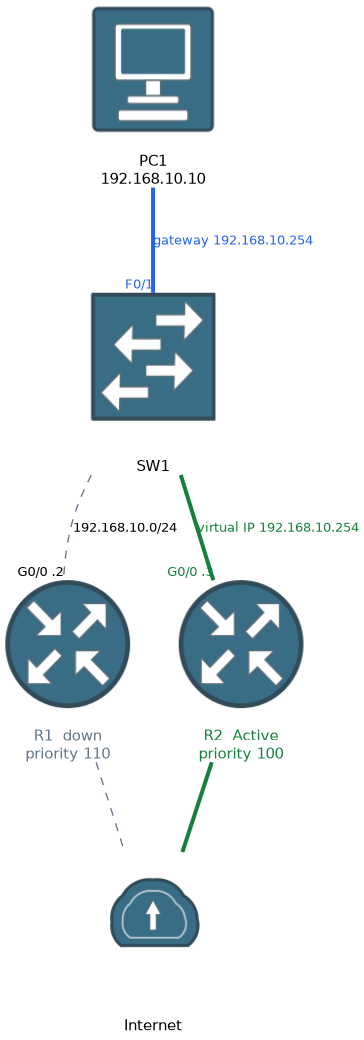 If the active router stops sending hellos for the hold time, the standby takes over and becomes Active. When the original router comes back, what happens depends on preempt.
With HSRP and no preempt, R2 stays active after R1 returns, even though R1 has the higher priority. With preempt, R1 takes the role back. VRRP preempts by default.
HSRP can lower a router's priority when a tracked object, such as an uplink, goes down, so a router with a dead uplink gives up the active role.
Spotting a fault in the output
| What you see | What it means |
|---|---|
| Both routers show Active (or both Master) | They cannot hear each other. Check the L2 path, VLAN, and that the group number, version and virtual IP match |
Standby shows unknown | No standby router has been heard |
| Wrong router is active | Priority is lower than expected, or preempt is off and the other router won earlier |
| State keeps changing | Hellos are lost intermittently, so the group is unstable |
When the groups look split, compare show standby brief on both routers. The group number, virtual IP and version must match.
HSRP version 1 and version 2 do not interoperate, so a version mismatch also prevents the routers from forming a group.
Common mistakes
These four errors are the usual ones.
Giving hosts a real router address as the gateway. Hosts must use the virtual IP, or the failover does nothing for them.
Giving two routers the same real IP address. Each needs its own address.
Expecting a recovered router to take over at once. HSRP does not preempt unless configured to.
Mixing up the role names. Active and standby are HSRP. Master and backup are VRRP.
What to remember for the exam
Seven facts cover FHRP status.
- An FHRP gives hosts a virtual gateway that survives one router failing.
- HSRP is Cisco proprietary with active and standby. VRRP is an open standard with master and backup.
- The highest priority wins, and the default priority is 100 in both.
- HSRP does not preempt by default. VRRP does.
- HSRP v1 virtual MAC is 0000.0C07.ACxx and v2 is 0000.0C9F.Fxxx. VRRP is 0000.5E00.01xx.
show standby briefandshow vrrp briefshow state, priority and the virtual IP.- Two routers both claiming the active or master role means they cannot hear each other.
Check yourself
Work through these three prompts.
In
show standby brief, what doP,Active localand the Standby address tell you?Pmeans this router is configured to preempt,Active localmeans this router is the active one, and the Standby address is the other router that will take over.After the active HSRP router fails and returns, why might it stay in standby?
HSRP does not preempt by default, so the router that took over stays active unless
preemptis configured on the returning router.Both routers in a group show Active. What does that point to?
They cannot exchange hellos, so each believes it is the only router. Check connectivity, and that the group number, version and virtual IP match.
Topic 4 of 4 in IP Routing
Test yourself on IP Routing
The full Cisco CCNA 200-301 v2.0 question bank has 1,242 questions, with timed practice exams and an explanation for every answer.
This study guide is independent and is not affiliated with, endorsed by, or sponsored by Cisco. Vendor names, certification names and exam codes are trademarks of their respective owners and are used for identification only.