Incident Response · Topic 3 of 5
Responding to Compromised Credentials
Contain exposed IAM user keys, role session credentials, instance profile credentials and root access, then hunt for persistence and rotate safely.
- 6 min
- Includes a diagram
- Deactivate IAM user keys first, and delete them after analysis.
- Temporary credentials cannot be deactivated one at a time. Use Revoke active sessions, which uses a deny with
aws:TokenIssueTime. AWSDenyAlland SCPs give fast broad containment. SCPs do not apply to the management account.
What it is
Stolen or leaked credentials are the most common cause of AWS incidents. They may be IAM user access keys committed to a public repository, temporary credentials taken from an instance, or a console password phished from a person.
The response goal has three parts: stop the credential from working, find everything it did, and remove anything the attacker left behind to keep access.
How it works
Step 1: confirm and identify
Typical triggers are a GuardDuty finding such as UnauthorizedAccess:IAMUser/InstanceCredentialExfiltration.OutsideAWS, a notice from AWS about an exposed key, or an unusual bill. Identify the principal and the access key ID, then look at what it did.
# AWS CLI: find recent API calls made with one access key (management events, last 90 days)
aws cloudtrail lookup-events \
  --lookup-attributes AttributeKey=AccessKeyId,AttributeValue=AKIAIOSFODNN7EXAMPLE
For anything older, or for data events, query the trail in S3 with Athena or use CloudTrail Lake.
Step 2: contain
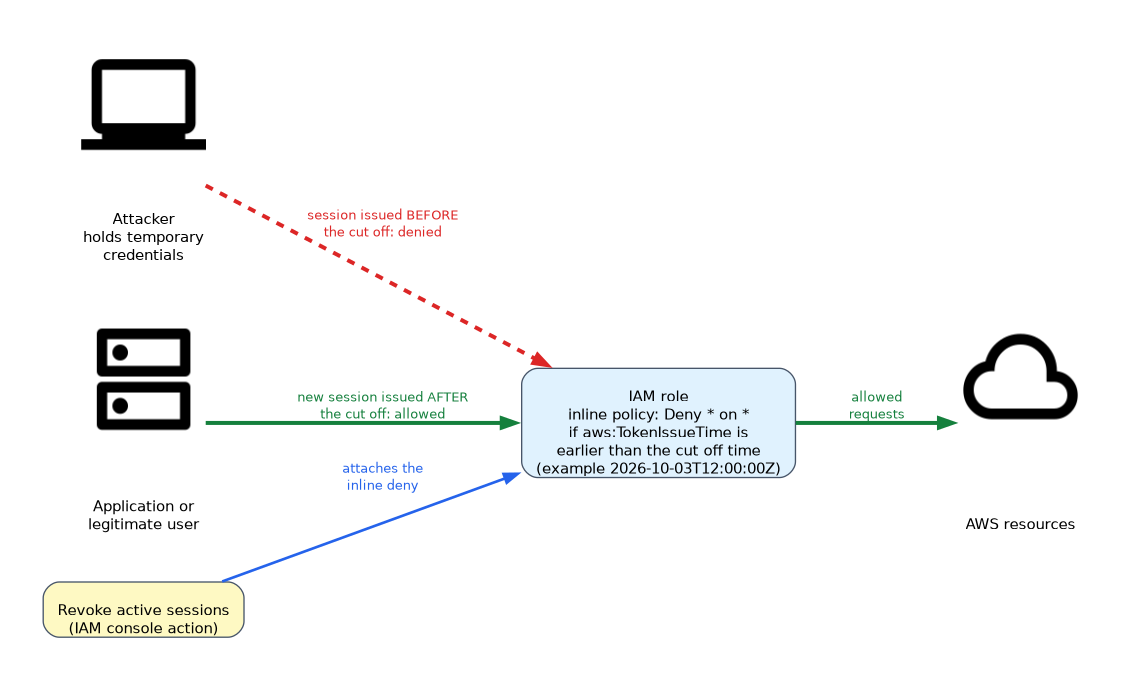 The action depends on the type of credential.
| Credential | Containment |
|---|---|
| IAM user access key | Make the key inactive, then delete it later |
| IAM user console access | Delete the login profile or reset the password, and review the registered MFA devices |
| Role session (temporary) | Revoke active sessions, or attach a deny policy |
| Instance profile credentials | Revoke sessions on the role, then replace the instance or role |
| Root user | Change the password, set up MFA and remove any root access keys |
Deactivating a key stops it working but keeps it for analysis.
# AWS CLI
aws iam update-access-key --user-name alice \
  --access-key-id AKIAIOSFODNN7EXAMPLE --status Inactive
Temporary credentials from STS (Security Token Service) cannot be deactivated one by one. The IAM console action Revoke active sessions attaches an inline policy to the role that denies everything for sessions issued before a time you choose.
{
  "Version": "2012-10-17",
  "Statement": {
    "Effect": "Deny",
    "Action": "*",
    "Resource": "*",
    "Condition": { "DateLessThan": { "aws:TokenIssueTime": "2026-10-03T12:00:00Z" } }
  }
}
The attacker's existing sessions are blocked because they were issued earlier. New sessions made after the cut off time work normally, so legitimate users can sign in again.
For wider containment, attach the AWS managed policy AWSDenyAll to the user or role, or apply a service control policy (SCP) to the account or organizational unit. An SCP does not affect the management account or service linked roles.
Step 3: scope what happened
Review CloudTrail for the principal across all Regions. Look for these classes of activity.
- Reconnaissance, such as many
List*,Describe*andGet*calls, andAccessDeniederrors. - Data access or exfiltration, including S3
GetObjectdata events and snapshot sharing. - Resource creation, especially EC2 instances in unused Regions for cryptocurrency mining.
- Changes to logging or detection, such as stopped trails or disabled GuardDuty.
Use Amazon Detective to see the principal's relationships over time, and IAM Access Advisor last accessed data to see which services it used.
Step 4: hunt for persistence
Attackers who have access create ways back in. Check for each of these.
- New IAM users, access keys, login profiles and roles.
- Changes to role trust policies that allow an outside account.
- New or changed SAML or OIDC (OpenID Connect) identity providers.
- Lambda functions, EC2 key pairs, or scheduled EventBridge rules that run attacker code.
- Resources shared outside the account, such as AMIs, snapshots and S3 bucket policies.
- Changes to the account's alternate contacts or to MFA devices.
IAM Access Analyzer external access findings help spot resources shared outside your zone of trust.
Step 5: recover
Delete attacker created resources, delete the compromised key, and issue new credentials through a secure channel. Rotate secrets that the principal could read, such as Secrets Manager values, database passwords and other keys. Move workloads to roles with temporary credentials, so there is no long term key to leak again.
Instance role credentials
If credentials came from an EC2 instance, the weakness is usually in the application or metadata access. Revoke the role sessions, isolate and investigate the instance, enforce IMDSv2 (Instance Metadata Service version 2) and fix the code path, such as a server side request forgery flaw.
What to remember for the exam
- Deactivate IAM user keys first, and delete them after analysis.
- Temporary credentials cannot be deactivated one at a time. Use Revoke active sessions, which uses a deny with
aws:TokenIssueTime. AWSDenyAlland SCPs give fast broad containment. SCPs do not apply to the management account.cloudtrail lookup-eventscovers 90 days of management events. Use Athena or CloudTrail Lake for more.- Hunt for persistence: new users, keys, roles, trust policy changes and identity providers.
- Replace long term keys with roles and temporary credentials after the incident.
- Rotate every secret the compromised principal could read.
- IMDSv2 and removing the application flaw close the instance credential theft path.
The answer to "stop an attacker who holds temporary role credentials, without breaking the application" is to revoke active sessions on the role, since the application simply obtains a new session.
Common mistakes
Deleting the key before investigating. Inactivating it stops the abuse and preserves the evidence of what it was used for.
Forgetting temporary credentials. Disabling the user or key does not end role sessions that were already issued.
Looking in one Region. Attackers often create resources in unused Regions, so review them all.
Stopping at the key. Without hunting for persistence, the attacker returns through a new user or a changed trust policy.
Revoking sessions with an inline deny affects every user of that role, including your own responders if they use the same role, so use separate roles for response.
Check yourself
How do you stop an attacker using stolen temporary credentials from a role?
Revoke active sessions, which attaches a deny policy with
aws:TokenIssueTimethat blocks sessions issued before the cut off.Why make an access key inactive before deleting it?
It stops use right away while keeping the key for the investigation.
Name two places where an attacker may leave persistence.
New IAM users or access keys, and changes to a role trust policy that allow an outside account.
Topic 3 of 5 in Incident Response
Test yourself on Incident Response
The full AWS SCS-C03 question bank has 858 questions, with timed practice exams and an explanation for every answer.
This study guide is independent and is not affiliated with, endorsed by, or sponsored by AWS. Vendor names, certification names and exam codes are trademarks of their respective owners and are used for identification only.