Data Protection · Topic 3 of 7
KMS Keys, Policies and Grants
Understand AWS KMS key types, key policies, IAM and grants, envelope encryption, encryption context, cross account use and key deletion for exam scenarios.
- 6 min
- Includes a diagram
- Access to a KMS key requires the key policy to allow it, either directly or by enabling IAM policies for the account.
- AWS managed keys cannot be edited and cannot be shared across accounts. Use customer managed keys for sharing and control.
- Envelope encryption uses
GenerateDataKey, because KMS encrypts directly only up to 4 KB.
What it is
AWS Key Management Service (KMS) creates and controls cryptographic keys used to protect data. Most AWS services integrate with it, so a KMS key policy is often what decides who can read encrypted data.
The exam focuses on key types, access, envelope encryption, and what happens when a key is disabled or deleted.
How it works
Key types
| Type | Who controls it | Policy | Notes |
|---|---|---|---|
| AWS owned key | AWS, shared across accounts | Not visible | No charge, no visibility in your account or CloudTrail |
AWS managed key (aws/service) | AWS creates it for a service in your account | You can view, not edit | Rotates automatically every year |
| Customer managed key | You | You write the key policy | Choose rotation, sharing, disabling, deletion |
Use a customer managed key when you need control: cross account sharing, custom rotation, restricted usage, or the ability to disable or delete the key. Keys can be symmetric, asymmetric, or HMAC (hash based message authentication code) keys.
Key policy is the root of access
A KMS key always has a key policy, and access requires the key policy to allow it. IAM policies can grant access only if the key policy contains a statement that enables IAM, usually by trusting the account root.
{
  "Version": "2012-10-17",
  "Statement": [
    {
      "Sid": "EnableIAMPolicies",
      "Effect": "Allow",
      "Principal": { "AWS": "arn:aws:iam::111122223333:root" },
      "Action": "kms:*",
      "Resource": "*"
    },
    {
      "Sid": "AllowUseByAppRole",
      "Effect": "Allow",
      "Principal": { "AWS": "arn:aws:iam::111122223333:role/AppRole" },
      "Action": ["kms:Encrypt", "kms:Decrypt", "kms:GenerateDataKey"],
      "Resource": "*",
      "Condition": { "StringEquals": { "kms:ViaService": "s3.us-east-1.amazonaws.com" } }
    }
  ]
}
The first statement lets IAM policies in the account manage access. The second allows one role to use the key, but only through S3 in that Region, because of the kms:ViaService condition. In a key policy, Resource is * and refers to the key itself.
Separate duties. Key administrators manage the key (create, rotate, disable) but should not be allowed to use it for encryption or decryption. Key users use it but cannot change the policy.
Grants
A grant is a specific permission on a key that can be retired or revoked, created with CreateGrant.
AWS services use grants to act for you, for example EBS asks KMS for a grant to encrypt and decrypt a volume. A grant can be retired or revoked. Use them to delegate key use programmatically without editing the key policy.
Envelope encryption
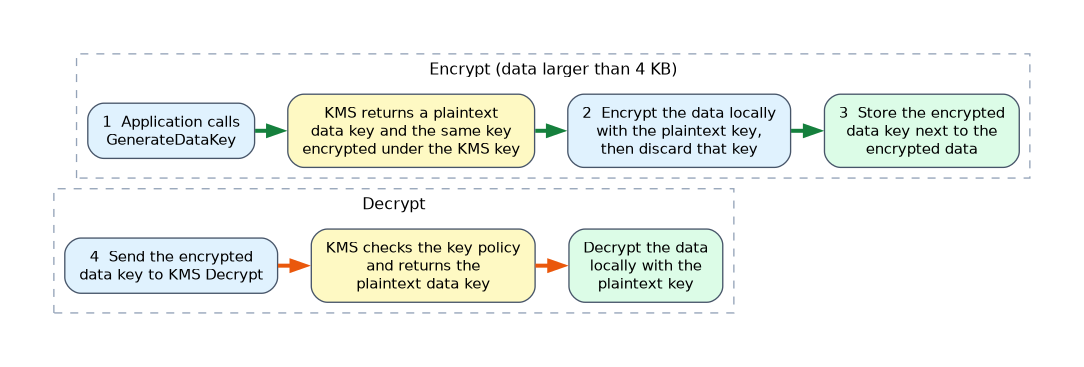 KMS encrypts only small data directly, up to 4 KB. For larger data, use envelope encryption.
- Call
GenerateDataKey. KMS returns a plaintext data key and the same key encrypted under the KMS key. - Use the plaintext data key to encrypt the data locally, then discard it from memory.
- Store the encrypted data key next to the encrypted data.
- To decrypt, send the encrypted data key to KMS with
Decrypt, and use the returned plaintext key.
# AWS CLI: create a customer managed key and an alias
aws kms create-key --description "app data key"
aws kms create-alias --alias-name alias/app-data \
  --target-key-id 1234abcd-12ab-34cd-56ef-1234567890ab
Encryption context
Encryption context is a set of non secret key value pairs bound to the encryption. The same context is needed to decrypt, and it appears in CloudTrail logs, so it adds integrity and audit information. You can write policy conditions on kms:EncryptionContext: keys.
Cross account use
To let account B use a key in account A, two things must be true. The key policy in account A must allow account B (or a principal in it), and account B's IAM policy must allow the principal to call KMS on that key ARN. AWS managed keys cannot be shared across accounts, so use a customer managed key for any cross account design such as shared encrypted snapshots.
Rotation
Automatic rotation creates new key material for a customer managed symmetric key on a schedule, which defaults to yearly. The key ID and ARN stay the same, and older material remains available so previously encrypted data still decrypts. Keys with imported material do not rotate automatically, and support for other key types is narrower, so plan manual rotation for them.
Disabling and deleting
A disabled key cannot be used, and you can enable it again. Deleting a key requires a waiting period of 7 to 30 days, during which it is unusable and the deletion can be cancelled. After the period, the key and its material are gone, and anything encrypted under it is unrecoverable.
Monitoring and troubleshooting
CloudTrail records KMS calls with the key ID and encryption context. A decrypt failing with AccessDenied is usually the key policy, the missing IAM allow in a cross account design, a missing grant, a disabled key, or a condition such as kms:ViaService that does not match the calling service.
What to remember for the exam
- Access to a KMS key requires the key policy to allow it, either directly or by enabling IAM policies for the account.
- AWS managed keys cannot be edited and cannot be shared across accounts. Use customer managed keys for sharing and control.
- Envelope encryption uses
GenerateDataKey, because KMS encrypts directly only up to 4 KB. - Grants give scoped, revocable permission, and AWS services use them.
- Encryption context adds integrity and appears in CloudTrail.
- Key deletion has a 7 to 30 day waiting period, and can be cancelled in that time.
- Rotation keeps the key ID and retains old material. It is automatic for customer managed symmetric keys, and imported material needs a manual process.
- Separate key administrators from key users.
If a question says "data must be unreadable at once if the key is compromised, but recoverable if needed later", disabling the key is reversible, while scheduled deletion is the irreversible step.
Common mistakes
Relying on IAM policies alone. Without an enabling statement in the key policy, IAM allows have no effect.
Using an AWS managed key for cross account sharing. It cannot be shared, so copy to a customer managed key.
Locking everyone out. A key policy that removes the account root statement and the only listed administrator can leave the key unmanageable.
Deleting a key to stop access. Disable it first, as deletion destroys data forever.
Anyone with permission to schedule key deletion can make all data under that key unrecoverable, so restrict kms:ScheduleKeyDeletion and alarm on it.
Check yourself
Why does KMS use envelope encryption?
KMS directly encrypts only small data, so a data key encrypts the data and KMS protects the data key.
How do you give another account use of a KMS key?
Allow the account or principal in the key policy, and allow the KMS actions in an IAM policy in that other account.
How long is the KMS key deletion waiting period?
Between 7 and 30 days, and the deletion can be cancelled during it.
Topic 3 of 7 in Data Protection
Test yourself on Data Protection
The full AWS SCS-C03 question bank has 858 questions, with timed practice exams and an explanation for every answer.
This study guide is independent and is not affiliated with, endorsed by, or sponsored by AWS. Vendor names, certification names and exam codes are trademarks of their respective owners and are used for identification only.