Testing and Deployment · Topic 6 of 6
Deployment Strategies and Rollback
Deploy with AWS CodeDeploy for DVA-C03: AppSpec files, hooks, in place, blue/green, canary and linear strategies, and automatic or manual rollback.
- 5 min
- Includes a diagram
- The CodeDeploy agent is needed on EC2 and on-premises servers only.
- Lambda and ECS deployments use traffic shifting: canary, linear or all at once.
- The EC2 AppSpec file is
appspec.ymlin the revision root, with the file mappings and hooks.
What it is
A deployment strategy decides how new code replaces old code and how much of your traffic is exposed to risk while it does. AWS CodeDeploy automates that process for EC2 instances, on-premises servers, Lambda functions and ECS services.
Rollback is the safety net. It returns users to the last working version, either automatically when a check fails or manually when you decide.
How it works
Strategies compared
| Strategy | How it works | Trade off |
|---|---|---|
| In place (rolling) | Updates existing instances in batches | No extra capacity, but reduced capacity during the update |
| Blue/green | Builds a new environment and switches traffic | Fast rollback, but temporarily runs two environments |
| Canary | Sends a small share of traffic first, then the rest | Limits exposure of a bad release |
| Linear | Shifts traffic in equal steps at fixed intervals | Gradual, longer deployment |
| All at once | Replaces everything immediately | Fastest, riskiest |
In place deployments exist only for EC2 and on-premises servers. Lambda and ECS deployments are blue/green by nature, because the new version is a separate function version or task set.
CodeDeploy and the appspec file
Every revision has an AppSpec file that tells CodeDeploy what to do. The compute platform changes its content.
| Platform | AppSpec content | Lifecycle hooks you can use |
|---|---|---|
| EC2 or on-premises | appspec.yml at the revision root with files and hooks | ApplicationStop, BeforeInstall, AfterInstall, ApplicationStart, ValidateService |
| Lambda | Function name, alias, current and target version | BeforeAllowTraffic, AfterAllowTraffic |
| ECS | Task definition and container name and port | BeforeInstall, AfterInstall, AfterAllowTestTraffic, BeforeAllowTraffic, AfterAllowTraffic |
On EC2, the CodeDeploy agent must run on each instance. Lambda and ECS need no agent. Hooks point to scripts on EC2, or to Lambda functions on the other platforms, and they can fail the deployment, for example when a ValidateService script returns an error.
A deployment group names the target instances, tags or Auto Scaling groups. The revision is stored in Amazon S3 or in a GitHub repository.
Deployment configurations
 For EC2 in place deployments, the predefined configurations are
 CodeDeployDefault.AllAtOnce, CodeDeployDefault.HalfAtATime and CodeDeployDefault.OneAtATime, and OneAtATime is the default.
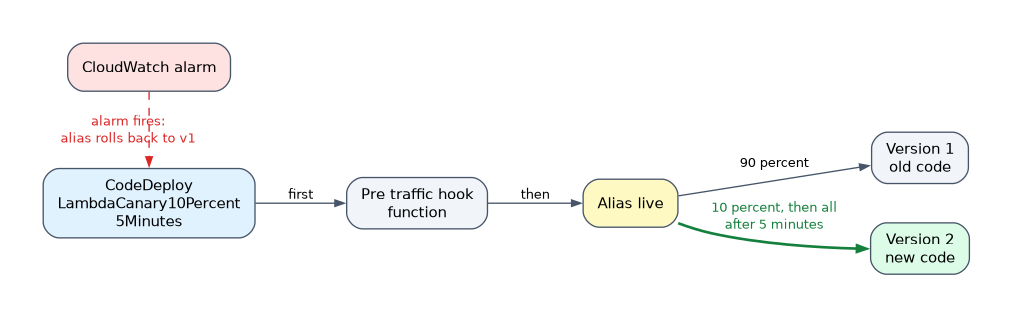
For Lambda, the names show the shape: CodeDeployDefault.LambdaCanary10Percent5Minutes moves 10 percent first and the rest five minutes later, while CodeDeployDefault.LambdaLinear10PercentEvery1Minute moves 10 percent each minute. LambdaAllAtOnce shifts everything at once. ECS has matching ECSCanary, ECSLinear and ECSAllAtOnce options. ECS also offers a built in blue/green deployment with a bake time, during which the old revision stays ready.
In a SAM template, set AutoPublishAlias and a DeploymentPreference with a type, alarms and optional pre and post traffic hook functions. SAM then creates the CodeDeploy application for you.
Automatic and manual rollback
CodeDeploy can roll back automatically when a deployment fails or when a configured CloudWatch alarm goes into the alarm state. A rollback is itself a new deployment of the last successful revision. For Lambda it means the alias moves back to the old version. You can also redeploy an earlier revision by hand at any time.
CloudFormation rolls back a failed stack operation by default. A failed create leaves the stack in ROLLBACK_COMPLETE, which you must delete before trying again. A failed update returns to the previous state as UPDATE_ROLLBACK_COMPLETE. You can add rollback triggers, which are CloudWatch alarms watched during and after the update, and CloudFormation rolls back if one fires.
If a rollback itself fails (UPDATE_ROLLBACK_FAILED), fix the blocking resource and run ContinueUpdateRollback. To keep failed resources for debugging, disable rollback on failure when creating the stack.
Manual rollback usually means deploying the previous template or code version again, or moving a Lambda alias back to the old version.
How the exam asks about this
- "Send 10 percent of Lambda traffic to the new version, then all of it if alarms stay quiet." -> A CodeDeploy canary configuration, set through SAM
DeploymentPreference. - "Roll back automatically when the error alarm fires." -> Enable CodeDeploy automatic rollback on the alarm, or a CloudFormation rollback trigger.
- "A pre deployment validation script must run on EC2 before traffic returns." -> A lifecycle hook in the AppSpec file.
What to remember for the exam
- The CodeDeploy agent is needed on EC2 and on-premises servers only.
- Lambda and ECS deployments use traffic shifting: canary, linear or all at once.
- The EC2 AppSpec file is
appspec.ymlin the revision root, with the file mappings and hooks. - The default EC2 configuration is OneAtATime.
- Automatic rollback triggers on a failed deployment or an alarm, and redeploys the last good revision.
- A CloudFormation stack in
ROLLBACK_COMPLETEmust be deleted before recreating it.
Blue/green on EC2 needs a load balancer to switch traffic. An answer that picks blue/green for instances with no load balancer is usually wrong.
Common mistakes
Choosing in place for Lambda. Lambda has no in place option. You shift traffic between versions with an alias.
Expecting rollback to undo data changes. Rolling back code does not revert database migrations or messages already processed.
Forgetting alarms in the deployment group. Without an attached alarm, a canary with a quiet failure completes and shifts all traffic.
Check yourself
Which hook runs after the new Lambda version receives traffic?
AfterAllowTraffic.
What state is a stack in after its creation fails and rolls back?
ROLLBACK_COMPLETE, and it must be deleted before you try again.Which CodeDeploy configuration limits a bad Lambda release to a small share first?
A canary configuration such as
CodeDeployDefault.LambdaCanary10Percent5Minutes.
Topic 6 of 6 in Testing and Deployment
Test yourself on Testing and Deployment
The full AWS DVA-C03 question bank has 850 questions, with timed practice exams and an explanation for every answer.
This study guide is independent and is not affiliated with, endorsed by, or sponsored by AWS. Vendor names, certification names and exam codes are trademarks of their respective owners and are used for identification only.