Security and Compliance · Topic 2 of 6
Multi Account Access and Federation
Manage access across many accounts with IAM Identity Center, cross account roles, SAML and OIDC federation, workload identity and Resource Access Manager.
- 5 min
- Includes a diagram
- IAM Identity Center is the answer for centralized workforce access to many accounts.
- Permission sets become IAM roles in each assigned account.
- Assign access to groups, not individual users.
What it is
With dozens of accounts you cannot create an IAM user in each one. The scalable pattern is one identity source, central assignment of access, and short lived role sessions in every account.
Humans usually sign in through AWS IAM Identity Center. Applications and pipelines assume roles, either across accounts or through federation from an external identity provider.
How it works
IAM Identity Center
IAM Identity Center is the recommended way to give workforce users access to multiple accounts and applications. It works with AWS Organizations, and you can enable it in the management account and delegate administration to another account.
| Concept | Meaning |
|---|---|
| Identity source | Identity Center directory, Active Directory, or an external identity provider |
| Group | Users are placed in groups, and access is assigned to groups |
| Permission set | A reusable template of policies, which Identity Center turns into a role in each assigned account |
| Assignment | Links a user or group, a permission set and an account |
With an external provider, users and groups are synchronized with SCIM, and sign in uses SAML 2.0. Sessions are temporary, so there are no long lived keys on laptops.
aws configure sso
aws sso login --profile dev-admin
aws s3 ls --profile dev-admin
Changing a permission set updates the roles in every assigned account, which is the key scale advantage. Attributes from the identity source can drive attribute based access control.
Cross account roles
For automation, the standard pattern is a role in the target account that trusts the source account. The pipeline or tool assumes it with STS.
Check three things: the trust policy in the target role, the permissions policy of the target role, and the permission of the source principal to call sts:AssumeRole. Avoid reusing OrganizationAccountAccessRole for automation, and create purpose built roles with narrower permissions.
A resource policy with aws:PrincipalOrgID lets any account in the organization read a bucket without listing accounts one by one.
Federation
 Federation lets an external identity provider vouch for a user, so no IAM user is needed.
| Method | Use |
|---|---|
| SAML 2.0 federation | Enterprise single sign on to the console or CLI |
| OpenID Connect (OIDC) federation | Web identities and workload identities |
| Amazon Cognito | Sign in and AWS credentials for end users of your app |
| IAM Roles Anywhere | Certificates give servers outside AWS temporary credentials |
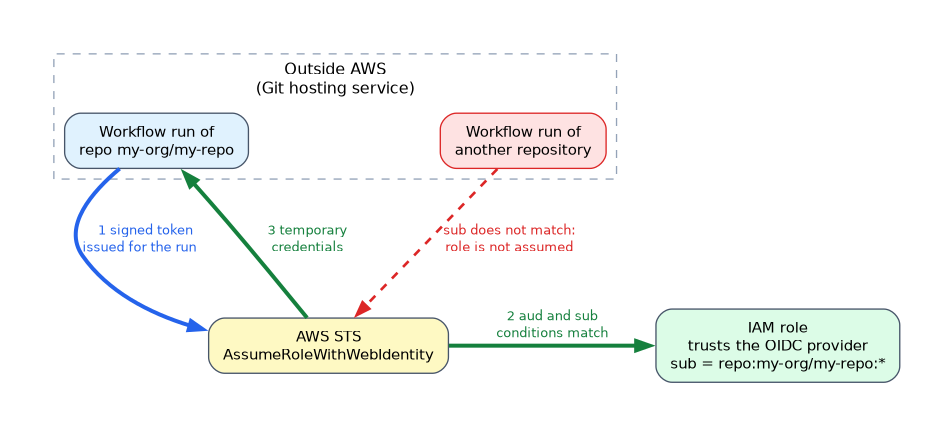
Pipelines outside AWS can use OIDC federation rather than stored access keys. For example, a Git hosting service issues a signed token per workflow run, and an IAM role trusts it.
{
  "Effect": "Allow",
  "Principal": {"Federated": "arn:aws:iam::111122223333:oidc-provider/token.actions.githubusercontent.com"},
  "Action": "sts:AssumeRoleWithWebIdentity",
  "Condition": {
    "StringEquals": {"token.actions.githubusercontent.com:aud": "sts.amazonaws.com"},
    "StringLike": {"token.actions.githubusercontent.com:sub": "repo:my-org/my-repo:*"}
  }
}
The condition on the subject claim limits which repository can assume the role. Without it, any repository using that provider could.
Sharing resources without copying
AWS Resource Access Manager (RAM) shares resources across accounts or with an organization, such as VPC subnets, Transit Gateways, Route 53 Resolver rules, License Manager configurations and more. The owner account keeps control, and participants use the shared resource as if it were local. Shared subnets let many accounts place workloads in a central network.
Guardrails around all of this
- SCPs cap what any role can do in the member accounts.
- Permission boundaries limit roles that teams create themselves.
- Delegated administrators move management of services such as Identity Center, GuardDuty and Security Hub out of the management account.
- Break glass access is a documented, monitored, MFA protected path for emergencies, with alarms when it is used.
Machine identities
Prefer roles for every machine identity: instance profiles, task roles, execution roles and IRSA (IAM roles for service accounts) on Kubernetes. If you must store a secret credential, keep it in Secrets Manager with rotation.
What to remember for the exam
- IAM Identity Center is the answer for centralized workforce access to many accounts.
- Permission sets become IAM roles in each assigned account.
- Assign access to groups, not individual users.
- Cross account automation uses assumed roles, not IAM users or shared keys.
- OIDC federation lets external pipelines assume roles without stored keys.
- Restrict the OIDC subject claim to the specific repository or branch.
- Cognito is for application end users; Identity Center is for the workforce.
- RAM shares resources such as subnets across accounts without copying.
aws:PrincipalOrgIDsimplifies organization wide resource policies.- Roles Anywhere gives temporary credentials to servers outside AWS.
If a question describes hundreds of employees needing console and CLI access to many accounts from the company directory, choose IAM Identity Center with groups and permission sets.
Common mistakes
Creating IAM users in every account. They multiply credentials and audit work.
Trusting an OIDC provider with no subject condition. Any workload from that provider could assume the role.
Confusing Cognito with Identity Center. One is for app customers, the other for employees.
Sharing access keys between accounts. Assumed roles give auditable, expiring sessions.
Do not use the management account for daily work, because SCPs do not protect it and a compromise there affects the entire organization.
Check yourself
What does an Identity Center permission set become in a target account?
An IAM role that users assume through their single sign on session.
How can an external build system call AWS without stored keys?
Use OIDC federation, where its signed token is exchanged for a role with
AssumeRoleWithWebIdentity.Which service shares a subnet with other accounts in an organization?
AWS Resource Access Manager.
Topic 2 of 6 in Security and Compliance
Test yourself on Security and Compliance
The full AWS DOP-C02 question bank has 844 questions, with timed practice exams and an explanation for every answer.
This study guide is independent and is not affiliated with, endorsed by, or sponsored by AWS. Vendor names, certification names and exam codes are trademarks of their respective owners and are used for identification only.