Security and Compliance · Topic 3 of 6
Encryption, KMS Keys and Secrets
Protect data with KMS keys, key policies, grants, envelope encryption, multi Region keys, Secrets Manager rotation, Parameter Store and ACM.
- 6 min
- Includes a diagram
- The key policy is the primary access control for a KMS key.
- AWS managed keys cannot have their policy edited; customer managed keys can.
- Cross account KMS use needs both the key policy and an IAM permission in the other account.
What it is
Data protection has two parts. Encryption at rest and in transit stops someone who gets the bytes from reading them, and secret management stops credentials from living in code, templates or images.
AWS Key Management Service (KMS) is the central service for keys. Most AWS storage services integrate with it, so you choose a key and the service handles the encryption.
How it works
Key types
| Key | Control |
|---|---|
| AWS owned key | Used by a service internally, invisible to you |
| AWS managed key | Created in your account for a service, such as aws/s3; you cannot edit its policy |
| Customer managed key | You define the key policy, rotation, sharing and deletion |
Choose customer managed keys when you need cross account sharing, custom key policies, audit of key use per key, or the ability to disable a key.
Key policies and grants
Every KMS key has a key policy, and it is the primary access control. IAM policies can grant access to the key only if the key policy allows that, usually through a statement that enables IAM policies for the account. A grant gives a specific principal narrow permission that can later be retired, and AWS services use grants behind the scenes.
To let another account use a key, the key policy must allow that account, and the other account must also give its own principals IAM permission.
{
  "Sid": "AllowUseByAuditAccount",
  "Effect": "Allow",
  "Principal": {"AWS": "arn:aws:iam::444455556666:root"},
  "Action": ["kms:Decrypt", "kms:DescribeKey"],
  "Resource": "*"
}
Envelope encryption
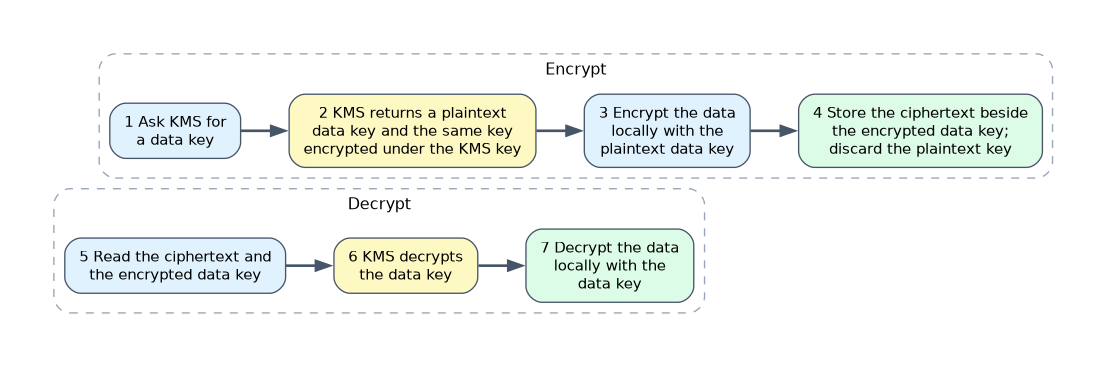 KMS encrypts only small amounts of data directly. For larger data, you ask KMS for a data key, encrypt the data locally with the plaintext key, store the encrypted data key beside the ciphertext, and discard the plaintext key.
To decrypt, KMS decrypts the data key first. This is envelope encryption, and the AWS SDK and most services do it for you.
Rotation, deletion and Regions
- Automatic rotation of customer managed symmetric keys creates new key material while keeping the same key ID, so data stays readable.
- Key deletion has a mandatory waiting period (7 to 30 days) so you can cancel it. Disable a key first to test the effect.
- Keys are Regional. Multi Region keys have the same key ID and material across Regions (the ID starts with
mrk-), which supports encrypting in one Region and decrypting in another for DR and global tables.
aws kms enable-key-rotation --key-id 1234abcd-12ab-34cd-56ef-1234567890ab
aws kms schedule-key-deletion --key-id 1234abcd-12ab-34cd-56ef-1234567890ab \
  --pending-window-in-days 14
Encryption in common services
| Service | Notes |
|---|---|
| S3 | New objects are encrypted by default with SSE-S3; use SSE-KMS for key control, and S3 Bucket Keys to cut KMS request cost |
| EBS | Turn on default encryption per Region; snapshots of encrypted volumes are encrypted |
| RDS and Aurora | Choose encryption at creation. To encrypt an existing database, copy a snapshot with encryption and restore from it |
| DynamoDB | Always encrypted at rest; choose the key type |
| Sharing encrypted AMIs or snapshots | Needs a customer managed key shared with the target account |
Enforce encryption in transit with bucket policies using aws:SecureTransport, TLS listeners on load balancers and certificates from AWS Certificate Manager (ACM). ACM renews public certificates automatically when validation by DNS remains in place, for supported integrated services.
{
  "Effect": "Deny",
  "Principal": "*",
  "Action": "s3:*",
  "Resource": ["arn:aws:s3:::my-bucket", "arn:aws:s3:::my-bucket/*"],
  "Condition": {"Bool": {"aws:SecureTransport": "false"}}
}
Secrets Manager and Parameter Store
| Feature | Secrets Manager | Parameter Store |
|---|---|---|
| Purpose | Secrets such as database credentials and API keys | Configuration values and simple secrets |
| Rotation | Built in, with a Lambda rotation function | None built in |
| Replication across Regions | Supported | Not built in |
| Encryption | KMS | KMS for SecureString |
| Cross account sharing | Resource policy | Limited; advanced tier parameters can be shared |
| Cost | Charged per secret | Standard tier is free |
aws secretsmanager rotate-secret --secret-id prod/db \
  --rotation-lambda-arn arn:aws:lambda:us-east-1:111122223333:function:rotate-db \
  --rotation-rules AutomaticallyAfterDays=30
Applications fetch the secret at runtime through the role, so the value never sits in code, user data or an image. CloudFormation can pass secrets with dynamic references, and CodeBuild reads them in the buildspec. For RDS, Secrets Manager can manage the master user password and rotate it automatically.
Data discovery
Amazon Macie scans S3 for sensitive data, such as personal identifiers, and reports findings. S3 Block Public Access, applied at the account level, prevents accidental public buckets.
What to remember for the exam
- The key policy is the primary access control for a KMS key.
- AWS managed keys cannot have their policy edited; customer managed keys can.
- Cross account KMS use needs both the key policy and an IAM permission in the other account.
- Envelope encryption encrypts data with a data key, and KMS protects the data key.
- Customer managed key rotation keeps the key ID, so old data stays readable.
- Key deletion has a waiting period of 7 to 30 days.
- Multi Region keys share key ID and material across Regions.
- You cannot encrypt an existing RDS instance in place: snapshot, copy encrypted, restore.
- Secrets Manager rotates secrets; Parameter Store does not rotate by itself.
- ACM renews DNS validated certificates automatically for integrated services.
A question about sharing an encrypted snapshot with another account is about a customer managed key and its key policy.
Common mistakes
Using the default AWS managed key for sharing. Its policy cannot be changed to trust another account.
Deleting a key right away. Everything encrypted with it becomes unreadable, so disable first and use the waiting period.
Hardcoding secrets in templates or user data. They are visible to anyone who can read the template.
Forgetting KMS permission on the role. A role can have S3 access and still fail on an encrypted object.
Key deletion cannot be undone after the waiting period, and data encrypted under that key is permanently lost.
Check yourself
Why can you not share a snapshot encrypted with the default aws/ebs key?
The AWS managed key policy cannot be edited to allow another account, so a customer managed key is needed.
Which service rotates database credentials automatically?
AWS Secrets Manager, using a rotation Lambda function.
How do you encrypt an existing unencrypted RDS database?
Take a snapshot, copy it with encryption enabled, and restore a new database from the copy.
Topic 3 of 6 in Security and Compliance
Test yourself on Security and Compliance
The full AWS DOP-C02 question bank has 844 questions, with timed practice exams and an explanation for every answer.
This study guide is independent and is not affiliated with, endorsed by, or sponsored by AWS. Vendor names, certification names and exam codes are trademarks of their respective owners and are used for identification only.