SDLC Automation · Topic 1 of 6
CodePipeline Design and Triggers
Design AWS CodePipeline pipelines with stages, actions, triggers, approvals and cross account or cross Region deployment, plus the exam traps around them.
- 5 min
- Includes a diagram
- A pipeline has at least two stages and the first holds a source action.
- Actions in one stage run in parallel by run order; stages run in sequence.
- Artifacts move between actions through an S3 artifact bucket, encrypted with KMS.
What it is
AWS CodePipeline is a managed continuous delivery service that models a release process as a series of stages. Each stage holds one or more actions, such as pulling source code, running a build, deploying, or waiting for a person to approve.
Continuous integration (CI) means every change is merged and built often. Continuous delivery (CD) means every change that passes the pipeline is ready to release. CodePipeline does not build or deploy anything itself: it orchestrates other services such as AWS CodeBuild, AWS CodeDeploy, AWS CloudFormation, Amazon ECS and AWS Lambda.
How it works
A pipeline needs at least two stages, and the first stage must contain a source action. Actions in the same stage run in parallel unless you give them different run orders. Stages run one after another.
Artifacts
Actions pass data to each other as artifacts. CodePipeline stores them in an Amazon S3 artifact bucket, encrypted with a key from AWS Key Management Service (KMS). A later action names the earlier output as its input artifact.
The core principle is to build once and promote the same artifact through every environment. Rebuilding for production means you ship something you never tested.
Sources and triggers
| Source | Notes |
|---|---|
| AWS CodeCommit | AWS hosted Git repository |
| GitHub, GitLab, Bitbucket | Reached through a connection (AWS CodeConnections, formerly CodeStar Connections) |
| Amazon S3 | A versioned bucket holding a zip file |
| Amazon ECR | A new image push starts the pipeline |
Change detection should use Amazon EventBridge events, not polling. Pipeline type V2 adds triggers with filters on branches, tags and file paths, plus pipeline level variables. V2 also lets you choose how overlapping executions behave: queued, superseded (a newer run replaces a waiting older one), or parallel.
Action categories
The categories are Source, Build, Test, Deploy, Approval and Invoke. Deploy providers include CloudFormation, CodeDeploy, ECS, Elastic Beanstalk, S3 and others. The Invoke category runs a Lambda function or a Step Functions state machine for custom logic.
Action output variables can be read later in the pipeline with the syntax #{namespace.VariableName}, for example the commit ID from the source action.
Manual approval
An approval action pauses the pipeline and can publish to an Amazon SNS topic. The reviewer needs the codepipeline:PutApprovalResult permission. An approval that nobody answers eventually times out and counts as rejected.
Cross account and cross Region
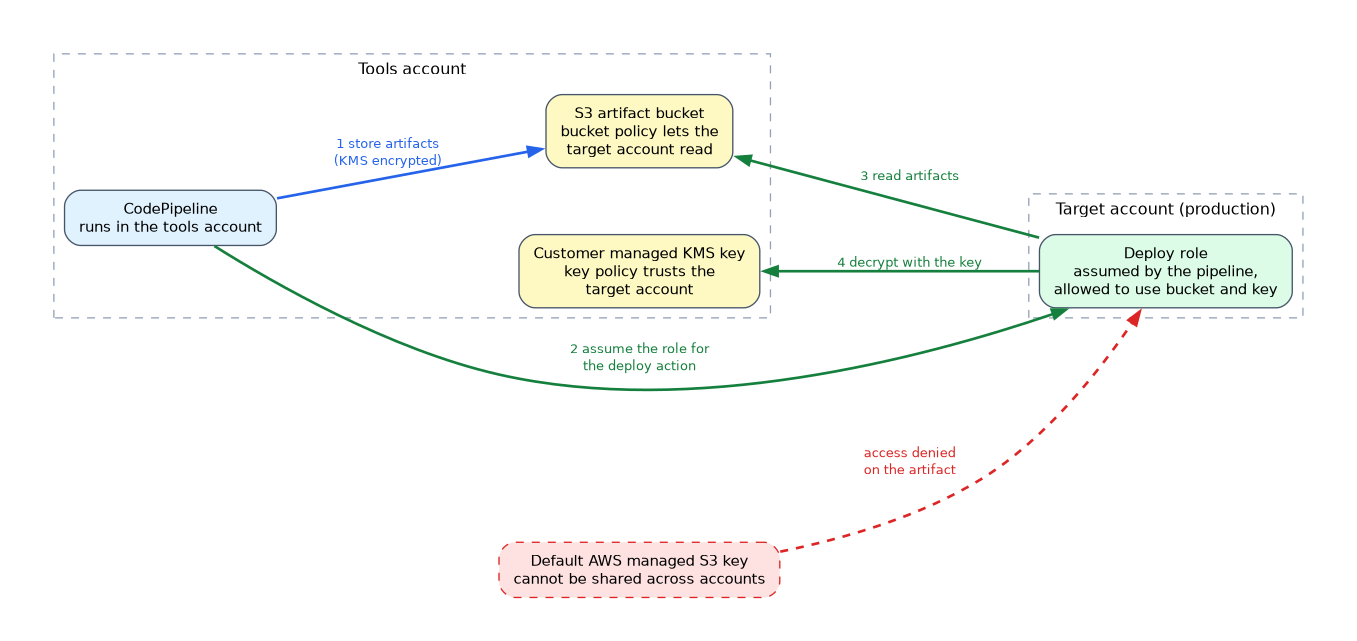 Production usually lives in a separate account. The pipeline runs in a tools account and assumes a role in the target account for the deploy action.
Three things must line up. The artifact bucket policy must let the target account read artifacts, the KMS key must be a customer managed key whose policy trusts the target account, and the target role must be able to use both. The default AWS managed S3 key cannot be shared across accounts, which is the classic failure.
For a cross Region action, CodePipeline needs an artifact bucket in each Region the pipeline uses. You declare these in the pipeline structure.
aws codepipeline get-pipeline --name my-pipeline
aws codepipeline start-pipeline-execution --name my-pipeline
aws codepipeline retry-stage-execution --pipeline-name my-pipeline \
  --stage-name Deploy --pipeline-execution-id <id> --retry-mode FAILED_ACTIONS
Pipeline as code
Define pipelines in CloudFormation with AWS::CodePipeline::Pipeline or in the AWS Cloud Development Kit (CDK). CDK Pipelines can modify its own definition when the pipeline code changes, which is called self mutation.
What to remember for the exam
- A pipeline has at least two stages and the first holds a source action.
- Actions in one stage run in parallel by run order; stages run in sequence.
- Artifacts move between actions through an S3 artifact bucket, encrypted with KMS.
- Cross account pipelines need a customer managed KMS key, a bucket policy for the target account and an assumable role there.
- Cross Region actions need an artifact bucket in each Region.
- Prefer EventBridge change detection over periodic polling.
- Manual approval actions notify through SNS and need
PutApprovalResult. - CodePipeline orchestrates; CodeBuild builds and CodeDeploy deploys.
- Build one artifact and promote it unchanged.
When a question says a cross account deploy fails with an access denied on the artifact, look for the default S3 managed key first.
Common mistakes
Rebuilding per environment. A separate build for each stage breaks the guarantee that production runs what staging tested.
Using the default encryption key across accounts. The target account cannot decrypt the artifacts, so the deploy action fails.
Expecting stages to run in parallel. Only actions inside one stage can run side by side. To fan out to several environments, put several actions in the same stage.
Confusing the approval and the test. A manual approval is a human gate; it does not validate anything by itself.
A pipeline role with broad administrator rights is a security risk, so give each action role only the permissions its provider needs.
Check yourself
Why does a cross account pipeline need a customer managed KMS key?
The target account must be allowed to decrypt the artifacts, and the key policy of an AWS managed key cannot be edited to trust another account.
How do you run two deploy actions at the same time in one pipeline?
Place both actions in the same stage with the same run order, because actions in a stage run in parallel.
Which change detection method does AWS recommend for a source?
EventBridge based detection, rather than polling the repository on a schedule.
Topic 1 of 6 in SDLC Automation
Test yourself on SDLC Automation
The full AWS DOP-C02 question bank has 844 questions, with timed practice exams and an explanation for every answer.
This study guide is independent and is not affiliated with, endorsed by, or sponsored by AWS. Vendor names, certification names and exam codes are trademarks of their respective owners and are used for identification only.