Incident and Event Response · Topic 5 of 5
Troubleshooting Applications, Access and Network
Troubleshoot Lambda, load balancer and API Gateway errors, IAM access denied and VPC connectivity using logs, CloudTrail, Flow Logs and Analyzer.
- 6 min
- Includes a diagram
- Lambda timeouts, throttles and memory issues show in metrics and the REPORT line.
- A Lambda in a VPC needs NAT or endpoints to reach the internet or AWS services.
- ALB: 502 bad response, 503 no healthy targets, 504 timeout.
What it is
Application failures show up as errors that users see: timeouts, HTTP 5xx codes, "access denied" and unreachable services. Each symptom narrows the cause to a layer, and the fastest approach is to test layer by layer rather than guess.
This page gives the common error patterns for serverless and load balanced applications, for IAM permission problems and for network paths.
How it works
Lambda
Watch the Errors, Throttles, Duration and ConcurrentExecutions metrics, and read the log output and the REPORT line.
| Symptom | Likely cause |
|---|---|
Task timed out after N seconds | Function timeout too short, or a slow downstream call |
| Out of memory | Memory setting too low; the REPORT line shows max memory used |
| Throttling (HTTP 429) | Concurrency limit reached, or reserved concurrency set too low |
| Function in a VPC cannot reach the internet or AWS APIs | No NAT gateway or VPC endpoint on the route |
| Access denied calling a service | The execution role lacks the permission |
| SQS messages processed repeatedly | Visibility timeout shorter than the function timeout |
Load balancer and API errors
An Application Load Balancer separates its own errors from those of the target, in metrics such as HTTPCode_ELB_5XX_Count and HTTPCode_Target_5XX_Count.
| Code | Typical cause |
|---|---|
| 502 Bad Gateway | The target closed the connection or sent an invalid response |
| 503 Service Unavailable | No registered healthy targets |
| 504 Gateway Timeout | The target did not answer within the idle timeout (60 seconds by default) |
| 403 or other 4xx | AWS WAF rule or listener rule blocked the request |
When targets show unhealthy, check the health check path, port and expected status code, the security group rules between load balancer and targets, and whether the application starts within the grace period.
For Amazon API Gateway, 429 means throttling, 502 often means a malformed response from a Lambda proxy integration, 504 means the integration timed out, and 403 means a missing authentication token, an authorizer denial or a resource policy block. Turn on execution logging and X-Ray tracing to see the integration step.
IAM access denied
Start by confirming who is calling.
aws sts get-caller-identity
aws sts decode-authorization-message --encoded-message <encoded-text>
The decode command turns the long encoded failure message returned by some services into readable JSON that names the action, resource and the policy type that denied it.
| Cause | Where to look |
|---|---|
| No allow in an identity policy | Attached policies of the user or role |
| Explicit deny | Any policy, since a deny always wins |
| Service control policy | The organization policies for the account |
| Permission boundary or session policy | The role boundary and the assume role session |
| Resource policy missing | Bucket, key or queue policy, especially cross account |
| KMS key access | The key policy and the role's key permissions |
CloudTrail records failed calls with an errorCode such as AccessDenied, so query it to find the caller and action. The IAM policy simulator tests what a principal can do, and IAM Access Analyzer can generate a least privilege policy from observed CloudTrail activity.
VPC connectivity
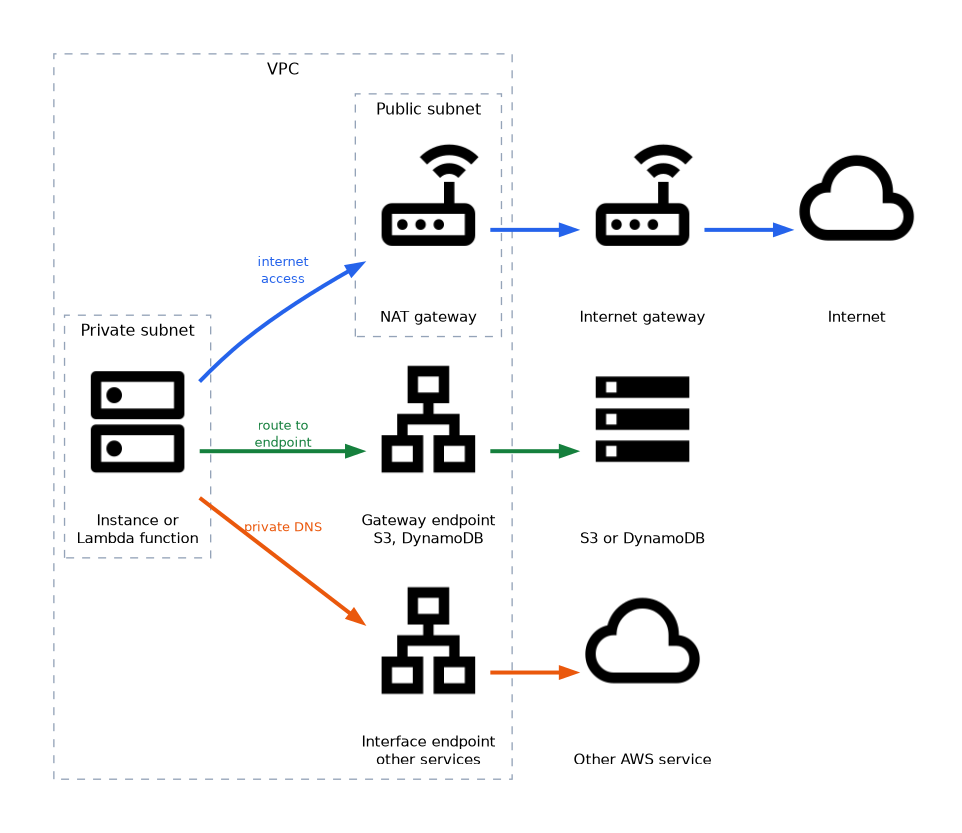 Work outward from the destination: name resolution, route, security group, network ACL, then the operating system and application.
| Check | Detail |
|---|---|
| DNS | VPC DNS support and hostnames enabled; private DNS on interface endpoints |
| Route table | Private subnet needs a route to a NAT gateway for internet access; the NAT gateway sits in a public subnet with a route to an internet gateway |
| Security group | Stateful, allow rules only: return traffic is automatic |
| Network ACL | Stateless, with allow and deny rules in both directions, including ephemeral return ports |
| Endpoints | Gateway endpoints for S3 and DynamoDB, interface endpoints for most other services |
VPC Flow Logs record accepted and rejected traffic per network interface.
2 111122223333 eni-0a1b2c3d 10.0.1.5 10.0.2.9 49152 443 6 10 840 1700000000 1700000060 REJECT OKThe fields run in order: version, account, interface, source address, destination address, source port, destination port, protocol (6 is TCP), packets, bytes, start, end, action and log status. A REJECT shows a security group or network ACL drop. With flow logs in CloudWatch Logs, query them directly.
fields @timestamp, srcAddr, dstAddr, dstPort, action
| filter action = "REJECT" and dstPort = 443
| stats count(*) as rejects by srcAddr, dstAddr
| sort rejects desc
| limit 20
VPC Reachability Analyzer checks the configured path between two resources without sending traffic, and names the component that blocks it. It analyses configuration, so it does not prove the application is listening.
What to remember for the exam
- Lambda timeouts, throttles and memory issues show in metrics and the REPORT line.
- A Lambda in a VPC needs NAT or endpoints to reach the internet or AWS services.
- ALB: 502 bad response, 503 no healthy targets, 504 timeout.
- ELB and target 5xx are counted separately; compare them to locate the fault.
- API Gateway 502 often means a bad Lambda proxy response; 504 means integration timeout.
- An explicit deny always wins over any allow.
decode-authorization-messageexplains encoded denials.- Security groups are stateful; network ACLs are stateless.
- Flow Logs show
REJECTentries; Reachability Analyzer analyses the configured path. - CloudTrail
errorCodevalues identify denied calls.
A question that says the connection "times out" points to routing, security groups or network ACLs, while "connection refused" points to the application not listening.
Common mistakes
Opening only the inbound rule. Network ACLs also need return traffic, which uses ephemeral ports.
Assuming IAM is the only layer. SCPs, boundaries, resource policies and KMS key policies can each deny.
Trusting Reachability Analyzer alone. It cannot see whether the process on the target is running.
Do not widen a security group to 0.0.0.0/0 just to test, because the rule often stays in place after the fix.
Check yourself
What does an ALB 503 error usually mean?
There are no registered healthy targets to receive the request.
Why does a Lambda function in a private subnet time out calling an AWS API?
There is no NAT gateway or VPC endpoint providing a route to that API.
How can you read an encoded authorization failure message?
Run
aws sts decode-authorization-messagewith the encoded text to see the denied action and the policy type.
Topic 5 of 5 in Incident and Event Response
Test yourself on Incident and Event Response
The full AWS DOP-C02 question bank has 844 questions, with timed practice exams and an explanation for every answer.
This study guide is independent and is not affiliated with, endorsed by, or sponsored by AWS. Vendor names, certification names and exam codes are trademarks of their respective owners and are used for identification only.