Incident and Event Response · Topic 1 of 5
EventBridge Event Routing
Route events with EventBridge using buses, rules, patterns, targets, cross account delivery, schedules, archive and replay, retries and dead letter queues.
- 6 min
- Includes a diagram
- EventBridge rules match events by pattern or run on a schedule.
- A rule has up to five targets, and each target can have its own DLQ and retry policy.
- Lambda, SNS and SQS targets need a resource policy that allows EventBridge; other targets use an IAM role.
What it is
Amazon EventBridge is a serverless event bus. Services and applications publish events (small JSON documents describing something that happened), and rules match events and send them to targets.
This is the backbone of event driven operations on AWS. An instance changes state, a pipeline fails or a GuardDuty finding arrives, and a rule routes it to a function, a runbook or a notification, with no polling.
How it works
Buses and sources
| Bus | Purpose |
|---|---|
| Default event bus | Receives events from AWS services in the account |
| Custom event bus | Receives events your applications send with PutEvents |
| Partner event bus | Receives events from supported SaaS partners |
Common AWS event sources include EC2 state changes, Auto Scaling lifecycle actions, CodePipeline and CodeBuild state changes, ECS task state changes, AWS Health, AWS Config compliance changes, GuardDuty findings and CloudWatch alarm state changes. Any API call recorded by CloudTrail can also become an event with the detail type AWS API Call via CloudTrail, which makes a very wide range of actions observable.
Rules and patterns
A rule has either an event pattern or a schedule. A pattern is JSON that names the fields to match, and any field you omit is ignored.
{
  "source": ["aws.ec2"],
  "detail-type": ["EC2 Instance State-change Notification"],
  "detail": {"state": ["terminated"]}
}
Patterns support content filtering: prefix matching, anything-but, numeric comparisons, exists and others. Match on as much as you can in the rule, so targets only run for events that matter.
Targets
A rule can have up to five targets. Typical targets are Lambda functions, Step Functions state machines, Systems Manager Automation and Run Command, SNS topics, SQS queues, Kinesis streams, CodePipeline pipelines, ECS tasks, API destinations (external HTTP endpoints) and other event buses. An input transformer reshapes the event before it reaches the target.
aws events put-rule --name ec2-terminated --event-pattern file://pattern.json
aws events put-targets --rule ec2-terminated \
  --targets "Id=1,Arn=arn:aws:lambda:us-east-1:111122223333:function:notify"
aws lambda add-permission --function-name notify --statement-id eb-ec2 \
  --action lambda:InvokeFunction --principal events.amazonaws.com \
  --source-arn arn:aws:events:us-east-1:111122223333:rule/ec2-terminated
The permission step matters. For Lambda, SNS and SQS targets, the target's own resource policy must allow EventBridge to call it.
For most other targets, the target definition names an IAM role that EventBridge assumes. The console adds the Lambda permission for you, but the CLI and CloudFormation do not.
Schedules
A rule can run on a rate or a cron expression, but EventBridge Scheduler is the newer, richer option. It supports one time and recurring schedules at large scale, with time zones, flexible time windows and retries, and it can call many service APIs directly.
Cross account and cross Region
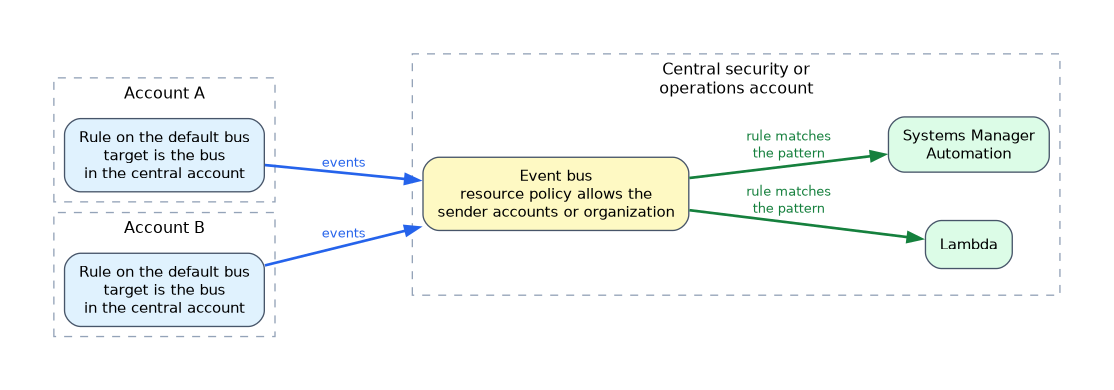 To send events to another account, the target account's bus needs a resource policy that allows the source account (or the whole organization) to put events. The source rule then names that bus as a target. The same mechanism works across Regions.
This pattern collects events from every account in a central security or operations account, which is the standard design for organization wide automation.
Reliability features
- Retries: EventBridge retries failed deliveries for up to 24 hours by default, and you can shorten that with a retry policy.
- Dead letter queue: a target can have an SQS queue that stores events that could not be delivered.
- Archive and replay: an archive stores events from a bus, and a replay sends them again to the bus, which helps recover after a bug in a consumer.
- At least once delivery: a target may receive the same event twice, so handlers must be idempotent.
EventBridge Pipes
Pipes connect a source such as SQS, Kinesis or DynamoDB Streams to a target, with optional filtering and enrichment in the middle. They suit point to point integrations where a bus with many rules is more than you need.
Choosing between services
| Need | Choose |
|---|---|
| React to AWS service and API events with rules | EventBridge |
| Fan out one message to many subscribers | SNS |
| Buffer work for consumers at their own pace | SQS |
| Ordered, replayable high volume stream | Kinesis Data Streams |
What to remember for the exam
- EventBridge rules match events by pattern or run on a schedule.
- A rule has up to five targets, and each target can have its own DLQ and retry policy.
- Lambda, SNS and SQS targets need a resource policy that allows EventBridge; other targets use an IAM role.
- CloudTrail API calls become events, which lets rules react to almost any action.
- Cross account delivery needs a resource policy on the destination bus.
- Archive and replay supports recovery and testing.
- Delivery is at least once, so design idempotent targets.
- EventBridge Scheduler handles large scale one time and recurring schedules.
- Use Pipes for source to target flows with filtering and enrichment.
When a question needs "react to an API call within minutes" with the least code, the answer is an EventBridge rule on the CloudTrail event with the right target.
Common mistakes
Forgetting the Lambda permission. The rule matches, but nothing runs because EventBridge is not allowed to invoke the function.
Matching too broadly. A rule on every EC2 event invokes a function constantly and wastes cost.
Expecting exactly once delivery. Duplicates happen, and a non idempotent handler double processes.
Ignoring Regions. A rule only sees events in its own Region, except global service events delivered in the US East (N. Virginia) Region.
A rule that reacts to a change and then makes the same kind of change can trigger itself in a loop, so filter out events caused by your own automation.
Check yourself
How do you collect events from many accounts into one account?
Send them to an event bus in the central account, whose resource policy allows the sender accounts or the organization.
Why might an EventBridge rule match but a Lambda target not run?
The function's resource policy does not allow
events.amazonaws.comto invoke it.What keeps events that fail delivery for later inspection?
A dead letter queue configured on the target.
Topic 1 of 5 in Incident and Event Response
Test yourself on Incident and Event Response
The full AWS DOP-C02 question bank has 844 questions, with timed practice exams and an explanation for every answer.
This study guide is independent and is not affiliated with, endorsed by, or sponsored by AWS. Vendor names, certification names and exam codes are trademarks of their respective owners and are used for identification only.