Data Store Management · Topic 2 of 7
S3 Data Lake Design
Design an Amazon S3 data lake with raw, curated and consumption zones, sensible prefixes and partitions, Apache Iceberg tables and S3 access options.
- 5 min
- Includes a diagram
- A data lake in S3 separates storage from compute and serves many engines at once.
- Keep a raw zone unchanged, then curated and consumption zones in columnar, partitioned form.
- S3 keys are flat. Prefixes look like folders and are used for partitions.
What it is
An Amazon S3 data lake keeps data in its original and processed forms in buckets, so many engines can read the same files. Storage is cheap and separate from compute, which means Athena, Glue, EMR and Redshift Spectrum can all work on one copy.
The design question is how to lay the data out so it is easy to find, cheap to query and safe to change.
How it works
Zones
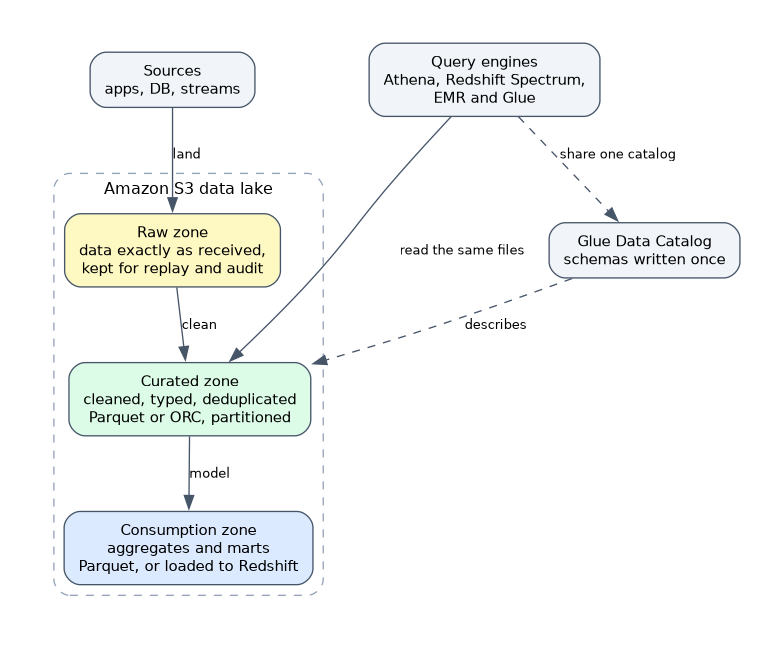 Most lakes use layers, sometimes called bronze, silver and gold, or raw, curated and consumption.
| Zone | Content | Format |
|---|---|---|
| Raw | Data exactly as received, kept for replay and audit | Source format |
| Curated | Cleaned, typed, deduplicated data | Parquet or ORC, partitioned |
| Consumption | Aggregates and marts for reports and machine learning | Parquet, or loaded to Redshift |
Keeping raw data unchanged lets you rebuild later layers if business rules change.
Buckets, prefixes and partitions
S3 has no real folders. A key such as curated/orders/year=2026/month=10/part-0001.parquet is one name, and the part before the last slash acts like a folder. Hive style key=value prefixes let Athena and Glue treat them as partitions.
Choose partition columns that queries filter on, usually a date. Avoid very fine partitions, which create many tiny files. S3 scales request rates per prefix, so spreading data over several prefixes supports parallel access.
Open table formats
Plain files in S3 cannot be updated safely in place. Open table formats such as Apache Iceberg, Apache Hudi and Delta Lake add a metadata layer on top of Parquet files.
They provide ACID transactions, row level inserts, updates and deletes, snapshots for time travel and schema evolution. Athena, Glue, EMR and Redshift support Apache Iceberg tables, and Iceberg is the format the exam mentions most often.
CREATE TABLE orders_iceberg (
  order_id bigint, amount double, order_date date)
PARTITIONED BY (order_date)
LOCATION 's3://my-bucket/curated/orders_iceberg/'
TBLPROPERTIES ('table_type'='ICEBERG');
Use such a table when the lake must support updates, deletes (for example privacy erasure requests) or change data capture merges.
Querying the lake
| Engine | Use |
|---|---|
| Athena | Interactive SQL, pay per data scanned |
| Redshift Spectrum | SQL from a Redshift cluster over S3 external tables |
| EMR and Glue | Large Spark jobs and heavy transformations |
| Lake Formation | Central permissions over the catalog and the data |
All of them can share one Glue Data Catalog, so the table definitions are written once.
Controlling access to the data
Bucket policies and IAM policies decide who can read objects. S3 Access Points give each application its own named endpoint and policy, which simplifies a bucket shared by many teams. S3 Block Public Access prevents public exposure at the bucket or account level.
For fine grained, column and row level control across Athena, Redshift and EMR, use AWS Lake Formation instead of managing object permissions by hand.
Performance and cost levers
Convert to columnar formats, compress, compact small files and partition on filter columns. Use S3 Intelligent-Tiering or lifecycle rules for data with changing access, which the lifecycle page covers.
S3 delivers strong read after write consistency for all operations, so a listing or read right after a write sees the new object. This removes the need for older workarounds that some tutorials still describe.
Choosing lake or warehouse
Keep cold, large and varied data in the lake. Load hot, frequently queried, modelled data into Redshift for speed and concurrency. Many designs do both and use Spectrum to join them.
What to remember for the exam
- A data lake in S3 separates storage from compute and serves many engines at once.
- Keep a raw zone unchanged, then curated and consumption zones in columnar, partitioned form.
- S3 keys are flat. Prefixes look like folders and are used for partitions.
- Apache Iceberg adds ACID, updates, deletes, time travel and schema evolution to S3 data.
- Athena, Glue, EMR and Redshift can all use a shared Glue Data Catalog.
- S3 Access Points give per application access policies on a shared bucket.
- Lake Formation provides column and row level permissions across engines.
- S3 provides strong read after write consistency.
If the lake needs row level updates or deletes, such as for erasure requests, look for Iceberg (or Hudi or Delta) in the answers.
Common mistakes
Treating S3 as a file system. There are no real directories, and renaming a prefix means copying objects.
Skipping the raw zone. Without untouched source data you cannot reprocess after a bug.
Hand editing Parquet files. Files in S3 are immutable objects. Use a table format or rewrite the partition.
Using one bucket policy for everything. Many teams with different needs are easier to manage with Access Points or Lake Formation.
Public access on a data lake bucket is a serious exposure, so keep Block Public Access on unless a specific use case needs it.
Check yourself
Why keep a raw zone that is never changed?
It lets you replay or rebuild later layers after a bug or a rule change.
Which format adds row level updates and deletes to S3 tables?
Apache Iceberg, also Hudi and Delta Lake.
What gives each team its own access policy on a shared bucket?
S3 Access Points.
Topic 2 of 7 in Data Store Management
Test yourself on Data Store Management
The full AWS DEA-C01 question bank has 845 questions, with timed practice exams and an explanation for every answer.
This study guide is independent and is not affiliated with, endorsed by, or sponsored by AWS. Vendor names, certification names and exam codes are trademarks of their respective owners and are used for identification only.