Data Store Management · Topic 3 of 7
Amazon Redshift Data Warehouse
Understand Redshift architecture, provisioned and serverless modes, distribution and sort keys, COPY and UNLOAD, Spectrum, data sharing and tuning.
- 5 min
- Includes a diagram
- Redshift is columnar and MPP. It targets OLAP, not high rate OLTP.
- Use
COPYfrom multiple S3 files for fast parallel loads, andUNLOADto export. - Distribution styles are KEY, ALL, EVEN and AUTO. Use ALL only for small tables.
What it is
Amazon Redshift is a managed, columnar data warehouse for analytical SQL on large structured datasets. It uses massively parallel processing (MPP), so a query is split across many nodes that each work on a slice of the data.
Choose it for complex joins and aggregations, many concurrent reports and repeated queries that need consistent speed.
How it works
Architecture and deployment
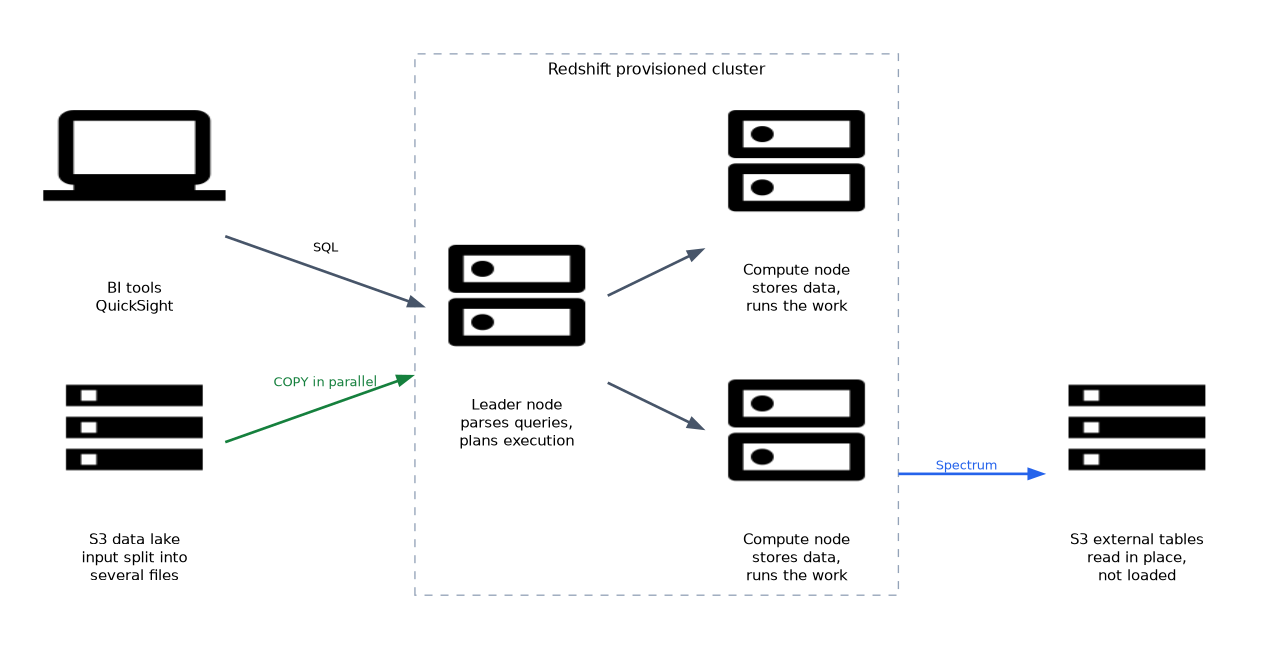 A provisioned cluster has a leader node that parses queries and plans execution, and compute nodes that store data and run the work. RA3 node types separate compute from storage by keeping data in Redshift managed storage backed by S3. Amazon Redshift Serverless removes cluster sizing, runs on RPUs (Redshift Processing Units) and bills for use.
Choose serverless for variable or unpredictable workloads, and provisioned clusters for steady use where you want reserved pricing and tuning control.
Loading and unloading data
The COPY command loads data in parallel from S3, DynamoDB and other sources. It performs best when the input is split into several files, so every slice reads a file at the same time.
COPY orders
FROM 's3://my-bucket/curated/orders/'
IAM_ROLE 'arn:aws:iam::123456789012:role/RedshiftCopyRole'
FORMAT AS PARQUET;

UNLOAD ('SELECT * FROM orders WHERE order_date = ''2026-10-01''')
TO 's3://my-bucket/exports/orders_'
IAM_ROLE 'arn:aws:iam::123456789012:role/RedshiftCopyRole'
FORMAT AS PARQUET;
UNLOAD writes query results to S3 in parallel. Redshift also supports streaming ingestion from Kinesis Data Streams and MSK into a materialized view, and zero ETL integrations that replicate from Aurora and other sources.
Distribution and sort keys
The distribution style decides which node slice stores each row.
| Style | Behavior | Use |
|---|---|---|
| KEY | Rows with the same key value go to the same slice | Large tables joined on that key |
| ALL | A full copy on every node | Small, slow changing dimension tables |
| EVEN | Round robin spread | No clear join key |
| AUTO | Redshift chooses and can change it | Default when unsure |
Sort keys store rows in sorted order, so range filters such as dates skip blocks that cannot match. Choose a sort key on columns used often in filters. Column compression encodings reduce storage and I/O, and Redshift can choose them automatically.
Query acceleration features
Materialized views store precomputed results and can refresh incrementally. Concurrency scaling adds temporary capacity for bursts of queries. Workload management (WLM) queues and priorities keep short dashboard queries from waiting behind long jobs, and automatic WLM adjusts for you.
Spectrum, federated queries and data sharing
Redshift Spectrum queries S3 data through external tables defined in the Glue Data Catalog, without loading it. Federated queries read live data from RDS and Aurora (PostgreSQL and MySQL) databases.
Data sharing lets one Redshift cluster or serverless namespace share live data with another, within or across accounts, without copying it. This suits producer and consumer designs.
Maintenance and performance
Updates and deletes leave rows that are marked as deleted, so tables need VACUUM to reclaim space and re sort, and ANALYZE to refresh statistics. Redshift runs both automatically in the background in many cases. EXPLAIN shows the query plan, and system tables and views show what ran and how long it took.
The Redshift Data API lets applications run SQL over HTTPS without managing connections and drivers. This works well with Lambda and Step Functions, and it can authenticate with Secrets Manager or temporary credentials.
Locks and blocking transactions
Both Redshift and RDS use locks so concurrent sessions do not corrupt data. A transaction keeps its locks until it commits or rolls back, so a long or forgotten open transaction makes other sessions wait.
In Redshift, a write or DDL (data definition language) statement takes a table lock. To investigate, query STV_LOCKS for current table locks and SVV_TRANSACTIONS for open transactions and the locks they hold or wait for. To free the table, end the blocking session with PG_TERMINATE_BACKEND.
SELECT * FROM svv_transactions;
SELECT PG_TERMINATE_BACKEND(18764);
In RDS, the engine takes row level and table level locks (InnoDB row locks in MySQL, pg_locks in PostgreSQL). If two transactions wait on each other, that is a deadlock. The engine detects it and rolls one transaction back, and the application should retry it.
Keep transactions short, commit promptly, and touch tables in the same order to reduce waits and deadlocks. S3 Object Lock is a different feature that protects objects from deletion.
Security basics
Clusters should sit in private subnets, with encryption at rest using AWS KMS (Key Management Service) and TLS (Transport Layer Security) in transit. Access control uses SQL GRANT statements, roles and, where needed, row level security and masking policies, which later chapters cover.
What to remember for the exam
- Redshift is columnar and MPP. It targets OLAP, not high rate OLTP.
- Use
COPYfrom multiple S3 files for fast parallel loads, andUNLOADto export. - Distribution styles are KEY, ALL, EVEN and AUTO. Use ALL only for small tables.
- Sort keys speed up range filters on sorted columns.
- Spectrum queries S3 in place. Federated query reaches RDS and Aurora.
- Data sharing shares live data between clusters without copying.
- Serverless suits variable demand. Provisioned suits steady load.
- The Data API runs SQL over HTTPS without managing connections.
A question that mentions "join two huge tables slowly" often wants a KEY distribution on the join column, so matching rows sit on the same slice.
Common mistakes
Using ALL on a huge table. Every node stores a full copy, which wastes space and slows loads.
Loading from one big file. A single file forces one slice to do the work. Split input into many files.
Row by row inserts. They are slow compared with COPY.
Never running maintenance. Without VACUUM and ANALYZE, deleted rows and stale statistics hurt performance, though automatic maintenance covers most cases.
Spectrum charges by data scanned in S3, so unpartitioned CSV external tables can cost more than expected.
Check yourself
Which command loads data into Redshift from S3 in parallel?
COPY, which works best with several input files.Which distribution style puts a full copy of a table on every node?
ALL.
How can Redshift join warehouse tables with data left in S3?
Through Redshift Spectrum external tables.
Topic 3 of 7 in Data Store Management
Test yourself on Data Store Management
The full AWS DEA-C01 question bank has 845 questions, with timed practice exams and an explanation for every answer.
This study guide is independent and is not affiliated with, endorsed by, or sponsored by AWS. Vendor names, certification names and exam codes are trademarks of their respective owners and are used for identification only.