Data Ingestion and Transformation · Topic 1 of 8
Streaming Data Ingestion
Choose between Kinesis Data Streams, Amazon Data Firehose and Amazon MSK for streaming ingestion, and handle shards, throughput limits and replay on AWS.
- 5 min
- Includes a diagram
- Kinesis Data Streams is for custom processing, ordering inside a shard and replay. Firehose is for managed delivery to a destination.
- A shard takes 1 MB per second or 1,000 records per second in, and 2 MB per second out.
- Default retention in Kinesis Data Streams is 24 hours, and it can be extended up to 365 days.
What it is
Streaming ingestion means taking records into AWS continuously, as they are produced, instead of in scheduled batches.
Typical sources are application logs, clickstreams, IoT (Internet of Things) devices and database change events. The exam asks you to pick the right service for the latency, the ordering and the delivery target that the scenario describes.
How it works
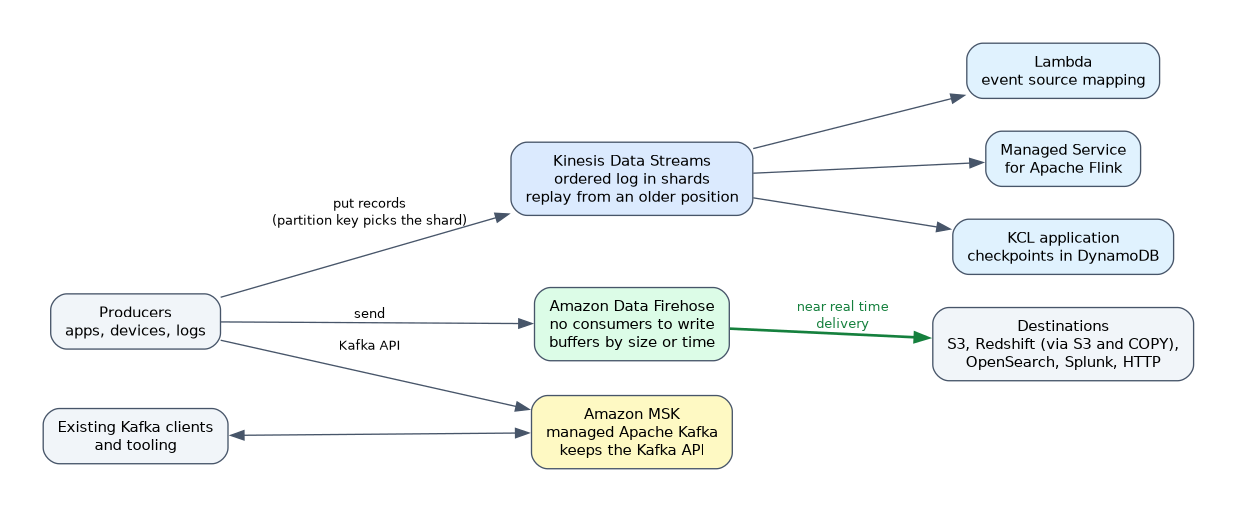
!Producers feed three streaming services: Kinesis Data Streams keeps an ordered log in shards that Lambda, Managed Service for Apache Flink and KCL applications read; Amazon Data Firehose buffers and delivers to S3, Redshift, OpenSearch, Splunk or HTTP endpoints; Amazon MSK serves existing Kafka clients. Three services cover most streaming questions, and they differ in who manages the consumers.
Kinesis Data Streams
Amazon Kinesis Data Streams (KDS) stores records in an ordered log that is split into shards. Each record carries a partition key, and the hash of that key decides which shard receives it. Records with the same key stay in order inside one shard.
Each shard accepts up to 1 MB per second or 1,000 records per second for writes. For reads, a shard gives 2 MB per second, shared between all consumers that use the default shared throughput. A stream can run in provisioned mode, where you set the shard count, or in on demand mode, where capacity scales for you.
Records are kept for 24 hours by default, and you can raise the retention to as long as 365 days. Because records stay in the stream, a consumer can replay data by reading again from an older position.
Amazon Data Firehose
Amazon Data Firehose (formerly Kinesis Data Firehose) is a fully managed delivery service. You do not write consumers and you do not manage shards. It buffers incoming data by size or by time, then writes it to a destination.
Destinations include Amazon S3, Amazon Redshift (through S3 and a COPY command), Amazon OpenSearch Service, Splunk and HTTP endpoints. Firehose can run a Lambda function to transform records and can convert JSON to Parquet or ORC using a schema from the AWS Glue Data Catalog. It delivers in near real time because of the buffer, not in true real time.
Amazon MSK
Amazon Managed Streaming for Apache Kafka (MSK) runs Apache Kafka clusters for you. Choose it when the team already uses Kafka clients, topics and tooling, or when a migration must keep the Kafka API. MSK Serverless removes the cluster sizing work, and MSK Connect runs Kafka Connect connectors to move data in and out.
Processing the stream
Amazon Managed Service for Apache Flink (formerly Kinesis Data Analytics) runs stateful stream processing such as windowed aggregations. AWS Lambda can read from a stream through an event source mapping, with a batch size you control. Amazon Redshift can also ingest straight from Kinesis Data Streams or MSK through streaming ingestion into a materialized view.
Comparing the options
| Need | Best fit |
|---|---|
| Custom consumers, replay, ordering per key | Kinesis Data Streams |
| Load to S3 or Redshift with no code | Amazon Data Firehose |
| Existing Kafka applications | Amazon MSK |
| Windowed analytics on the stream | Managed Service for Apache Flink |
Handling throttling and hot shards
When writes exceed a shard limit, the producer receives a ProvisionedThroughputExceededException. The usual fixes are more shards, a better partition key that spreads data evenly, and producer retries with backoff. The Kinesis Producer Library (KPL) batches and aggregates records to use shard capacity well.
Several consumers on one stream compete for the same 2 MB per second per shard. Enhanced fan out gives each registered consumer its own 2 MB per second per shard, pushed over HTTP/2.
What to remember for the exam
- Kinesis Data Streams is for custom processing, ordering inside a shard and replay. Firehose is for managed delivery to a destination.
- A shard takes 1 MB per second or 1,000 records per second in, and 2 MB per second out.
- Default retention in Kinesis Data Streams is 24 hours, and it can be extended up to 365 days.
- Firehose buffers data, so it is near real time, and it can transform with Lambda and convert to Parquet or ORC.
- Enhanced fan out removes read contention between several consumers.
- Pick MSK when Kafka compatibility is a stated requirement.
- A hot shard comes from a skewed partition key, and the fix is a better key, not just more shards.
- The Kinesis Client Library (KCL) tracks its checkpoints in a DynamoDB table.
When a question says "no custom code" and "deliver to S3", the answer is almost always Amazon Data Firehose.
Common mistakes
Calling Firehose real time. It buffers, so it is near real time. If the scenario needs sub second reads by several consumers, use Kinesis Data Streams.
Adding shards to fix a hot key. If one key gets most of the traffic, extra shards do not help because that key still maps to one shard.
Expecting replay from Firehose. Firehose does not store records for you to read again. Replay needs Kinesis Data Streams or MSK, or a copy of the raw data in S3.
Ignoring the old names. Questions may say Kinesis Data Firehose or Kinesis Data Analytics. They mean Amazon Data Firehose and Managed Service for Apache Flink.
Ordering is only guaranteed within one shard, so records with different partition keys can arrive in a different order than they were sent.
Check yourself
Which service delivers streaming data to S3 with no consumer code?
Amazon Data Firehose, which buffers and writes to the destination.
A producer gets ProvisionedThroughputExceededException on one shard. What is a likely cause?
A skewed partition key is sending too much traffic to one shard.
How can two consumers each read at full speed from one stream?
Use enhanced fan out, which gives each consumer its own throughput per shard.
Topic 1 of 8 in Data Ingestion and Transformation
Test yourself on Data Ingestion and Transformation
The full AWS DEA-C01 question bank has 845 questions, with timed practice exams and an explanation for every answer.
This study guide is independent and is not affiliated with, endorsed by, or sponsored by AWS. Vendor names, certification names and exam codes are trademarks of their respective owners and are used for identification only.