Data Ingestion and Transformation · Topic 2 of 8
Batch Ingestion and Migration
Pick the right AWS service for batch loads and database migration with DMS, AppFlow, DataSync, Transfer Family and Glue, using idempotent, replayable loads
- 7 min
- Includes a diagram
- DMS handles database migration and CDC. It does not convert schemas across engines.
- AppFlow is for SaaS sources, DataSync is for file shares and bulk copy, Transfer Family is for SFTP partners.
- Use Snow Family when network transfer is too slow or not possible.
What it is
Batch ingestion moves data in chunks, on a schedule or when a file arrives. The source can be a relational database, a SaaS (software as a service) application, files on premises or another AWS account.
The exam tests two skills here. One is matching the source to the right transfer service. The other is designing loads that are safe to run twice, so a retry never creates duplicate rows.
How it works
Matching the source to the service
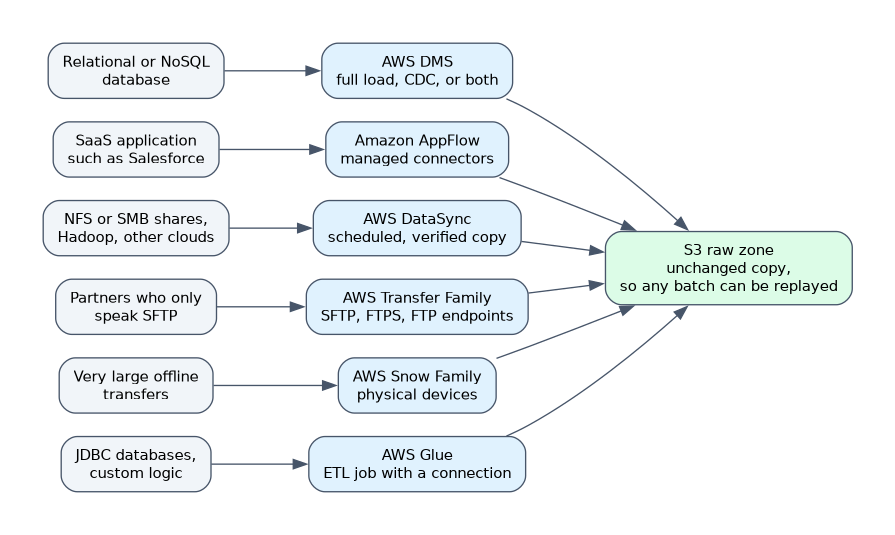
| Source | Service | Notes |
|---|---|---|
| Relational or NoSQL database | AWS Database Migration Service (DMS) | Full load, change data capture (CDC), or both |
| SaaS application such as Salesforce | Amazon AppFlow | Managed connectors, no code |
| NFS or SMB file shares, Hadoop, other clouds | AWS DataSync | Scheduled, verified copy to S3, EFS or FSx |
| Partners who only speak SFTP | AWS Transfer Family | SFTP, FTPS and FTP endpoints backed by S3 or EFS |
| Very large offline transfers | AWS Snow Family | Physical devices shipped to AWS |
| JDBC (Java Database Connectivity) databases, custom logic | AWS Glue | ETL (extract, transform, load) job with a connection |
| Existing S3 data | S3 Batch Operations, replication, aws s3 sync | Copy within or across buckets |
Pulling from a REST API
A REST (representational state transfer) API that AppFlow does not cover can be consumed with a scheduled Lambda function or a Glue Python shell job. The code calls the endpoint in a loop, follows the pagination token or cursor in each response until none is returned, and writes the raw JSON to S3 unchanged.
- Keep the API key or token in Secrets Manager, never in code.
- On an HTTP 429 (too many requests) or a 5xx error, retry with exponential backoff, and honor a wait hint if the API sends one.
- Store the last cursor or timestamp (for example in DynamoDB or Parameter Store) so a re run resumes cleanly, and write to a dated S3 prefix so a retry overwrites instead of duplicating.
- Lambda stops at 15 minutes, so a long pull belongs in Glue.
Database Migration Service
DMS reads from a source endpoint and writes to a target endpoint. A replication instance runs the task, or you can use DMS Serverless, which scales capacity for you. A task can do a full load, replicate ongoing changes with CDC, or do a full load followed by CDC.
DMS moves data but does not convert a schema between different engines. For a heterogeneous move, such as Oracle to PostgreSQL, use the AWS Schema Conversion Tool or DMS Schema Conversion first. DMS can write to S3, and CDC output there lands as files that carry an operation indicator for inserts, updates and deletes.
Allowlisting source IP addresses
Some sources accept connections only from known IP addresses. AWS jobs do not have a fixed address by default, so you give them one and tell the source about it.
| Component | How to get a fixed address | Source side rule |
|---|---|---|
| Glue job or Lambda function in a VPC | Route a private subnet through a NAT gateway with an Elastic IP | Allow that Elastic IP in the source firewall |
| DMS replication instance | Use the instance IP, or the NAT gateway Elastic IP when it sits in a private subnet | Allow that address in the source firewall |
| Source inside AWS, such as RDS | Use private addressing | Allow the job or replication instance security group in the source security group |
A Lambda function that is not attached to a VPC has no stable outbound address, so it cannot be allowlisted.
Triggers and scheduling
A batch job needs something to start it. Common triggers are an Amazon EventBridge schedule, an S3 event notification, an AWS Glue trigger, an AWS Step Functions state machine or an Amazon Managed Workflows for Apache Airflow (MWAA) DAG (directed acyclic graph).
S3 event notifications can invoke Lambda, send to SQS or SNS, or go to EventBridge. EventBridge supports filtering on object key prefixes and many other fields.
Idempotency and replayability
An idempotent load gives the same result when run once or many times. Replayable means you can re run a past period because the raw input still exists. Keep an untouched copy of source data in a raw S3 layer, and write results so a re run replaces a partition instead of appending to it.
Ways to get idempotency include overwriting a partition, using a merge or upsert on a business key, and using AWS Glue job bookmarks so a job skips data it already processed. In a streaming path, a deduplication key serves the same purpose.
Throttling and limits
Sources and targets push back when you load too fast. Use SQS as a buffer in front of Lambda, set batch sizes, add retries with exponential backoff and cap concurrency. Lambda has reserved concurrency for this, which also protects a database from too many connections.
For Redshift, load with the COPY command from several files in S3 so the nodes read in parallel. Many small single row INSERT statements are slow in comparison.
COPY sales FROM 's3://my-bucket/raw/sales/2026/10/'
IAM_ROLE 'arn:aws:iam::123456789012:role/RedshiftCopyRole'
FORMAT AS PARQUET;
Fan in and fan out
Fan in means many sources feeding one target, such as several Kinesis streams landing in one data lake. Fan out means one event feeding several targets. Amazon SNS with SQS queues is the classic fan out pattern, where each queue serves a different consumer.
What to remember for the exam
- DMS handles database migration and CDC. It does not convert schemas across engines.
- AppFlow is for SaaS sources, DataSync is for file shares and bulk copy, Transfer Family is for SFTP partners.
- Use Snow Family when network transfer is too slow or not possible.
- Land raw data in S3 unchanged, so any batch can be replayed.
- Make loads idempotent with partition overwrite, upsert on a key, or Glue job bookmarks.
- Load Redshift with
COPYfrom many files in S3, not row by row inserts. - SQS in front of Lambda smooths bursts. Reserved concurrency caps the load on a downstream system.
- EventBridge schedules and S3 event notifications are the usual batch triggers.
If a question mentions "ongoing replication with minimal downtime", think DMS with CDC.
Common mistakes
Choosing DMS for schema conversion. DMS copies data. A different engine needs the Schema Conversion Tool first.
Appending on retry. A job that appends rows without a key creates duplicates when it fails halfway and runs again.
Using DataSync for a SaaS source. DataSync reads storage systems, and AppFlow reads SaaS applications.
Forgetting the target limits. A fast Lambda fan out can overload a database, so add a queue or a concurrency cap.
Glue job bookmarks track processed data per job, so changing the job logic without resetting the bookmark can skip data you meant to reprocess.
Check yourself
Which service replicates ongoing database changes into S3 with little downtime?
AWS DMS using a full load plus change data capture.
How do you make a daily batch load safe to retry?
Overwrite the day's partition or upsert on a business key, so a re run gives the same result.
A partner can only deliver files over SFTP. Which service fits?
AWS Transfer Family, which exposes an SFTP endpoint backed by S3.
Topic 2 of 8 in Data Ingestion and Transformation
Test yourself on Data Ingestion and Transformation
The full AWS DEA-C01 question bank has 845 questions, with timed practice exams and an explanation for every answer.
This study guide is independent and is not affiliated with, endorsed by, or sponsored by AWS. Vendor names, certification names and exam codes are trademarks of their respective owners and are used for identification only.