Cloud Technology and Services · Topic 7 of 11
AWS Storage Services
Compare Amazon S3 storage classes, EBS, EFS, FSx, instance store, Storage Gateway, AWS Backup and the Snow Family for the Cloud Practitioner exam.
- 5 min
- Includes a diagram
- S3 is object storage in buckets, designed for 11 nines of durability.
- Pick the S3 class by access pattern: Standard for frequent, Intelligent Tiering for unknown, IA classes for infrequent, Glacier classes for archives.
- Glacier Deep Archive is the cheapest and slowest class.
What it is
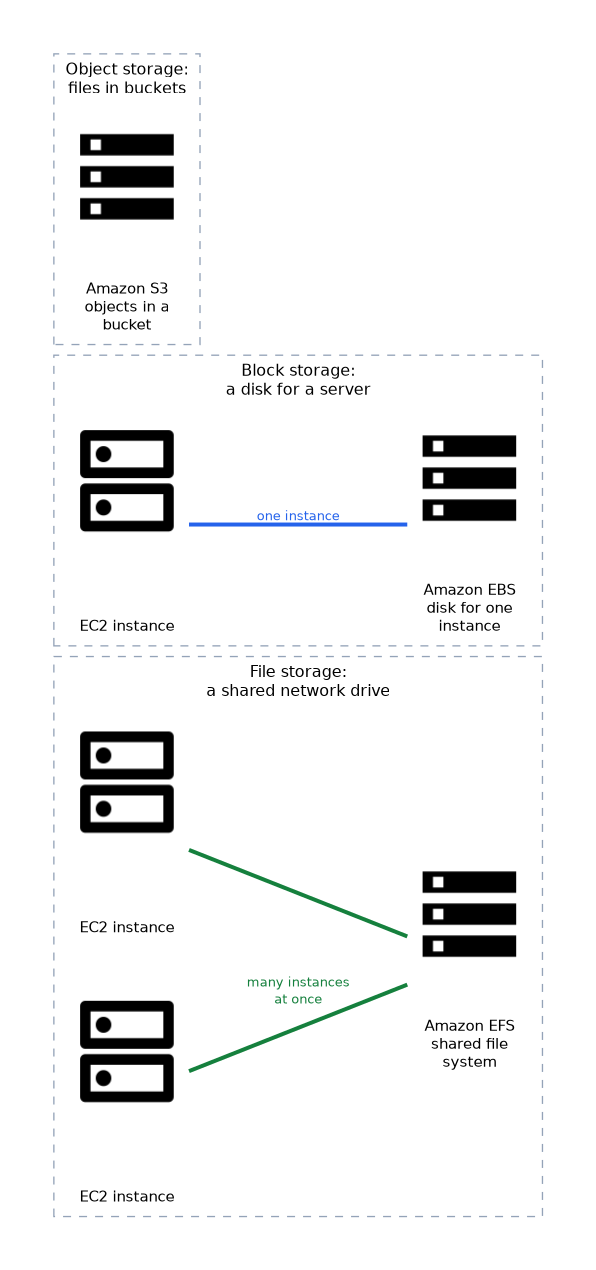
AWS offers three basic storage types. Object storage keeps files as objects in buckets, block storage acts like a disk attached to a server, and file storage offers a shared network drive.
Choosing the right one depends on how the data is used, how fast it must be reached, and how often it is accessed.
The exam tests the match between the storage type, the service and, for Amazon Simple Storage Service (S3), the right storage class for the access pattern.
How it works
Amazon S3
Amazon Simple Storage Service (S3) stores objects in buckets. It scales to very large amounts of data and is designed for very high durability, with a stated design target of 99.999999999 percent (11 nines).
S3 is used for backups, websites, data lakes and content. Features include versioning, encryption, lifecycle rules and bucket policies. Block Public Access settings help prevent accidental exposure.
S3 storage classes
| Class | Use it for |
|---|---|
| S3 Standard | Frequently accessed data |
| S3 Intelligent Tiering | Data with unknown or changing access patterns; moves objects between tiers automatically |
| S3 Standard IA (infrequent access) | Data accessed rarely but needed quickly, stored in multiple Availability Zones (AZs) |
| S3 One Zone IA | Rarely accessed data that can be recreated, stored in one AZ at lower cost |
| S3 Glacier Instant Retrieval | Archive data that needs access in milliseconds |
| S3 Glacier Flexible Retrieval | Archive data where retrieval can take minutes to hours |
| S3 Glacier Deep Archive | Long term archive with the lowest cost and the slowest retrieval |
A lifecycle rule moves objects to a cheaper class after a set time, or deletes them. For example, move logs to Glacier after 90 days.
Block and file storage
| Service | Type | Key points |
|---|---|---|
| Amazon EBS (Elastic Block Store) | Block | A virtual disk for an Elastic Compute Cloud (EC2) instance, in one Availability Zone. Persists after the instance stops. Snapshots back it up |
| EC2 instance store | Block | Temporary storage on the host. Data is lost when the instance stops or is terminated |
| Amazon EFS (Elastic File System) | File | Shared file system for Linux, usable by many instances at once, grows and shrinks automatically |
| Amazon FSx | File | Managed file systems for specific needs, such as Windows File Server or Lustre for high performance computing |
EBS is for one server's disk. EFS is for a shared file system. If the question mentions Windows file shares, think FSx for Windows File Server.
Hybrid, backup and transfer
| Service | Purpose |
|---|---|
| AWS Storage Gateway | Connects on premises systems to AWS storage, so local apps use cloud storage |
| AWS Backup | Central place to set and manage backup policies across many services |
| AWS DataSync | Moves large amounts of file data between on premises and AWS |
| AWS Snow Family | Physical devices to move data or process it at the edge |
Durability, availability and cost
Durability means data is not lost. Availability means data can be reached when needed. Colder classes cost less to store but usually cost more or take longer to retrieve.
Data in S3 Standard is stored across multiple AZs in a Region, which is part of the design for durability.
Shared responsibility
For S3, AWS runs the service, and you manage who can access the bucket, whether data is encrypted and what lifecycle rules apply.
What to remember for the exam
- S3 is object storage in buckets, designed for 11 nines of durability.
- Pick the S3 class by access pattern: Standard for frequent, Intelligent Tiering for unknown, IA classes for infrequent, Glacier classes for archives.
- Glacier Deep Archive is the cheapest and slowest class.
- One Zone IA stores data in a single AZ, so it is less resilient.
- EBS is block storage tied to one AZ and attached to one EC2 instance at a time in the usual case.
- Instance store data is temporary and disappears when the instance stops or is terminated.
- EFS is a shared Linux file system. FSx covers Windows File Server and other specialist file systems.
- Storage Gateway links on premises and AWS. AWS Backup centralises backups.
Wording such as "infrequently accessed but needed in milliseconds" points to Standard IA. "Cheapest long term archive" points to Glacier Deep Archive.
Common mistakes
Using EBS as shared storage. For shared access by many servers, use EFS or FSx.
Storing important data on instance store. It is lost when the instance stops or is terminated.
Choosing One Zone IA for critical data. A single AZ failure can lose it.
Assuming Glacier is instant. Only the Instant Retrieval class returns data in milliseconds.
S3 is an object store, not a file system you mount like a disk. Applications that need a shared file system should use EFS or FSx.
Check yourself
Which S3 class suits data with unknown or changing access patterns?
S3 Intelligent Tiering, which moves objects between tiers automatically.
Which storage is a virtual disk for a single EC2 instance?
Amazon EBS.
Which service gives a shared file system to many Linux instances?
Amazon EFS.
Topic 7 of 11 in Cloud Technology and Services
Test yourself on Cloud Technology and Services
The full AWS CLF-C02 question bank has 832 questions, with timed practice exams and an explanation for every answer.
This study guide is independent and is not affiliated with, endorsed by, or sponsored by AWS. Vendor names, certification names and exam codes are trademarks of their respective owners and are used for identification only.