Snowflake Gen AI Governance · Topic 1 of 15
Model Access Controls and the Account-Level Allowlist
Control which Cortex models users can call with the CORTEX_MODELS_ALLOWLIST parameter, its values, who sets it and why RBAC is now preferred.
- 4 min
- Includes a diagram
- The parameter is
CORTEX_MODELS_ALLOWLIST, set withALTER ACCOUNTby ACCOUNTADMIN. - Values are
'All','None'or a comma-separated list of lowercase model names. - It works at the account level only, never per user or session.
What it is
Snowflake Cortex hosts many large language models from different providers. An administrator usually does not want every user to call every model, because models differ in cost, quality and approval status. Model access controls decide which models a role or an account may use.
There are two mechanisms. The older one is an account-level allowlist parameter named CORTEX_MODELS_ALLOWLIST. The newer and recommended one is role-based access control (RBAC) on model objects, covered on the next page.
The allowlist is a legacy control. Snowflake documents that from August 2026 it can only be changed to 'None', and that it will be removed later in 2026. Know it for the exam, but expect new designs to use RBAC.
How it works
Two layers before any model runs
Every call to a Cortex function first needs the base privileges: the USE AI FUNCTIONS account privilege and the CORTEX_USER or AI_FUNCTIONS_USER database role. Model access controls are a second layer on top. They answer a different question: "may this role use this specific model?"
The allowlist parameter
CORTEX_MODELS_ALLOWLIST is set with ALTER ACCOUNT. It is an account-level parameter only. You cannot set it for a user or a session.
| Value | Effect |
|---|---|
'All' | Every model is allowed through the allowlist |
'None' | No model is allowed through the allowlist (RBAC grants still work) |
| Comma-separated list | Only the listed models are allowed through the allowlist |
Model names in the list are case-sensitive and must be lowercase.
USE ROLE ACCOUNTADMIN;
ALTER ACCOUNT SET CORTEX_MODELS_ALLOWLIST = 'All';
ALTER ACCOUNT SET CORTEX_MODELS_ALLOWLIST = 'mistral-large2,llama3.1-70b';
ALTER ACCOUNT SET CORTEX_MODELS_ALLOWLIST = 'None';
SHOW PARAMETERS LIKE 'CORTEX_MODELS_ALLOWLIST' IN ACCOUNT;
Only ACCOUNTADMIN sets it. New accounts default to 'All'.
How the allowlist and RBAC combine
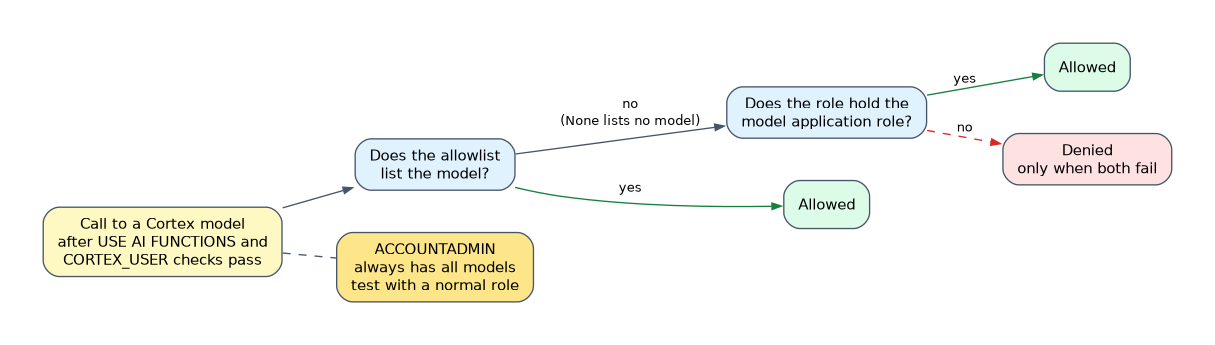 Access is granted when either the allowlist or an RBAC grant permits the model. It is denied only when both fail. That is why setting the allowlist to
'None' does not lock everyone out: roles that hold a model application role keep working.
| Allowlist | Role has model grant | Result |
|---|---|---|
| Lists the model | No | Allowed |
| Does not list the model | Yes | Allowed |
| Does not list the model | No | Denied |
'None' | Yes | Allowed |
ACCOUNTADMIN is special
ACCOUNTADMIN always has access to all models, including through a secondary role. When you test a restriction, do not test as ACCOUNTADMIN. Use a normal role and run USE SECONDARY ROLES NONE so a hidden secondary role does not give extra access.
What a denied call looks like
For functions such as AI_CLASSIFY, AI_FILTER, AI_AGG and AI_SUMMARIZE_AGG, the error for a disallowed model explains how to change the allowlist or the RBAC grants. The same controls also apply to the Cortex REST API, Cortex Agents and Snowflake Intelligence.
Think of the allowlist as a blunt account-wide switch and RBAC as the fine-grained tool. A question that says "only the data science team may use model X" points to RBAC, because the allowlist cannot target a role.
Common mistakes
Setting the allowlist to restrict one team. It is account-wide. Everyone is affected, and it cannot name roles.
Writing model names in mixed case. Names are case-sensitive and must be lowercase, so Llama3.1-70B in the list does not match.
Testing as ACCOUNTADMIN. ACCOUNTADMIN always has all models, so the test passes even when the restriction is broken.
Thinking 'None' blocks all model use. It blocks access through the allowlist only. RBAC grants still allow calls.
Forgetting the base privileges. A role with a model grant still needs USE AI FUNCTIONS and a Cortex database role.
What to remember for the exam
- The parameter is
CORTEX_MODELS_ALLOWLIST, set withALTER ACCOUNTby ACCOUNTADMIN. - Values are
'All','None'or a comma-separated list of lowercase model names. - It works at the account level only, never per user or session.
- Access is allowed if the allowlist OR RBAC allows it; denied only if both fail.
- ACCOUNTADMIN always sees all models.
- It is a legacy control; Snowflake recommends RBAC and setting the allowlist to
'None'.
Check yourself
Who can set CORTEX_MODELS_ALLOWLIST and at what level?
Only ACCOUNTADMIN, at the account level with ALTER ACCOUNT; it cannot be set per user or session.
A model is not on the allowlist but the role holds a grant for it. What happens?
The call is allowed, because access is denied only when both the allowlist and RBAC fail.
Why can a test of a model restriction pass when it should fail?
ACCOUNTADMIN, or a secondary role, always has access to all models, so test with a normal role and USE SECONDARY ROLES NONE.
Topic 1 of 15 in Snowflake Gen AI Governance
Test yourself on Snowflake Gen AI Governance
The full Snowflake GES-C02 question bank has 585 questions, with timed practice exams and an explanation for every answer.
This study guide is independent and is not affiliated with, endorsed by, or sponsored by Snowflake. Vendor names, certification names and exam codes are trademarks of their respective owners and are used for identification only.