Snowflake Gen AI Governance · Topic 6 of 15
Individual Privileges for Cortex Analyst, Search, Agents and Snowflake Intelligence
Know the privileges each Cortex feature needs: search service USAGE, semantic view access, agent USAGE, MODIFY, MONITOR and Snowflake Intelligence grants.
- 4 min
- Includes a diagram
- Search query: USAGE on service, database and schema. Create: CREATE CORTEX SEARCH SERVICE plus SELECT and a warehouse.
- Agent privileges: CREATE AGENT, USAGE, MODIFY, MONITOR, OWNERSHIP.
- Tools need their own grants; the default is to warn, not fail.
What it is
Database roles such as CORTEX_USER open the door to a feature. Individual privileges are the object-level grants that let a role use a particular search service, agent or semantic view. A call succeeds only when the role holds both.
This is the most scenario-heavy part of Cortex security. A typical question describes an agent that fails for one user and asks which grant is missing.
How it works
Cortex Search
| Action | Requirement |
|---|---|
| Create a service | CORTEX_USER or CORTEX_EMBED_USER database role, CREATE CORTEX SEARCH SERVICE (or schema ownership), SELECT on the source table or view, USAGE on the refresh warehouse, and change tracking on the source objects |
| Query a service | USAGE on the service, plus USAGE on its database and schema |
| Suspend or resume | OPERATE on the service |
| View refresh history | MONITOR, OPERATE or OWNERSHIP on the service |
GRANT USAGE ON DATABASE cortex_search_db TO ROLE customer_support;
GRANT USAGE ON SCHEMA cortex_search_db.services TO ROLE customer_support;
GRANT USAGE ON CORTEX SEARCH SERVICE cortex_search_db.services.transcript_search_service TO ROLE customer_support;
Cortex Analyst
Analyst needs the CORTEX_USER or CORTEX_ANALYST_USER database role. For the semantic model or semantic view it also needs:
SELECTon the tables the model references (orUSAGEon the semantic view and its database and schema),READorWRITEon the stage when the semantic model YAML file sits on a stage,USAGEon any Cortex Search service the model references.
Running the generated SQL needs a warehouse and is billed separately from the Analyst message.
Cortex Agents
| Privilege | On | What it allows |
|---|---|---|
CREATE AGENT | Schema | Create an agent |
USAGE | Agent | Query the agent; also needs USAGE on its database and schema |
MODIFY | Agent | Update, DROP AGENT and UNDROP AGENT (undrop also needs CREATE AGENT) |
MONITOR | Agent | View threads, logs and traces |
OWNERSHIP | Agent | Given to the creator; transferable |
USAGE | Warehouse | Needed for the warehouse a tool uses |
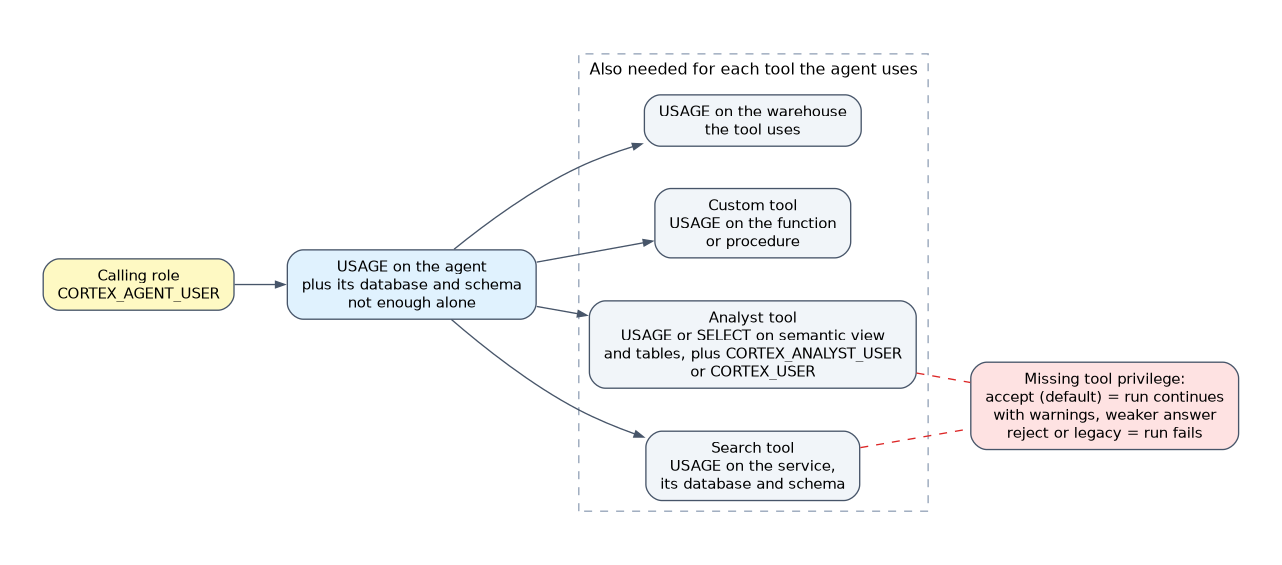
Agent USAGE alone is not enough. The caller's active roles also need privileges on each tool's objects:
- Search tool:
USAGEon the service, its database and its schema. - Analyst tool:
USAGEorSELECTon the semantic view, tables and database objects, plusCORTEX_ANALYST_USERorCORTEX_USER. - Custom tool (function or stored procedure):
USAGEon it.
GRANT USAGE ON AGENT sales_db.agents.support_agent TO ROLE support_role;
GRANT USAGE ON WAREHOUSE agent_wh TO ROLE support_role;
Inaccessible tools
By default (accept), a missing tool privilege does not reject the run. The agent uses the tools it can reach and reports the rest as warnings. Setting orchestration.tool_not_accessible to reject or legacy makes the run fail instead. So a user may get weaker answers without any error, which is a classic trap.
Snowflake Intelligence
Snowflake Intelligence is the agent chat app (recent docs call it Snowflake CoWork). An account has one object, named SNOWFLAKE_INTELLIGENCE_OBJECT_DEFAULT, and you cannot choose another name.
| Privilege | Allows |
|---|---|
CREATE SNOWFLAKE INTELLIGENCE ON ACCOUNT | Create the object; held by ACCOUNTADMIN by default |
USAGE | See the agent list and configuration |
MODIFY | Add or remove agents and change configuration; admins have it by default |
GRANT USAGE ON SNOWFLAKE INTELLIGENCE SNOWFLAKE_INTELLIGENCE_OBJECT_DEFAULT TO ROLE PUBLIC;
ALTER SNOWFLAKE INTELLIGENCE SNOWFLAKE_INTELLIGENCE_OBJECT_DEFAULT ADD AGENT sales_db.agents.support_agent;
Users still need USAGE on each agent, and sessions start with the user's default role and default warehouse, so set both. To limit a user to the app only, use ALTER USER <name> SET ALLOWED_INTERFACES = (SNOWFLAKE_INTELLIGENCE). Adding an agent to the object makes it visible; it does not grant USAGE on the agent.
Debug a failing agent from the bottom up: role has CORTEX_AGENT_USER, USAGE on agent, USAGE on each tool object, USAGE on the tool warehouse, and a default warehouse set.
Common mistakes
Granting agent USAGE only. The tools' objects need grants too.
Missing database and schema USAGE. Object USAGE is useless without them.
Missing change tracking on a source table when creating a search service.
Assuming adding an agent to Snowflake Intelligence grants access. It only lists it; USAGE on the agent is separate.
Expecting an error for an inaccessible tool. The default behavior is a warning.
What to remember for the exam
- Search query: USAGE on service, database and schema. Create: CREATE CORTEX SEARCH SERVICE plus SELECT and a warehouse.
- Agent privileges: CREATE AGENT, USAGE, MODIFY, MONITOR, OWNERSHIP.
- Tools need their own grants; the default is to warn, not fail.
- Snowflake Intelligence object has CREATE, USAGE and MODIFY privileges.
Check yourself
Which privilege lets a role view an agent's traces?
MONITOR on the agent.
A user can query an agent but answers ignore the Search tool. Why?
The role lacks USAGE on the search service or its schema, and the default accept behavior skips the tool with a warning.
What does MODIFY on the Snowflake Intelligence object allow?
Adding or removing agents and changing configuration.
Topic 6 of 15 in Snowflake Gen AI Governance
Test yourself on Snowflake Gen AI Governance
The full Snowflake GES-C02 question bank has 585 questions, with timed practice exams and an explanation for every answer.
This study guide is independent and is not affiliated with, endorsed by, or sponsored by Snowflake. Vendor names, certification names and exam codes are trademarks of their respective owners and are used for identification only.