Snowflake Gen AI Governance · Topic 9 of 15
Cortex Search Costs and the Types of Search Charges
Break down Cortex Search costs: warehouse refresh, EMBED_TEXT tokens, serving per GB per month, storage and cloud services, plus suspending and monitoring.
- 5 min
- Includes a diagram
- Components: warehouse, EMBED_TEXT tokens, serving per GB per month, storage, cloud services.
- Serving charges continue with no queries; indexing and serving suspend separately.
- Warehouse for a service: dedicated, MEDIUM or smaller.
What it is
A Cortex Search service keeps an index of your text and serves hybrid (vector and keyword) queries over it. Unlike an AI function, which bills when you call it, a search service bills while it exists. The cost has several separate components, and the exam asks you to name them and to say which one runs when nobody is searching.
How it works
The cost components
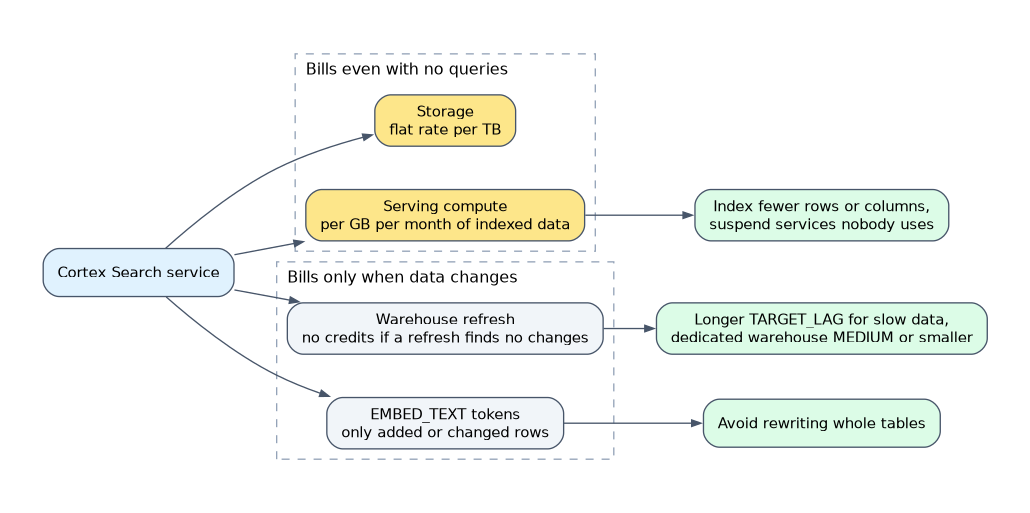
| Component | What is charged | When |
|---|---|---|
| Virtual warehouse compute | Running the source query, embedding jobs and index building during initialization and refresh | At creation and each refresh. No credits are used if a refresh finds no changes |
| EMBED_TEXT token cost | Per token embedded | When rows are inserted or updated, and only for added or changed rows |
| Multi-index embedding cost | Depends on the embedding method and the number of indexed columns | With multi-index services |
| Serving compute | Per GB per month of uncompressed indexed data | While the service is available, even with no queries |
| Storage | Flat rate per TB for the materialized table and index structures | Continuous |
| Cloud services compute | Billed only when daily cloud services cost exceeds 10 percent of daily warehouse cost | Daily |
The most important lesson: the serving cost depends on index size and runs all the time the service is available. A large unused index still costs.
Choosing the refresh settings
TARGET_LAG says how far the index may trail the source. A shorter lag means more frequent refresh checks, which means more warehouse use when data changes.
CREATE OR REPLACE CORTEX SEARCH SERVICE transcript_search_service
  ON transcript_text
  ATTRIBUTES region
  WAREHOUSE = cortex_search_wh
  TARGET_LAG = '1 day'
  EMBEDDING_MODEL = 'snowflake-arctic-embed-l-v2.0'
  AS (SELECT transcript_text, region, agent_id FROM support_transcripts);
Snowflake recommends a dedicated warehouse no larger than MEDIUM for each service. A bigger warehouse does not make the refresh meaningfully better but raises cost.
Suspending to save credits
Indexing and serving can be suspended separately.
ALTER CORTEX SEARCH SERVICE transcript_search_service SUSPEND INDEXING;
ALTER CORTEX SEARCH SERVICE transcript_search_service RESUME INDEXING;- Suspending indexing stops refreshes (warehouse and embedding costs), but the index still exists.
- Auto-suspend serving is a preview feature.
AUTO_SUSPENDis a number of seconds of query inactivity, with a minimum of 1800. Serving resumes when the next query arrives, so the first query after a suspend can be slower. - Indexing suspends automatically after five consecutive refresh failures. Check
INDEXING_STATEandINDEXING_ERRORinDESCRIBE CORTEX SEARCH SERVICE.
Monitoring and limiting
Query SNOWFLAKE.ACCOUNT_USAGE.CORTEX_SEARCH_DAILY_USAGE_HISTORY for credits by day, service and consumption type (SERVING, EMBED_TEXT_TOKENS, BATCH). It does not include every cost of a service, such as the warehouse used for refresh, which appears under warehouse metering.
Cortex Search supports resource budgets for spending limits. It is not one of the per-user quota domains.
| Cost question | Answer |
|---|---|
| What bills with no queries? | Serving and storage |
| What bills only on data change? | Warehouse refresh and EMBED_TEXT tokens |
| Which view shows it? | CORTEX_SEARCH_DAILY_USAGE_HISTORY |
| Which limit control works? | Resource budgets |
To cut Cortex Search cost, index only the columns you search, lengthen TARGET_LAG for slow-changing data, and suspend or drop services nobody uses.
A worked cost review
A team complains that their search bill is high although few users query the service. Walk through the components in order.
- Serving. In
CORTEX_SEARCH_DAILY_USAGE_HISTORY, filter onCONSUMPTION_TYPE = 'SERVING'. A steady daily value that tracks the index size is normal. Reduce it by indexing fewer rows or fewer columns, or by suspending services that are not needed. - Embedding tokens. Filter on
EMBED_TEXT_TOKENS. Spikes line up with bulk loads or updates, because only added or changed rows are embedded. Avoid rewriting whole tables when only a few rows changed. - Refresh warehouse. Check the warehouse used by the service in the metering views. A very short
TARGET_LAGon a table that changes often keeps the warehouse busy. - Batch queries. The
BATCHtype covers batch search queries, which have their own serving and query embedding cost.
Search compared with other Cortex costs
| Feature | Unit | Charged when idle |
|---|---|---|
| Cortex Search | Index size and time, plus embedding tokens and refresh warehouse | Yes, serving |
| AI functions | Tokens | No |
| Cortex Analyst | Messages | No |
| SPCS | Compute pool nodes | Yes, in IDLE state |
The pattern to remember: persistent resources (search services, compute pools) cost money while they exist, and on-demand calls (AI functions, Analyst messages) cost money only when used.
Common mistakes
Thinking idle means free. Serving is charged per GB per month while the service is available.
Using a large warehouse for refresh. A dedicated warehouse no larger than MEDIUM is recommended.
Reading CORTEX_SEARCH_DAILY_USAGE_HISTORY as the full bill. Refresh warehouse compute and some other costs sit elsewhere.
Expecting per-user quotas on Search. Only resource budgets apply.
Double counting embeddings. Embedding tokens may also appear in the AI functions usage view.
What to remember for the exam
- Components: warehouse, EMBED_TEXT tokens, serving per GB per month, storage, cloud services.
- Serving charges continue with no queries; indexing and serving suspend separately.
- Warehouse for a service: dedicated, MEDIUM or smaller.
- View: CORTEX_SEARCH_DAILY_USAGE_HISTORY with consumption types SERVING, EMBED_TEXT_TOKENS, BATCH.
Check yourself
Which Cortex Search charge runs even when nobody queries?
Serving, charged per GB per month of indexed data, plus storage.
What causes EMBED_TEXT token charges?
Embedding rows that are inserted or updated, only for added or changed rows.
Which view shows daily Cortex Search credits?
SNOWFLAKE.ACCOUNT_USAGE.CORTEX_SEARCH_DAILY_USAGE_HISTORY.
Topic 9 of 15 in Snowflake Gen AI Governance
Test yourself on Snowflake Gen AI Governance
The full Snowflake GES-C02 question bank has 585 questions, with timed practice exams and an explanation for every answer.
This study guide is independent and is not affiliated with, endorsed by, or sponsored by Snowflake. Vendor names, certification names and exam codes are trademarks of their respective owners and are used for identification only.