Snowflake Gen AI Functions · Topic 26 of 26
Snowflake Model Registry: Logging a Model and Calling It for Inference
Log a third-party or custom model in the Snowflake Model Registry, then call it from Python, SQL or a Snowpark Container Services inference service.
- 4 min
- Includes a diagram
- Log with
Registry(session).log_model(...); it returns aModelVersion. - Call with
mv.run(...)in Python,MODEL(...)!method(...)in SQL, or a deployed SPCS service. - Signatures come from
sample_input_dataorsignatures.
What it is
The Snowflake Model Registry is the place to store, version, govern and run machine learning models in Snowflake. Models are schema level objects, so normal RBAC applies. It is the second way, next to Snowpark Container Services, to run a model Snowflake does not host.
The two work together. You log the model to the registry, then call it in a warehouse, or deploy it to a Snowpark Container Services inference service when it needs a GPU or must serve online.
How it works
Logging the model
Logging uses the snowflake-ml-python package and a Snowpark session.
from snowflake.ml.registry import Registry

reg = Registry(session=session, database_name="ML", schema_name="REGISTRY")
mv = reg.log_model(
    model,
    model_name="SENTIMENT_MODEL",
    version_name="V1",
    sample_input_data=sample_df,
)
Key points about log_model:
- It returns a ModelVersion object, here
mv. - Each call with the same
model_nameand a newversion_nameadds a version. The name plus version must be unique in the schema. - A signature describes inputs and outputs. Provide
sample_input_dataorsignaturesfor most models. Snowpark ML models, MLflow models and Hugging Face pipelines are exceptions. target_platformssays where the model can run:"WAREHOUSE","SNOWPARK_CONTAINER_SERVICES", or both. If you chooseWAREHOUSEand the model cannot run there,log_modelfails.- Supported types include scikit-learn, XGBoost, LightGBM, Prophet, CatBoost, PyTorch, TensorFlow, Keras, Hugging Face pipelines, Sentence Transformer and MLflow pyfunc models, plus custom models.
- For libraries outside public PyPI, set
artifact_repository_mapwhen logging.
Privileges:
| Action | Privilege |
|---|---|
| Create a model | Schema ownership or CREATE MODEL on the schema |
| Run in a warehouse | USAGE on the model |
| Run in SPCS and see metadata | READ on the model |
GRANT USAGE ON FUTURE MODELS IN SCHEMA <schema> TO ROLE <role> covers models created later.
USAGE is for warehouse inference only. If a scenario needs a role to call a model on SPCS, that role needs READ.
Calling the model
From Python. Use the ModelVersion object.
result = mv.run(test_df, function_name="predict")The call runs in the session's warehouse and returns a DataFrame matching the input type. Snowpark results are lazy, so they run when you call collect(), show() or to_pandas(). mv.show_functions() lists the methods a model exposes.
From SQL. Use the MODEL syntax with the model name and a method.
SELECT MODEL(ml.registry.sentiment_model)!predict(review_text)
FROM reviews;
The method name must match one the model exposes. Check the SQL reference for how to select a specific version, because the quick reference page does not show one in this form.
On Snowpark Container Services. For GPU or online serving, deploy a version as a service.
mv.create_service(
    service_name="sentiment_svc",
    service_compute_pool="llm_pool",
    ingress_enabled=True,
)
mv.run_batch(...) runs batch inference over the same version. A Hugging Face text generation or vision language model served this way can be passed as the model in AI_COMPLETE by its service name <db>.<schema>.<service>, an open preview feature that does not support guardrails. The caller needs USAGE on the service and its inference function, and READ on the stage for staged files.
Why use the registry at all
The registry gives each model a versioned, governed home. You can see who created a version, grant or revoke access with normal grants, and roll back by calling an earlier version. Models also stay inside Snowflake, so training artifacts and inference data are protected by the same account controls as your tables. This is the exam answer when a scenario asks how to track versions of a custom model and control who can run it.
Registry or direct SPCS
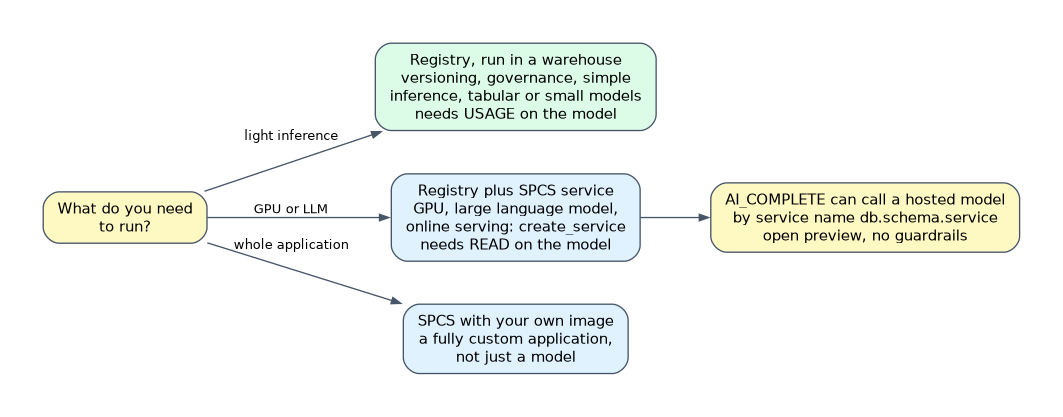
| Situation | Choose |
|---|---|
| Versioning, governance and simple inference, mostly tabular or small models | Registry, run in a warehouse |
| GPU, large language model, online serving | Registry plus SPCS service |
| A fully custom application, not just a model | SPCS with your own image |
Common mistakes
Logging without a signature. It is required for most model types.
Granting USAGE and expecting SPCS calls to work. SPCS inference needs READ.
Setting target_platforms to WAREHOUSE for a model that needs a GPU. Logging fails.
Forgetting that Snowpark results are lazy. Nothing runs until an action.
Using the same model_name and version_name twice is an error. Each version name is unique within the model in that schema.
What to remember for the exam
- Log with
Registry(session).log_model(...); it returns aModelVersion. - Call with
mv.run(...)in Python,MODEL(...)!method(...)in SQL, or a deployed SPCS service. - Signatures come from
sample_input_dataorsignatures. USAGEruns in a warehouse;READruns on SPCS;CREATE MODELcreates.- Use
mv.create_service(...)to serve on a compute pool.
Check yourself
What does
log_modelreturn?A
ModelVersionobject for the logged model version.Which privilege lets a role run a model on Snowpark Container Services?
READon the model, sinceUSAGEcovers warehouse inference only.How do you call a registered model from SQL?
With
MODEL(<name>)!<method>(...)in a SELECT.
Topic 26 of 26 in Snowflake Gen AI Functions
Test yourself on Snowflake Gen AI Functions
The full Snowflake GES-C02 question bank has 585 questions, with timed practice exams and an explanation for every answer.
This study guide is independent and is not affiliated with, endorsed by, or sponsored by Snowflake. Vendor names, certification names and exam codes are trademarks of their respective owners and are used for identification only.