Snowflake Gen AI Functions · Topic 16 of 26
Cortex Search for Unstructured Data: Chunking, Embedding Models and Reranking
Build a Cortex Search service over documents: split text recursively, size chunks, pick an embedding model and understand hybrid search with reranking.
- 4 min
- Includes a diagram
- Pipeline: parse (
LAYOUT), split withSPLIT_TEXT_RECURSIVE_CHARACTER, one chunk per row, then the service. - Recommended chunk size: 512 tokens or fewer.
- Default embedding model:
snowflake-arctic-embed-m-v1.5, 512 token context.
What it is
Cortex Search is a managed search service over a table or view. It runs hybrid retrieval over a text column and keeps its index fresh. For documents the usual pipeline is: parse the file, split it into chunks, store one chunk per row, then create the service on the chunk column.
Chunking matters because the embedding model reads only a limited amount of text per row. A whole document in one row is truncated for the vector part of the index.
How it works
Recursive split with Markdown
SNOWFLAKE.CORTEX.SPLIT_TEXT_RECURSIVE_CHARACTER returns an array of strings.
SELECT c.value::STRING AS chunk
FROM docs,
LATERAL FLATTEN(SNOWFLAKE.CORTEX.SPLIT_TEXT_RECURSIVE_CHARACTER(
markdown_text, 'markdown', 1500, 200)) c;| Argument | Meaning |
|---|---|
| text | The text to split |
| format | 'none' uses only the separators you give; 'markdown' also splits on headers, code blocks and tables |
| chunk_size | Maximum characters per chunk, an integer above zero |
| overlap | Optional characters shared between neighbor chunks; must be smaller than chunk_size |
| separators | Optional ordered list; default ["\n\n", "\n", " ", ""] |
"Recursive" means it tries the largest separator first (paragraph break), then falls back to smaller ones (line, space, empty string) until pieces fit. The markdown format is the natural pair for AI_PARSE_DOCUMENT in LAYOUT mode, because that mode outputs Markdown headers and tables. Headers then act as split points and chunks stay on topic.
The split function counts characters, but retrieval guidance is in tokens. Use AI_COUNT_TOKENS with ai_embed and the model name to check a chunk against the model limit. As a rough guide, 512 tokens is about 385 English words.
Chunk sizing
- Snowflake recommends chunks of no more than 512 tokens (about 385 English words).
- Smaller chunks usually improve retrieval and the quality of the LLM answer, because the passage is focused.
- Text beyond the embedding model's context window is truncated before embedding. Keyword retrieval still uses the full text.
- Overlap protects a sentence that falls on a boundary, at the cost of some duplicate content.
- Very small chunks lose context. Very large ones are truncated and dilute the match.
Embedding models
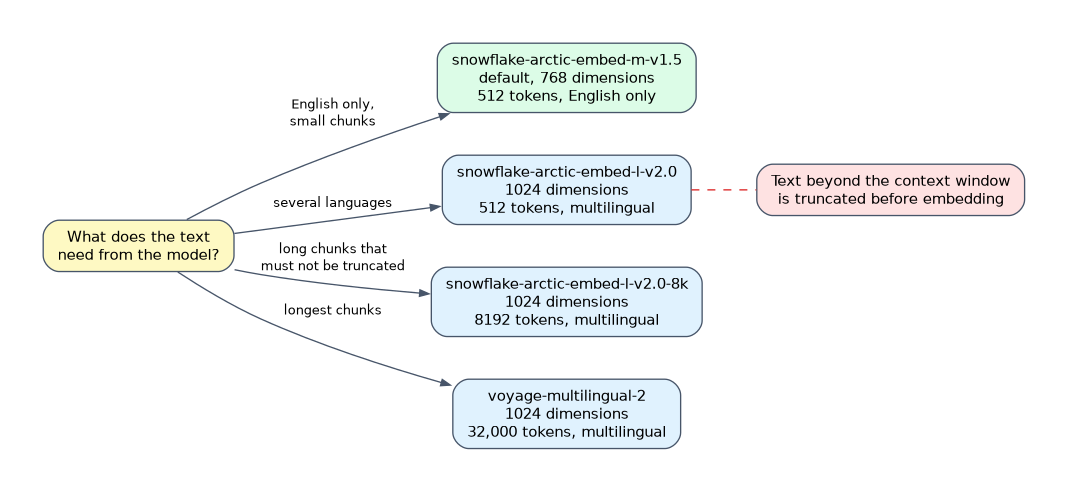 The
EMBEDDING_MODEL option in CREATE CORTEX SEARCH SERVICE picks the model. The default is snowflake-arctic-embed-m-v1.5.
| Model | Dimensions | Context (tokens) | Language |
|---|---|---|---|
snowflake-arctic-embed-m-v1.5 (default) | 768 | 512 | English only |
snowflake-arctic-embed-l-v2.0 | 1024 | 512 | Multilingual |
snowflake-arctic-embed-l-v2.0-8k | 1024 | 8192 | Multilingual |
voyage-multilingual-2 | 1024 | 32,000 | Multilingual |
Pick by need: English only text and small chunks use the default. Documents in several languages use a multilingual model. Long chunks that must not be truncated use the 8k or the Voyage model. Availability varies by region.
CREATE OR REPLACE CORTEX SEARCH SERVICE doc_search
  ON chunk
  ATTRIBUTES doc_name
  WAREHOUSE = search_wh
  TARGET_LAG = '1 day'
  EMBEDDING_MODEL = 'snowflake-arctic-embed-l-v2.0'
AS (SELECT chunk, doc_name FROM doc_chunks);
ON is the searched text column. ATTRIBUTES columns are returned and can be used as filters. TARGET_LAG says how stale the index may become. Change tracking must be enabled on the source objects.
Hybrid search and semantic reranking
Each query combines three steps:
- Vector search for semantically similar chunks.
- Keyword search for lexically similar chunks.
- Semantic reranking of the best candidates, which reorders them by relevance.
Reranking is on by default. You can turn it off with "scoring_config": {"reranker": "none"}, and you can adjust the weights of text, vectors and reranker, or add numeric boosts and time decays.
Hybrid search explains why Cortex Search finds both "refund policy" by exact words and "getting my money back" by meaning.
Common mistakes
Indexing whole documents in one row. The vector index sees only the first part.
Choosing chunk size in tokens for the split function. Its chunk_size is characters.
Using the English only default for multilingual content.
Splitting Markdown with format 'none'. Headers and tables are then not used as split points.
Forgetting change tracking or the warehouse. The service needs both to build and refresh.
What to remember for the exam
- Pipeline: parse (
LAYOUT), split withSPLIT_TEXT_RECURSIVE_CHARACTER, one chunk per row, then the service. - Recommended chunk size: 512 tokens or fewer.
- Default embedding model:
snowflake-arctic-embed-m-v1.5, 512 token context. - Search is hybrid (vector plus keyword) with semantic reranking on by default.
- Text beyond the model's context is truncated for embeddings, not for keywords.
Check yourself
What does the
markdownformat of the split function add?It also splits on headers, code blocks and tables.
What happens to chunk text beyond the embedding model's context window?
It is truncated before vector embedding, though keyword search uses all of it.
How do you disable semantic reranking in a query?
Set
rerankerto"none"inscoring_config.
Topic 16 of 26 in Snowflake Gen AI Functions
Test yourself on Snowflake Gen AI Functions
The full Snowflake GES-C02 question bank has 585 questions, with timed practice exams and an explanation for every answer.
This study guide is independent and is not affiliated with, endorsed by, or sponsored by Snowflake. Vendor names, certification names and exam codes are trademarks of their respective owners and are used for identification only.