Snowflake Gen AI Functions · Topic 1 of 26
Snowflake Cortex AI Functions - Families, Access and Error Handling
Learn how Snowflake Cortex AI functions are grouped, which privileges and database roles you need to call them, and how they behave on errors and at scale.
- 5 min
- Includes a diagram
- Cortex AI functions are SQL functions that start with
AI_and run models inside Snowflake. - Three groups: general (
AI_COMPLETE), task specific, and helper (TO_FILE,PROMPT,AI_COUNT_TOKENS). - Access needs
USE AI FUNCTIONSplusCORTEX_USERorAI_FUNCTIONS_USER; both default toPUBLIC.
What it is
Snowflake Cortex AI functions (also called Cortex AISQL) are SQL functions that run large language models and other AI models on your data without leaving Snowflake. You call them like any other function inside SELECT, WHERE, JOIN and GROUP BY. The models run inside the Snowflake service perimeter, so the data does not go to an outside provider.
The current functions all start with AI_. Older functions in the SNOWFLAKE.CORTEX schema (COMPLETE, TRY_COMPLETE, SUMMARIZE, EMBED_TEXT_768 and others) still exist for backward compatibility, but Snowflake points new work at the AI_* versions.
The functions fall into three groups, and the exam expects you to place a function in its group quickly.
| Group | Purpose | Functions |
|---|---|---|
| General | Open ended prompts to any supported model | AI_COMPLETE |
| Task specific | One job, tuned prompt, no prompt writing | AI_CLASSIFY, AI_EXTRACT, AI_PARSE_DOCUMENT, AI_SENTIMENT, AI_SUMMARIZE, AI_SUMMARIZE_AGG, AI_AGG, AI_TRANSLATE, AI_FILTER, AI_EMBED, AI_SIMILARITY, AI_TRANSCRIBE, AI_REDACT |
| Helper | Prepare inputs or measure them | TO_FILE, PROMPT, AI_COUNT_TOKENS |
How it works
Choosing the function
When a scenario names a clear task, the task specific function is usually the best answer. It needs less prompt text, returns a predictable format and is easier to run over a whole table. AI_COMPLETE is the answer when the task is free form, needs a chosen model, or needs a custom output shape.
Two functions work across many rows instead of one row at a time: AI_AGG and AI_SUMMARIZE_AGG. They accept more text than fits in one model context window, which is why they exist next to the per row functions.
Required access
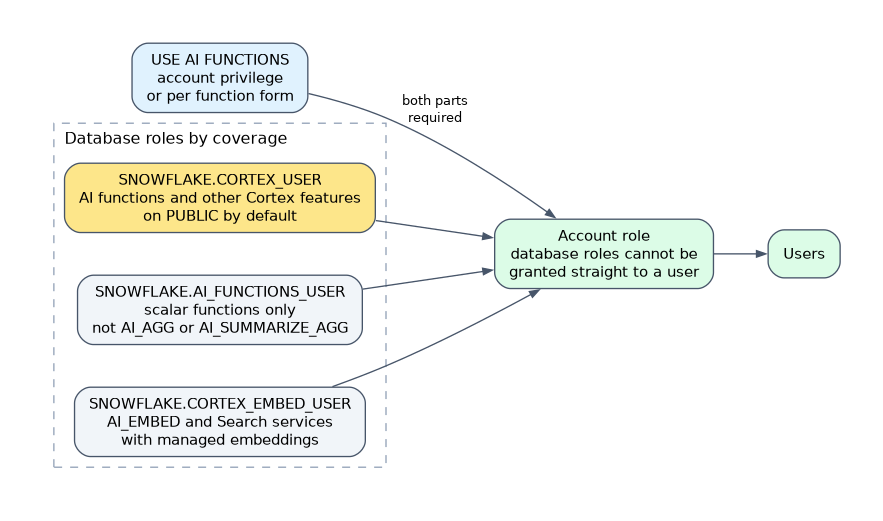 Calling an AI function needs two things together.
- The account level privilege
USE AI FUNCTIONS. A per function form also exists, such asGRANT USE AI FUNCTION AI_COMPLETE ON ACCOUNT TO ROLE analyst;. - One of the database roles
SNOWFLAKE.CORTEX_USERorSNOWFLAKE.AI_FUNCTIONS_USER.
Both the privilege and CORTEX_USER are granted to the PUBLIC role by default, so every user can call the functions until an administrator revokes them.
| Database role | Granted to PUBLIC by default | What it covers |
|---|---|---|
SNOWFLAKE.CORTEX_USER | Yes | AI functions and other Cortex features |
SNOWFLAKE.AI_FUNCTIONS_USER | No | Scalar AI functions only, not AI_AGG or AI_SUMMARIZE_AGG |
SNOWFLAKE.CORTEX_EMBED_USER | No | AI_EMBED, the older embedding functions and Cortex Search services with managed embeddings |
Database roles cannot be granted directly to a user. Grant them to an account role, then grant that role to users.
REVOKE DATABASE ROLE SNOWFLAKE.CORTEX_USER FROM ROLE PUBLIC;
GRANT DATABASE ROLE SNOWFLAKE.AI_FUNCTIONS_USER TO ROLE analyst;
GRANT USE AI FUNCTIONS ON ACCOUNT TO ROLE analyst;A role that still holds CORTEX_USER keeps access to every Cortex feature. To limit a team to scalar AI functions you must revoke CORTEX_USER from PUBLIC and from that role, then grant AI_FUNCTIONS_USER.
Error handling
Most AI_* functions return NULL for a row that cannot be processed, and the rest of a multi row query keeps running. The common optional last argument return_error_details changes this. When it is TRUE, the function returns an object with a value field and an error field instead of a bare NULL.
Two exceptions to remember. AI_REDACT fails the whole query on a row error by default; setting the session parameter AI_SQL_ERROR_HANDLING_USE_FAIL_ON_ERROR to FALSE turns row errors into NULL. The older COMPLETE raises an error, and TRY_COMPLETE is the version that returns NULL instead.
Files and stages
Several functions take a FILE value built with TO_FILE from a staged file. Files from user stages, table stages, stages with double quoted names and stages using certain client side or full encryption modes (SNOWFLAKE_FULL, AWS_CSE, AZURE_CSE) cannot be used.
Cost and operation
Cost follows the tokens processed, and the warehouse that runs the query is billed too. The cost documentation advises a warehouse of size MEDIUM or smaller, because a larger warehouse does not make AI functions faster.
The functions are built for throughput on large tables. For low latency interactive apps, Snowflake points to the REST APIs for Complete, Embed and Agents instead.
Some functions are marked preview in the documentation. Functions that are not marked preview are generally available.
When a question mixes "which privilege" and "which role", the full answer has two parts: USE AI FUNCTIONS plus a database role.
Common mistakes
Granting a database role to a user. Database roles go to roles, never directly to users.
Revoking a per function grant and expecting access to stop. The blanket USE AI FUNCTIONS privilege and a per function grant combine with OR, so the revoke has no effect while the blanket privilege is still held.
Using a large warehouse to speed up AI functions. Throughput does not improve and cost rises.
Expecting an error on a failed row. The default is NULL for that row, not a failed query.
Choosing AI_COMPLETE for every task. If a task specific function exists, it is usually the intended answer.
What to remember for the exam
- Cortex AI functions are SQL functions that start with
AI_and run models inside Snowflake. - Three groups: general (
AI_COMPLETE), task specific, and helper (TO_FILE,PROMPT,AI_COUNT_TOKENS). - Access needs
USE AI FUNCTIONSplusCORTEX_USERorAI_FUNCTIONS_USER; both default toPUBLIC. AI_FUNCTIONS_USERleaves outAI_AGGandAI_SUMMARIZE_AGG.- A failed row returns
NULLunlessreturn_error_detailsisTRUE, which returnsvalueanderror. - Use a warehouse of
MEDIUMor smaller.
Check yourself
Which two things must a role have to call
AI_COMPLETE?The account privilege
USE AI FUNCTIONSand the database roleCORTEX_USERorAI_FUNCTIONS_USER.How can an administrator stop all users from calling AI functions by default?
Revoke
CORTEX_USER(and theUSE AI FUNCTIONSprivilege) fromPUBLIC.What does a failed row return by default, and how do you see the reason?
NULL; passreturn_error_detailsasTRUEto get an object withvalueanderror.
Topic 1 of 26 in Snowflake Gen AI Functions
Test yourself on Snowflake Gen AI Functions
The full Snowflake GES-C02 question bank has 585 questions, with timed practice exams and an explanation for every answer.
This study guide is independent and is not affiliated with, endorsed by, or sponsored by Snowflake. Vendor names, certification names and exam codes are trademarks of their respective owners and are used for identification only.