Snowflake Document Processing · Topic 6 of 7
Troubleshooting Document Processing - Errors, GET_PRESIGNED_URL and Privileges
Troubleshoot document processing: AI_EXTRACT and AI_PARSE_DOCUMENT errors, cross-region behavior, GET_PRESIGNED_URL file checks and required privileges.
- 5 min
- Includes a diagram
- AI_EXTRACT returns
errorandresponse. AI_PARSE_DOCUMENT returns NULL unlessreturn_error_detailsis TRUE. - Cross-region inference on: per document error. Off: whole statement fails.
- GET_PRESIGNED_URL: default 3,600 seconds, max 604,800, needs server side encryption, returns a URL even for a missing file.
What it is
When a document query returns an error or a column of NULLs, you work through a short list of causes: the file, the request, the limits and the privileges. This page covers how errors are reported, how to look at the file itself with GET_PRESIGNED_URL, and the privileges that must be in place.
How it works
How AI_EXTRACT reports errors
AI_EXTRACT returns an object with error and response. A NULL error means success. Common messages fall into groups:
| Group | Examples |
|---|---|
| Access | "Not found.", "Provided file cannot be found.", "Provided file cannot be accessed." (insufficient privileges) |
| Format | Unsupported format, or a corrupted file |
| Request | "Empty request.", "Missing or empty response format.", "Invalid response format." (not valid JSON), "Duplicate feature name found." |
| Limits | Too many questions, over the page limit, page size or file size exceeded |
| Internal | "Internal error." Retry, then contact support |
Cross-region inference changes the blast radius
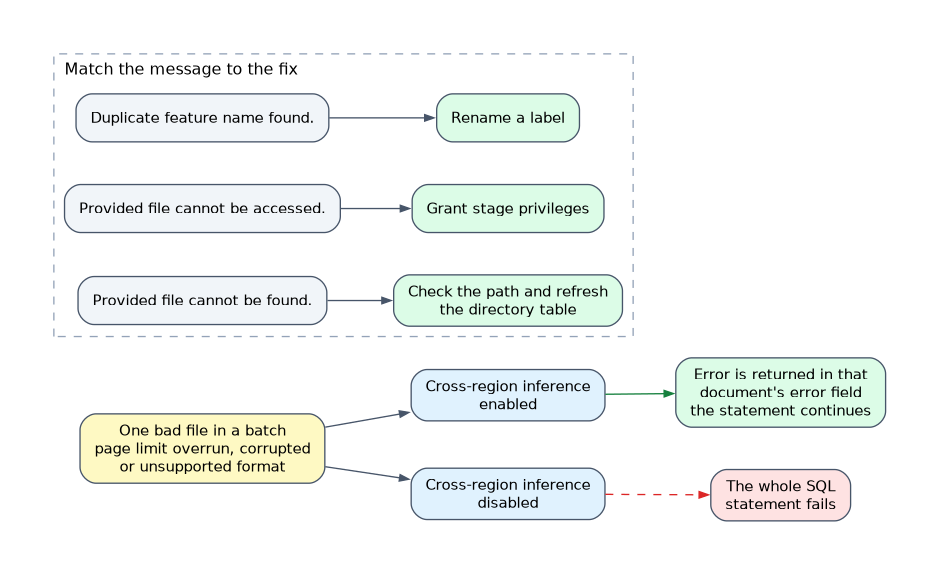 How a file problem affects the statement depends on cross-region inference.
- Enabled: a problem with one document is returned in that document's
errorfield and the statement continues. This covers page limit overruns, corrupted files and unsupported formats. - Disabled: the same file problems fail the whole SQL statement.
In a batch over many files, this is why one bad PDF can stop a query in one account and merely produce an error row in another.
How AI_PARSE_DOCUMENT reports errors
By default, a row that cannot be processed returns NULL and the query still completes. Pass return_error_details as TRUE to get an OBJECT with value, error and metadata (such as page count) instead.
SELECT relative_path,
       AI_PARSE_DOCUMENT(TO_FILE('@docs.public.inbox', relative_path),
                         {'mode': 'LAYOUT'}, TRUE) AS result
FROM DIRECTORY(@docs.public.inbox);
Typical causes: unsupported language or format, more than 2,000 pages, page dimensions exceeded, a file over 100 MB, a missing or inaccessible file, or extract_images set to TRUE in AGENTIC mode. Invalid page selections and filtering a non paginated file raise row level errors. In AGENTIC mode a failed image shows an error marker inside the image result, so check image results before using them.
GET_PRESIGNED_URL
When an error says the file is corrupted or unreadable, look at the file. GET_PRESIGNED_URL returns a URL you can open in a browser to download a file from a stage.
SELECT GET_PRESIGNED_URL(@docs.public.inbox, 'contracts/msa_2026.pdf', 3600);| Item | Detail |
|---|---|
| Syntax | GET_PRESIGNED_URL(@stage, 'relative_path' [, expiration_seconds]) |
| Default expiry | 3,600 seconds (60 minutes) |
| Maximum expiry | 604,800 seconds (7 days), but 3,600 for stages using an AWS IAM role and for OneLake stages |
| Privilege | READ on an internal stage, USAGE on an external stage |
| Stage requirement | Server side encryption, so create internal stages with SNOWFLAKE_SSE |
Two traps:
- The function returns a URL even when the file does not exist. Opening it is how you confirm the file is there. A missing file shows a
NoSuchKeyXML error. - On Azure external stages it works only when the container is accessed through a storage integration, not a SAS token.
If downloads from an internal stage come back corrupted, check that the stage was created with SNOWFLAKE_SSE.
Requirements and privileges
| Need | Why |
|---|---|
| SNOWFLAKE.CORTEX_USER database role | Required to call AI_EXTRACT and AI_PARSE_DOCUMENT. An ACCOUNTADMIN grants it |
| USAGE on the database and schema of the stage | To reach the stage |
| READ on an internal stage, or USAGE on an external stage | To read the files |
| Region availability | Native regions only, otherwise cross-region inference must be enabled |
| Warehouse | No larger than MEDIUM |
The error "Provided file cannot be accessed." is a privilege problem. "Provided file cannot be found." is a path or stage problem.
GRANT DATABASE ROLE SNOWFLAKE.CORTEX_USER TO ROLE doc_analyst;Match the message to the fix. "Cannot be found" means check the path and refresh the directory table. "Cannot be accessed" means grant stage privileges. "Duplicate feature name" means rename a label.
GET_PRESIGNED_URL gives anyone holding the link access until it expires. Keep the expiry short.
Common mistakes
Assuming a returned URL proves the file exists. The function does not check.
Granting only CORTEX_USER. The role also needs access to the stage.
Treating NULL from AI_PARSE_DOCUMENT as an empty document. It signals a failure. Turn on return_error_details to see why.
Ignoring cross-region inference when debugging. It decides whether one bad file fails the batch.
Using SAS token access on Azure with GET_PRESIGNED_URL. A storage integration is required.
What to remember for the exam
- AI_EXTRACT returns
errorandresponse. AI_PARSE_DOCUMENT returns NULL unlessreturn_error_detailsis TRUE. - Cross-region inference on: per document error. Off: whole statement fails.
- GET_PRESIGNED_URL: default 3,600 seconds, max 604,800, needs server side encryption, returns a URL even for a missing file.
- Privileges: SNOWFLAKE.CORTEX_USER plus stage READ or USAGE.
- Warehouse no larger than MEDIUM.
Check yourself
A batch of PDFs fails entirely because one file is corrupted. What setting explains it?
Cross-region inference is disabled, so file problems fail the whole statement instead of filling that document's error field.
You need to confirm a staged file is readable. What do you use?
GET_PRESIGNED_URL, then open the URL in a browser, because the function returns a URL even if the file is missing.
What privilege is missing when the error says "Provided file cannot be accessed."?
The role lacks access to the stage, such as READ on an internal stage or USAGE on an external stage.
Topic 6 of 7 in Snowflake Document Processing
Test yourself on Snowflake Document Processing
The full Snowflake GES-C02 question bank has 585 questions, with timed practice exams and an explanation for every answer.
This study guide is independent and is not affiliated with, endorsed by, or sponsored by Snowflake. Vendor names, certification names and exam codes are trademarks of their respective owners and are used for identification only.