Snowflake Document Processing · Topic 2 of 7
AI_PARSE_DOCUMENT - page_split, Page Selection and Page Limits
Handle pages in AI_PARSE_DOCUMENT: page_split output, page_filter and FL_FILTER_PAGES ranges, and the 2,000 page and 100 MB limits for long documents.
- 5 min
- Includes a diagram
page_splitdefaults to FALSE. TRUE returns apagesarray withcontent,indexanddimensions.page_filterranges are zero based, start inclusive, end exclusive, and implypage_split.- FL_FILTER_PAGES replaces the file argument and also accepts negative values. Do not combine it with
page_filter.
What it is
Long documents are the main source of parsing trouble. Two ideas matter: page_split, which returns one result per page, and the page limits, which cap how much of a document one call can handle. Selecting only some pages avoids processing and paying for pages you do not need.
The syllabus names a "page_limit" topic. The current reference for AI_PARSE_DOCUMENT does not list an option with that name. What it documents is a page ceiling per document and two ways to select pages: the page_filter option and the FL_FILTER_PAGES function. Study those, and treat any answer that invents a page_limit option with suspicion.
How it works
page_split
page_split is a BOOLEAN option. It defaults to FALSE, so the whole document comes back as one content string.
When TRUE, the result holds a pages array. Each entry has:
content: the text for that page (plain text in OCR, Markdown in LAYOUT).index: the zero based position of the page in the original document.dimensions: the pageheightandwidth.
The index is the position in the file, not a printed page number. A document that starts with a cover page and numbers its first chapter page "1" still has that page at index 1 or later.
Page splitting supports PDF, PPTX and DOCX only. Other formats such as an image or HTML file return an error when you ask for it. It helps with long documents, because each page then arrives as its own piece you can send to a later step.
SELECT AI_PARSE_DOCUMENT(
  TO_FILE('@docs.public.reports', 'annual.pdf'),
  {'mode': 'LAYOUT', 'page_split': TRUE}
);
Selecting pages with page_filter
page_filter is an array of objects, each with start and end:
{'mode': 'LAYOUT',
'page_filter': [{'start': 0, 'end': 3}, {'start': 10, 'end': 12}]}- Indexes are zero based.
startis inclusive andendis exclusive, so start 0 and end 3 is pages at index 0, 1 and 2.- Setting
page_filterturns page splitting on by itself, so you do not also setpage_split.
Selecting pages with FL_FILTER_PAGES
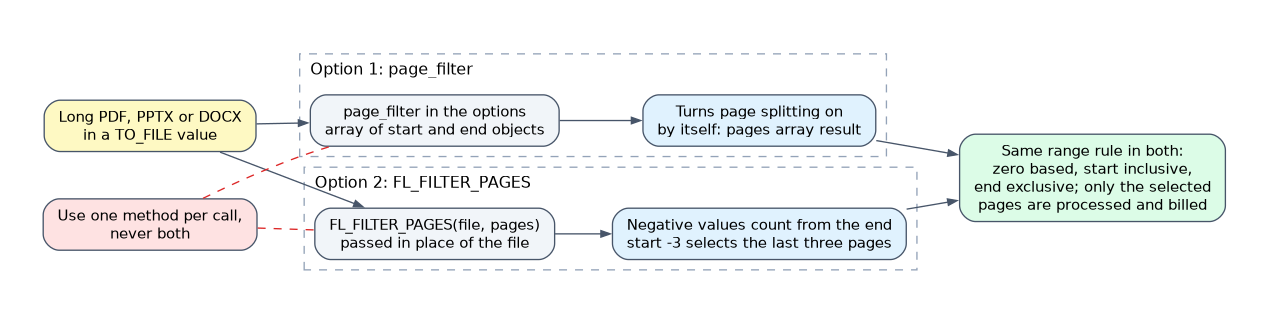 FL_FILTER_PAGES(file, pages) is passed in place of the file argument. The pages argument is an array of objects with optional
start and end fields, using the same zero based, inclusive start, exclusive end rule. Negative values count from the end, so {'start': -3} selects the last three pages, and ranges past the end are clamped.
SELECT AI_PARSE_DOCUMENT(
  FL_FILTER_PAGES(TO_FILE('@docs.public.reports', 'annual.pdf'), [{'start': 0, 'end': 3}]),
  {'mode': 'LAYOUT'}
);
Use one of the two selection methods in a call, never both. The reference says neither takes precedence, so the result would be unreliable.
What filtering changes
metadata.pageCountreports the pages processed, not the size of the source file.- Page
indexvalues keep their original positions, even after filtering. - Filtering applies to that one call only. The stored file is untouched.
- A non paginated file such as plain text returns an error when you filter it.
- An invalid or empty selection produces a row level error.
The limits that act as the page limit
| Limit | Value |
|---|---|
| Maximum file size | 100 MB |
| Maximum pages per document | 2,000 |
| Best results font size | 8 points or larger |
| Images extracted in LAYOUT mode | Up to 50 per document |
| Images in AGENTIC mode | Up to 2,000 per document |
A document over 2,000 pages, a file over 100 MB or a page larger than the maximum resolution gives an error. The fix for an oversized file is to split it into smaller files before upload, not to change the mode.
Billing connection
PDF and DOCX files are billed per page, so selecting a range means you are billed for the pages processed. An image file counts as one page. HTML and TXT count each 3,000 character chunk as one page.
When a scenario says a 3,000 page contract fails, the answer is to split it into smaller files and process them separately, because a single document is capped at 2,000 pages.
Common mistakes
Treating end as inclusive. It is exclusive. To get pages at index 0 to 4 you write start 0 and end 5.
Reading index as the printed page number. It is the zero based position in the file.
Combining page_filter and FL_FILTER_PAGES. Pick one.
Setting page_split on an image or HTML file. Only PDF, PPTX and DOCX are supported.
Expecting pageCount to be the document length after filtering. It counts processed pages.
What to remember for the exam
page_splitdefaults to FALSE. TRUE returns apagesarray withcontent,indexanddimensions.page_filterranges are zero based, start inclusive, end exclusive, and implypage_split.- FL_FILTER_PAGES replaces the file argument and also accepts negative values. Do not combine it with
page_filter. - There is no documented
page_limitoption. The cap is 2,000 pages and 100 MB per document. - Page splitting works for PDF, PPTX and DOCX only.
Check yourself
A call uses start 2 and end 5 in page_filter. Which indexes are parsed?
Indexes 2, 3 and 4, because the end is exclusive and indexes are zero based.
Why would you set page_split to TRUE for a very long report?
It returns one result per page, so later steps such as chunking or extraction can handle each page separately.
How do you handle a document that exceeds 2,000 pages?
Split it into smaller files and process each one, because a single document is capped at 2,000 pages.
Topic 2 of 7 in Snowflake Document Processing
Test yourself on Snowflake Document Processing
The full Snowflake GES-C02 question bank has 585 questions, with timed practice exams and an explanation for every answer.
This study guide is independent and is not affiliated with, endorsed by, or sponsored by Snowflake. Vendor names, certification names and exam codes are trademarks of their respective owners and are used for identification only.