Storage and Data Protection · Topic 4 of 4
Validating and Rolling Back Changes
Test a Snowflake change on a clone, compare results, promote with SWAP WITH, and roll back with UNDROP, Time Travel clones and a swap back to the old copy.
- 5 min
- Includes a diagram
- Validate on a clone:
COUNT,MINUS,HASH_AGG. - Promote with
ALTER ... SWAP WITH, atomic and metadata only; repeat it to roll back. - Rollback tools:
UNDROP, cloneATorBEFORE,SWAP WITH.
What it is
Every data engineering release has two safety questions. Is the change correct before users see it, and how do you undo it after it goes wrong? Snowflake answers both with the tools you already know: clones for testing, SWAP WITH for an instant promotion, and Time Travel for rollback.
The key idea is that these operations only change metadata, so they are fast on tables of any size.
How it works
Validate before promoting
Run the change against a clone, not against production.
CREATE TABLE sales_test CLONE sales;
-- apply the change to sales_test: new logic, added column, backfill, MERGE
SELECT COUNT(*) FROM sales_test;
SELECT COUNT(*) FROM sales;
Then prove the result is right:
| Check | How |
|---|---|
| Row counts | Compare COUNT(*) of old and new |
| Differences | SELECT * FROM sales_test MINUS SELECT * FROM sales and the reverse |
| Whole table fingerprint | Compare HASH_AGG(*) of both tables |
| Business totals | Compare SUM, MIN, MAX of key columns |
| Pipeline run | Run the dev pipeline on the clone, with tasks resumed |
HASH_AGG returns one number for all rows regardless of order, so two tables with identical content return the same value. This is a quick way to show that a refactored query changed nothing.
A clone is a full size copy of production data, so tests run against realistic volume and skew. That is the main reason to test on a clone instead of on a small sample.
Promote with SWAP WITH
Once the clone is validated, make it the live object with one atomic statement.
ALTER TABLE sales_test SWAP WITH sales;
ALTER SCHEMA sales_new SWAP WITH sales;
ALTER DATABASE app_new SWAP WITH app;- The swap exchanges the two names in a single transaction, with no gap where the table is missing.
- New queries see the new object as soon as the swap commits.
- After the swap, the old version is still there under the other name. It is your instant rollback.
- You can swap tables, schemas and databases. Check the privileges on what is now live, because a clone does not carry the same grants as the original.
Rollback
How you roll back depends on what went wrong.
| Problem | Fix |
|---|---|
| A table, schema or database was dropped | UNDROP TABLE, UNDROP SCHEMA or UNDROP DATABASE |
| A bad DML statement changed data | Clone the table BEFORE (STATEMENT => query_id), then swap it back |
| A release was promoted by SWAP | Run the same SWAP WITH again |
| Data must be restored in place | INSERT OVERWRITE INTO t SELECT * FROM t AT (...) |
| The schema or table was replaced with CREATE OR REPLACE | Rename the new object, then UNDROP the old version |
-- undo a bad DELETE
CREATE TABLE orders_restored CLONE orders BEFORE (STATEMENT => '01b2c3d4-0000-1111-0000-aaaabbbbcccc');
ALTER TABLE orders_restored SWAP WITH orders;
Three limits to keep in mind:
- Everything depends on Time Travel retention. After it ends, only Snowflake support can recover permanent tables through Fail-safe, and you cannot do that yourself.
UNDROPfails if the name is already taken. Rename the new object first, then undrop.- Cloning resets the table's load history, so check COPY and Snowpipe behavior before putting a restored table back into a load process.
Do not repair a table by cloning it over the original name with CREATE OR REPLACE TABLE ... CLONE. Restore into a new name, check it, then swap. That way the broken table is still available if the restore turns out to be wrong.
A full release pattern
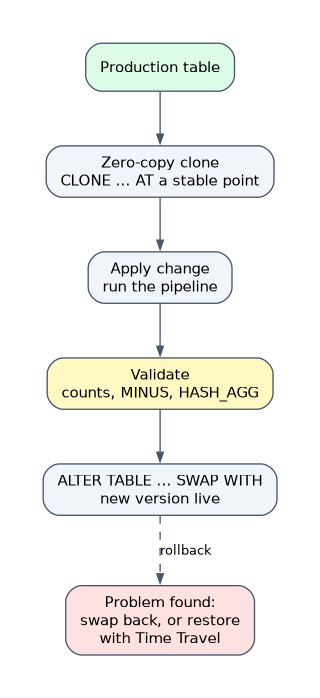 Combine all the pieces into one repeatable process.
- Clone production, ideally with
ATset to a stable point in time. - Apply the change to the clone and run the pipeline.
- Compare results to the original with the checks above.
SWAP WITHthe production object.- Keep the old object for a few days as the rollback path, then drop it.
- For streams and tasks, suspend tasks before the swap and resume after, so no run happens in the middle.
Common mistakes
Testing on a tiny sample. It hides problems that only appear at production volume.
Forgetting Time Travel is limited. Rollback by Time Travel only works inside the retention period.
Cloning over the original. Always restore to a new name and swap.
Ignoring grants after a swap. The new live object may have different access than the old one, so check it.
What to remember for the exam
- Validate on a clone:
COUNT,MINUS,HASH_AGG. - Promote with
ALTER ... SWAP WITH, atomic and metadata only; repeat it to roll back. - Rollback tools:
UNDROP, cloneATorBEFORE,SWAP WITH. - Rollback is only possible inside the Time Travel retention period.
Check yourself
How do you promote a validated clone to production with no downtime?
Use ALTER TABLE ... SWAP WITH, which exchanges the two names in one atomic operation.
A DELETE removed rows by mistake 20 minutes ago. What is the safest repair?
Clone the table BEFORE the statement's query ID into a new name, verify it, then swap it with the original.
Which statement can compare two large tables with one number?
HASH_AGG(*) on each table, which returns the same value for the same content in any order.
Topic 4 of 4 in Storage and Data Protection
Test yourself on Storage and Data Protection
The full Snowflake DEA-C02 question bank has 709 questions, with timed practice exams and an explanation for every answer.
This study guide is independent and is not affiliated with, endorsed by, or sponsored by Snowflake. Vendor names, certification names and exam codes are trademarks of their respective owners and are used for identification only.