Data Transformation · Topic 13 of 14
Snowpark Architecture, Querying and Filtering
Learn how Snowpark pushes DataFrame code down to Snowflake as SQL, how lazy evaluation works, and how to query and filter data with the library.
- 4 min
- Includes a diagram
- Snowpark pushes processing down to Snowflake as SQL; compute is a virtual warehouse; data is not moved to the client.
- DataFrames are lazy; actions such as
collect,show,countandto_pandastrigger execution. - Sources:
session.table,session.sql,session.read,session.create_dataframe.
What it is
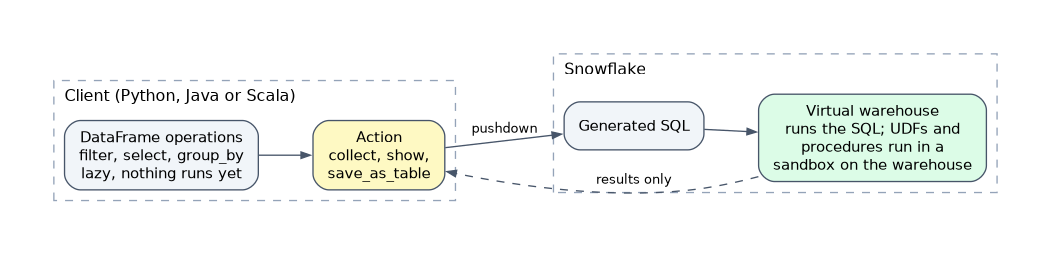
Snowpark is a library (Python, Java and Scala) that lets you write data transformations as DataFrame code instead of SQL. The key idea is pushdown: your code is turned into SQL and runs inside Snowflake's engine, next to the data. Nothing is pulled to your machine until you ask for results.
Compared with a classic Spark cluster, there is no separate cluster to manage and no data movement. Compute is a virtual warehouse.
How it works
Architecture
| Piece | Role |
|---|---|
| Session | The connection to Snowflake; every DataFrame belongs to one. Built from connection parameters with Session.builder.configs(...).create() |
| DataFrame | A lazy description of a query: a table, a SQL query or a transformation of another DataFrame |
| Warehouse | Runs the generated SQL |
| Server side objects | UDFs, UDTFs and stored procedures written in Snowpark run on the server in a secure Python, Java or Scala sandbox |
Two places run your code:
- Client side: the DataFrame calls that build the query. They only produce SQL text.
- Server side: the SQL, plus any UDF or stored procedure handler code you registered, runs in Snowflake.
If a scenario says "avoid pulling large data to the client", the answer is to keep work in DataFrame transformations and write the result with write.save_as_table, not to call collect() or to_pandas() on the full set.
Lazy evaluation
DataFrame transformations such as filter, select and join do not run anything. Snowpark only builds up the query. A query runs when you call an action.
| Transformations (lazy) | Actions (execute) |
|---|---|
select, filter, join, group_by, with_column, sort | collect, show, count, first, take, to_pandas |
write.save_as_table, write.copy_into_location |
Benefits: Snowflake can optimize the whole chain as one statement, and unused steps cost nothing. Use df.explain() to see the plan, and df.queries to see the generated SQL.
Calling collect() brings every row into client memory. Use limit or show for inspection.
Getting a DataFrame
from snowflake.snowpark import Session
session = Session.builder.configs(connection_parameters).create()

orders = session.table("sales.public.orders")           # from a table
recent = session.sql("SELECT * FROM orders WHERE ...")  # from a query
small = session.create_dataframe([[1, "a"], [2, "b"]], schema=["id", "val"]) # from local datasession.table()references a table without loading it.session.readloads staged files (CSV, JSON, Parquet and others) into a DataFrame with a file format and schema.session.sql()accepts any SQL and returns a DataFrame you can keep transforming.
Querying and filtering
Columns are referenced with col("name") or df["name"], from snowflake.snowpark.functions.
from snowflake.snowpark.functions import col

result = (orders
    .filter((col("status") == "SHIPPED") & (col("amount") > 100))
    .select("order_id", "customer_id", "amount")
    .sort(col("amount").desc())
    .limit(10))
result.show()| Task | Method | |
|---|---|---|
| Keep rows | filter(condition) or where(condition) | |
| Choose columns | select("a", col("b")) and drop("c") | |
| Combine conditions | & for AND, `\ | for OR, ~` for NOT, each condition in parentheses |
| Test membership | col("x").isin([...]) | |
| Null checks | col("x").is_null(), is_not_null() | |
| Text match | col("x").like("A%"), col("x").startswith("A") | |
| Range | col("x").between(1, 10) | |
| Order and limit | sort(...) or order_by(...), limit(n) |
Use &, | and ~, not Python and, or, not, which do not work on column expressions.
Filter as early as possible. Because the whole chain becomes one SQL query, early filters let Snowflake prune micro-partitions and scan less data.
Common mistakes
Expecting code to run when it is written. Nothing executes until an action is called.
Collecting a large result. collect() and to_pandas() copy all data to the client and can run out of memory.
Using Python and and or in conditions. Use & and | with parentheses around each comparison.
Treating a DataFrame as stored data. It is a query definition; to keep the result, save it with write.save_as_table.
What to remember for the exam
- Snowpark pushes processing down to Snowflake as SQL; compute is a virtual warehouse; data is not moved to the client.
- DataFrames are lazy; actions such as
collect,show,countandto_pandastrigger execution. - Sources:
session.table,session.sql,session.read,session.create_dataframe. - Filter with
filterorwhere, combine conditions with&,|,~. - UDFs and stored procedures in Snowpark run server side.
Check yourself
When does a Snowpark DataFrame query actually run?
When an action such as collect, show, count or to_pandas is called, or when the result is written to a table.
Why is Snowpark processing considered pushdown?
The library turns DataFrame operations into SQL that runs on a Snowflake warehouse, so data stays in Snowflake.
How do you write the condition "status is SHIPPED and amount over 100" in Snowpark?
filter((col("status") == "SHIPPED") & (col("amount") > 100)).
Topic 13 of 14 in Data Transformation
Test yourself on Data Transformation
The full Snowflake DEA-C02 question bank has 709 questions, with timed practice exams and an explanation for every answer.
This study guide is independent and is not affiliated with, endorsed by, or sponsored by Snowflake. Vendor names, certification names and exam codes are trademarks of their respective owners and are used for identification only.