Data Transformation · Topic 3 of 14
External Functions - Create, Secure and Use
How Snowflake external functions call remote services through an API integration and proxy: setup, batching, JSON format, security, limits and use cases.
- 5 min
- Includes a diagram
- External function = UDF that calls a remote service through a proxy, configured by an API integration.
- JSON batches go out by HTTPS POST; asynchronous services are polled with GET.
- Scalar only, slower than internal UDFs, cannot be shared, 10 MB response limit per batch.
What it is
An external function is a UDF whose logic runs outside Snowflake, in a remote service such as AWS Lambda or Azure Functions. Inside Snowflake it stores no code, only the URL of a proxy service and the name of an API integration.
Use one when the logic lives in a service you cannot move into Snowflake, such as a language Snowflake does not run (Go or C#), a third party API, or an existing model endpoint.
How it works
The three pieces
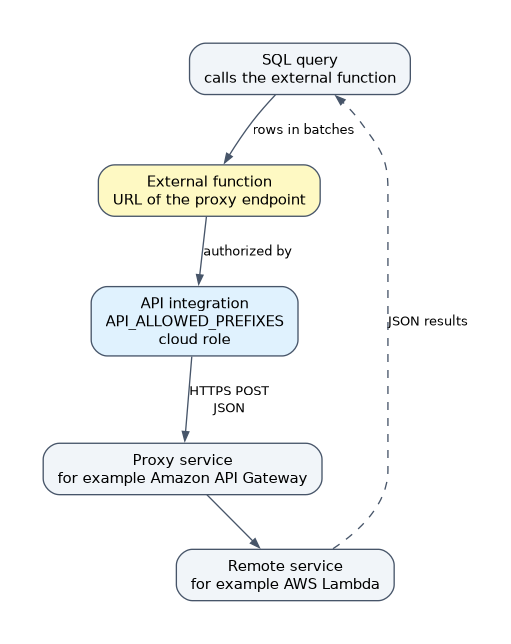
| Piece | What it is | Examples |
|---|---|---|
| Remote service | The code, with an HTTPS endpoint that takes and returns JSON | AWS Lambda, Azure Functions, a server on EC2 |
| Proxy service | A gateway that Snowflake calls instead of the remote service; it relays data and can authenticate | Amazon API Gateway, Azure API Management, Google Cloud API Gateway |
| API integration | A Snowflake object that holds the security information for the proxy | CREATE API INTEGRATION |
Creating one
First create the API integration, which names the provider, the credentials and the URL prefixes that functions may use.
CREATE API INTEGRATION my_api_int
  API_PROVIDER = aws_api_gateway
  API_AWS_ROLE_ARN = 'arn:aws:iam::123456789012:role/snowflake_ext_role'
  API_ALLOWED_PREFIXES = ('https://abc123.execute-api.us-west-2.amazonaws.com/prod/')
  ENABLED = TRUE;
Other providers include aws_private_api_gateway, azure_api_management (with AZURE_TENANT_ID and AZURE_AD_APPLICATION_ID) and google_api_gateway. For AWS, run DESCRIBE INTEGRATION my_api_int and copy API_AWS_IAM_USER_ARN and API_AWS_EXTERNAL_ID into the trust policy of the IAM role.
Then create the function.
CREATE EXTERNAL FUNCTION sentiment(text VARCHAR)
  RETURNS VARIANT
  API_INTEGRATION = my_api_int
AS 'https://abc123.execute-api.us-west-2.amazonaws.com/prod/sentiment';Creating an API integration is an administrator task (the CREATE INTEGRATION privilege). A role then needs USAGE on the integration to create functions with it, and USAGE on the function to call it. Future grants on external functions are not supported.
Working with external functions
Snowflake sends rows in batches as an HTTPS POST. Each batch is JSON with a data array, where each inner array is a row number followed by the argument values. The service must return the same row numbers with the result.
Request:  {"data": [[0, "great"], [1, "awful"]]}
Response: {"data": [[0, "positive"], [1, "negative"]]}- The remote service returns one batch for one batch received, and the maximum response size per batch is 10 MB.
- If the service says the work is asynchronous, Snowflake keeps sending GET requests until the result is ready, the function times out, or an error occurs.
- Retries happen at batch level, so the remote service should tolerate repeated calls (idempotent logic).
- Useful options:
MAX_BATCH_ROWS(a hint for batch size),HEADERSandCONTEXT_HEADERS(send values such as the calling user to the service),COMPRESSION, andREQUEST_TRANSLATORorRESPONSE_TRANSLATORto adapt formats. - Call it like any function:
SELECT sentiment(review_text) FROM reviews;. VOLATILEis the default;IMMUTABLEallows result reuse. Null handling usesCALLED ON NULL INPUTorRETURNS NULL ON NULL INPUT.
Limitations
| Limitation | Detail |
|---|---|
| Scalar only | One value returned per input row; no table or aggregate external functions |
| Functions only | There are no external stored procedures |
| Slower | Network hops make them slower than built in functions or internal UDFs |
| Not shareable | Cannot be shared through Secure Data Sharing or used in shared views |
| Not allowed in some places | A DEFAULT clause of CREATE TABLE, or a COPY transformation |
| Cloud support | Callable from Snowflake accounts on AWS, Azure and Google Cloud |
Rows leave Snowflake when an external function runs. Treat the remote service as a third party that could retain the data, and send only the columns it needs.
Securing external functions
Security is layered, and it comes from the API integration and the proxy rather than from the function body.
- Authentication to the proxy. On AWS, Snowflake assumes an IAM role whose trust policy names the Snowflake IAM user and external ID; on Azure, a Microsoft Entra ID application is used.
- Allowed prefixes.
API_ALLOWED_PREFIXESlimits which URLs a function can call;API_BLOCKED_PREFIXESexcludes some. - Private connectivity. An AWS private API Gateway endpoint keeps traffic on the cloud network.
- Privileges. Control who can create functions through
USAGEon the integration, and who can call them throughUSAGEon the function. - Secure function.
CREATE SECURE EXTERNAL FUNCTIONhides the definition from roles that do not own it, as with secure UDFs. - Disable access fast.
ALTER API INTEGRATION ... SET ENABLED = FALSEstops every function that uses the integration.
When a question asks why a function cannot reach a URL, check the integration's API_ALLOWED_PREFIXES first. When it asks how to cut off a service quickly, disable the API integration.
Common mistakes
Expecting an external function to return a table. They are scalar only.
Skipping the trust policy. The IAM role must trust the Snowflake IAM user and external ID that DESCRIBE INTEGRATION returns.
Putting credentials in the function. They belong in the API integration and the proxy.
Using one for heavy per row work on a large table. Network round trips make a Java or Python UDF a better fit when the code can run inside Snowflake.
What to remember for the exam
- External function = UDF that calls a remote service through a proxy, configured by an API integration.
- JSON batches go out by HTTPS POST; asynchronous services are polled with GET.
- Scalar only, slower than internal UDFs, cannot be shared, 10 MB response limit per batch.
- Security: IAM role or Entra ID application, allowed prefixes,
USAGEprivileges,SECUREkeyword.
Check yourself
Which Snowflake object stores the authentication details for the proxy service?
The API integration.
Can an external function return multiple rows per input row?
No. External functions are scalar and return one value per row.
How do you stop all external functions that use one gateway?
Disable the API integration with ALTER API INTEGRATION ... SET ENABLED = FALSE.
Topic 3 of 14 in Data Transformation
Test yourself on Data Transformation
The full Snowflake DEA-C02 question bank has 709 questions, with timed practice exams and an explanation for every answer.
This study guide is independent and is not affiliated with, endorsed by, or sponsored by Snowflake. Vendor names, certification names and exam codes are trademarks of their respective owners and are used for identification only.