Data Movement · Topic 8 of 17
Snowpipe, Snowpipe Streaming and the Kafka Connector
Compare Snowpipe auto ingest and the REST API, Snowpipe Streaming channels and offset tokens, and the Kafka connector: latency, ordering, billing.
- 6 min
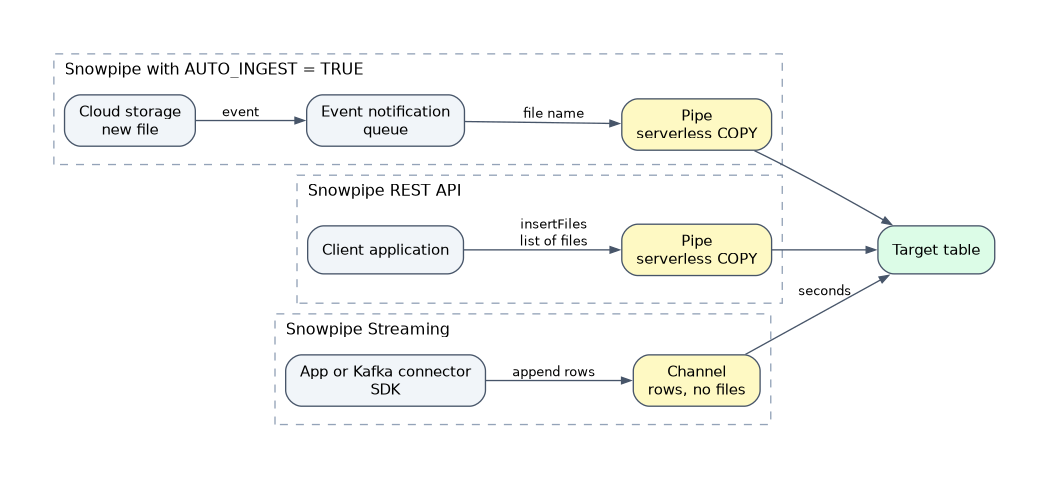
- Includes a diagram
- Auto ingest: cloud events, external stage, notification channel. REST API:
insertFiles, key pair auth, works with internal stages. - Snowpipe: serverless, about a minute of latency, 14 day metadata, default
SKIP_FILE,REFRESHcovers 7 days. - Snowpipe Streaming: rows, no files, seconds of latency, channels and offset tokens, pipe object for transformation.
What it is
Snowpipe loads files soon after they land in a stage, using serverless compute. A pipe wraps one COPY INTO statement and is triggered either by cloud event notifications (auto ingest) or by a call to the Snowpipe REST API.
Snowpipe Streaming writes rows straight into tables from an application, with no files and no stage. The Snowflake Connector for Kafka is a ready made client that reads Kafka topics and loads them, using either Snowpipe (files) or Snowpipe Streaming (rows).
How it works
Snowpipe: auto ingest or REST API
CREATE PIPE orders_pipe AUTO_INGEST = TRUE AS
  COPY INTO orders FROM @s3_stage/orders/
  FILE_FORMAT = (TYPE = PARQUET)
MATCH_BY_COLUMN_NAME = CASE_INSENSITIVE;| Auto ingest | REST API | |
|---|---|---|
| Trigger | Cloud event notification when a file arrives | Client calls insertFiles with a list of staged files |
| Stage type | External stage (S3, GCS, Azure) | Internal or external stage |
| Authentication | None from your code; Snowflake receives the events | Key pair authentication (JWT) |
| Status calls | SYSTEM$PIPE_STATUS, COPY_HISTORY | insertReport and loadHistoryScan, plus the views |
| Fits | Files already landing in your bucket | Your own app that stages files and controls timing |
For auto ingest, DESC PIPE or SHOW PIPES shows a notification_channel:
- Amazon S3: a Snowflake managed SQS queue ARN that you add to the bucket's event notification, or an SNS topic (
AWS_SNS_TOPIC) when other consumers also need the events, or EventBridge routed to SNS. - Google Cloud Storage: Pub/Sub with a notification integration.
- Azure Blob Storage: Event Grid with a notification integration.
Set the notification prefix to the stage path and end the stage URL with a slash, so unrelated files do not generate events.
Internal stages usually mean the REST API path. Auto ingest is built around cloud storage events.
Snowpipe behavior to know:
- Serverless. No warehouse; billing is a fixed number of credits per GB loaded (text files by uncompressed size), with no per file charge. Moderately sized files still load more efficiently than thousands of tiny ones.
- Latency. Usually about a minute or more after the file arrives; not guaranteed.
- Order. Files generally load oldest first, but order is not guaranteed.
- Deduplication. A pipe remembers loaded files for 14 days and skips them.
- Errors. Default
ON_ERRORisSKIP_FILE;ABORT_STATEMENTis not supported.ERROR_INTEGRATIONon the pipe sends notifications. - Backfill.
ALTER PIPE ... REFRESHqueues files staged in the last 7 days that were not loaded. - Control.
ALTER PIPE ... SET PIPE_EXECUTION_PAUSED = TRUEpauses the pipe. - Transactions. Snowpipe combines or splits loads into one or more transactions based on the rows in each file, unlike one COPY statement, which is a single transaction.
ALTER PIPE cannot change the COPY statement. CREATE OR REPLACE PIPE wipes load history, so pause first and check which files already loaded.
Snowpipe Streaming
A client library (Java, Python or Node.js SDK) or the REST API sends rows to a table in small batches. Snowflake commits them and they become queryable in seconds. The high performance architecture is the current design; the earlier classic architecture is still documented.
| Concept | Meaning |
|---|---|
| Channel | A connection from a client to one target table |
| Named channel | Ordered, exactly once ingestion per channel; used for sources with strict order such as Kafka partitions or CDC |
| Elastic channel | Producers write without managing channels and Snowflake scales ingestion; delivery is at least once with no ordering guarantee |
| Offset token | A marker the client saves with each batch; after a restart it reads the last committed token and resumes without gaps or duplicates |
| Pipe object | Applies COPY style transformation before commit: reorder columns, cast types, expressions, clustering |
Facts: throughput is high (documented up to 20 GB per second per table) with latency as low as about 5 seconds, depending on row size, concurrency and transformations. Billing is throughput based, in credits per uncompressed GB. It can also target Snowflake managed Apache Iceberg tables. There is no staging and no COPY file step.
| Bulk COPY | Snowpipe | Snowpipe Streaming | |
|---|---|---|---|
| Unit | Files | Files | Rows |
| Compute | Your warehouse | Serverless | Serverless |
| Latency | Batch | Minutes | Seconds |
| Dedup | 64 days load metadata | 14 days load metadata | Offset tokens per channel |
Snowpipe Streaming compared to the Kafka connector
The connector is not an alternative engine; it is a client that sits on top of the same services.
| Snowpipe Streaming SDK or REST | Snowflake Connector for Kafka | |
|---|---|---|
| Who writes the client | You, in code | Snowflake supplies it, run inside Kafka Connect |
| Source | Any application, device or service | Kafka topics only |
| Flexibility | Full control of batching, channels, schemas | Configuration only |
| Ingestion method | Rows | Snowpipe (files) or Snowpipe Streaming (rows) |
| Default table | Your own columns | Two VARIANT columns: RECORD_CONTENT and RECORD_METADATA, unless schematization is on |
| Restart safety | You manage offset tokens | Connector manages offsets and channels |
With the classic connector in Snowpipe mode it creates, per topic, an internal stage, one pipe per partition and a table. In Snowpipe Streaming mode it opens channels instead, reaching lower latency, and supports a dead letter queue for failed records. Schematization turns record fields into columns. Snowflake recommends the connector version 4 for new work, which uses the high performance architecture; the classic connector is planned for future deprecation.
Kafka topic and no code wanted points to the connector. Custom app, IoT device or a non Kafka source points to a Snowpipe Streaming SDK or the REST API.
Common mistakes
Assigning a warehouse to a pipe. Pipes have no warehouse; compute is serverless.
Staging files for Snowpipe Streaming. It needs no stage; rows go directly to the table.
What to remember for the exam
- Auto ingest: cloud events, external stage, notification channel. REST API:
insertFiles, key pair auth, works with internal stages. - Snowpipe: serverless, about a minute of latency, 14 day metadata, default
SKIP_FILE,REFRESHcovers 7 days. - Snowpipe Streaming: rows, no files, seconds of latency, channels and offset tokens, pipe object for transformation.
- Kafka connector: Snowpipe or Snowpipe Streaming mode,
RECORD_CONTENTandRECORD_METADATAby default, dead letter queue in streaming mode. - Choose by source and latency: files in bucket, Snowpipe; rows from a custom app, Snowpipe Streaming; Kafka, the connector.
Check yourself
Which Snowpipe trigger works with an internal stage?
The REST API, where the client calls insertFiles with key pair authentication.
How does a Snowpipe Streaming client resume after a crash without duplicates?
It reads the last committed offset token for its channel and continues from there.
What columns does the Kafka connector create by default?
Two VARIANT columns, RECORD_CONTENT for the message and RECORD_METADATA for topic, partition, offset and other details.
Topic 8 of 17 in Data Movement
Test yourself on Data Movement
The full Snowflake DEA-C02 question bank has 709 questions, with timed practice exams and an explanation for every answer.
This study guide is independent and is not affiliated with, endorsed by, or sponsored by Snowflake. Vendor names, certification names and exam codes are trademarks of their respective owners and are used for identification only.