Snowflake AI Data Cloud Features & Architecture · Topic 1 of 17
Snowflake Architecture - Cloud Services, Compute and Storage Layers
Learn the three Snowflake layers for COF-C03: Cloud Services for metadata and optimization, virtual warehouses for compute, and micro-partitioned storage.
- 5 min
- Includes a diagram
- Three layers: Database Storage, Compute (virtual warehouses), Cloud Services. Each scales independently.
- Hybrid design: shared-disk central storage plus shared-nothing MPP compute clusters.
- Storage is compressed, columnar micro-partitions (about 50 to 500 MB uncompressed) in cloud object storage.
What it is
Snowflake is a fully managed data platform that runs on AWS, Microsoft Azure or Google Cloud. You never install software, patch servers or tune hardware; Snowflake runs all of that for you.
Its architecture has three independent layers: Database Storage, Compute (virtual warehouses) and Cloud Services. Because the layers are separate, storage and compute scale and are billed independently of each other.
Snowflake describes the design as a hybrid of two classic models. Like a shared-disk system, all compute reads one central copy of the data. Like a shared-nothing MPP system, each virtual warehouse processes queries on its own cluster of nodes, with a local cache.
How it works
Database Storage layer
When data is loaded, Snowflake reorganizes it into its own compressed, columnar format and stores it in cloud object storage in the account's region. Data is split into micro-partitions of about 50 to 500 MB of uncompressed data each.
You cannot see or open these files directly. Data is reachable only through SQL run by Snowflake. Storage is billed on the average compressed amount stored per month, including data kept for Time Travel and Fail-safe.
Because storage is shared, any number of warehouses can read the same table at the same time without copying it. Zero-copy cloning and Secure Data Sharing are built on this: they reference existing micro-partitions instead of duplicating them.
Compute layer
Queries run on virtual warehouses, which are clusters of compute resources provisioned by Snowflake. Each warehouse is independent; a heavy load job on one warehouse does not slow down queries on another.
Warehouses can be started, suspended, resized and scaled out at any time. They consume credits only while running, billed per second with a 60-second minimum each time a warehouse starts or resumes.
Each warehouse keeps a local disk cache of the micro-partitions it has read. That cache is lost when the warehouse suspends, which matters when you tune Auto-suspend.
Cloud Services layer
Cloud Services is the "brain" of Snowflake. It is a collection of services that coordinate everything else:
| Service | What it does |
|---|---|
| Authentication | Verifies users (password, SSO, key pair, OAuth, MFA) |
| Access control | Checks roles and privileges on every request |
| Metadata management | Stores table definitions, micro-partition statistics, Time Travel history |
| Query parsing and optimization | Compiles SQL and builds the execution plan, using metadata to prune micro-partitions |
| Infrastructure management | Provisions warehouses and manages storage |
| Result cache | Returns a stored query result without using a warehouse |
Some queries never touch a warehouse. A SELECT COUNT(*) on a table or MIN and MAX on a column can be answered from metadata, and a repeated identical query can come from the result cache.
Cloud Services also consume credits. They are billed only when daily Cloud Services usage is above 10% of daily warehouse usage; below that, the usage is covered.
How the layers work together
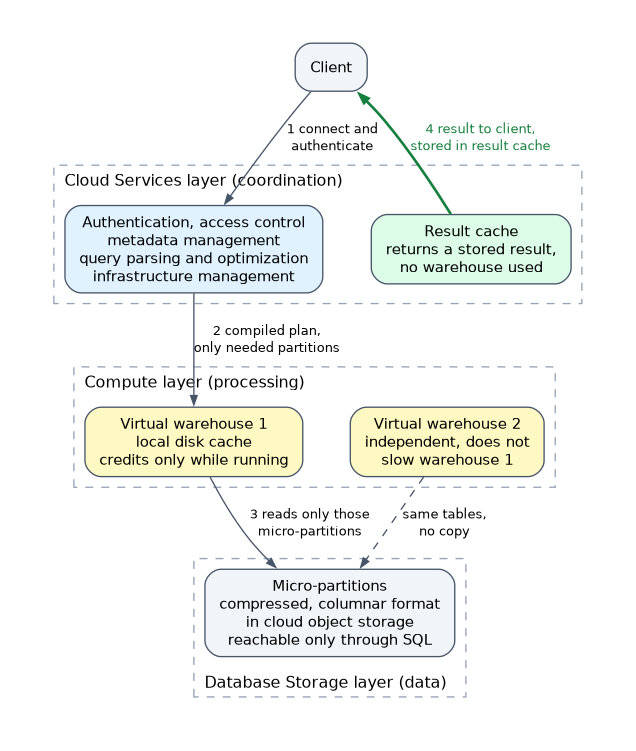
- A client connects and authenticates through Cloud Services.
- Cloud Services compiles the query, checks privileges and uses metadata to decide which micro-partitions are needed.
- The selected virtual warehouse reads only those micro-partitions from storage, using its local cache where it can.
- Results go back through Cloud Services to the client, and the result is stored in the result cache.
When a question asks which layer handles something, ask "is this data, processing or coordination?" Data at rest is Storage, running the query is Compute, and anything about logins, metadata, privileges, optimization or the result cache is Cloud Services.
How the exam asks about this
- "Which layer stores the statistics used to prune micro-partitions?" -> Cloud Services (metadata management).
- "Two teams run heavy queries on the same table without affecting each other" -> separate virtual warehouses reading the same shared storage.
- "A query returned instantly with no warehouse running" -> result cache or metadata, both in Cloud Services.
Common mistakes
Thinking each warehouse has its own copy of the data. Warehouses share one copy in the storage layer. Only the local cache is per warehouse, and it is temporary.
Putting the optimizer in the compute layer. Parsing, optimization and pruning decisions happen in Cloud Services. The warehouse executes the plan it receives.
Assuming Cloud Services are always free. They are covered up to 10% of daily warehouse usage, then billed. Very frequent small metadata-heavy queries can push usage above that threshold.
Believing customers manage the storage files. Snowflake owns the micro-partition files. You manage tables, not files, and you cannot read the internal format with outside tools.
What to remember for the exam
- Three layers: Database Storage, Compute (virtual warehouses), Cloud Services. Each scales independently.
- Hybrid design: shared-disk central storage plus shared-nothing MPP compute clusters.
- Storage is compressed, columnar micro-partitions (about 50 to 500 MB uncompressed) in cloud object storage.
- Warehouses bill per second after a 60-second minimum, only while running.
- Cloud Services handle authentication, access control, metadata, query optimization, infrastructure management and the result cache.
- Cloud Services credits are billed only above 10% of daily warehouse usage.
Suspending a warehouse saves credits but drops its local disk cache. The result cache lives in Cloud Services and is not lost when a warehouse suspends.
Check yourself
Which Snowflake layer performs query optimization and micro-partition pruning decisions?
The Cloud Services layer, which uses table metadata to build the plan and choose the micro-partitions to scan.
Why does a heavy data load on one warehouse not slow BI queries on another warehouse?
Each virtual warehouse is an independent compute cluster, and both read the same shared storage layer.
When are Cloud Services credits actually billed?
Only when daily Cloud Services usage exceeds 10% of the daily virtual warehouse usage.
Topic 1 of 17 in Snowflake AI Data Cloud Features & Architecture
Test yourself on Snowflake AI Data Cloud Features & Architecture
The full Snowflake SnowPro Core COF-C03 question bank has 845 questions, with timed practice exams and an explanation for every answer.
This study guide is independent and is not affiliated with, endorsed by, or sponsored by Snowflake. Vendor names, certification names and exam codes are trademarks of their respective owners and are used for identification only.