Snowflake AI Data Cloud Features & Architecture · Topic 3 of 17
Snowflake Object Hierarchy - Organization, Account, Schemas, Tables and Views
Map the Snowflake object hierarchy from organization and account down to databases, schemas, tables and views, with fully qualified names for COF-C03.
- 6 min
- Includes a diagram
- Hierarchy: Organization -> Account -> Database -> Schema -> schema-level objects.
- ORGADMIN manages the organization and its accounts.
- Account-level: users, roles, warehouses, databases, resource monitors, integrations, network policies, shares, applications.
What it is
Every object in Snowflake lives in a container, and the containers nest in a fixed order. At the top is the organization, which holds one or more accounts. Each account holds account-level objects, including databases, and each database holds schemas, which in turn hold tables, views and other schema-level objects.
Knowing the level of an object tells you where it is created, how it is named and which privileges control it. The exam often asks which objects are account level and which are schema level.
How it works
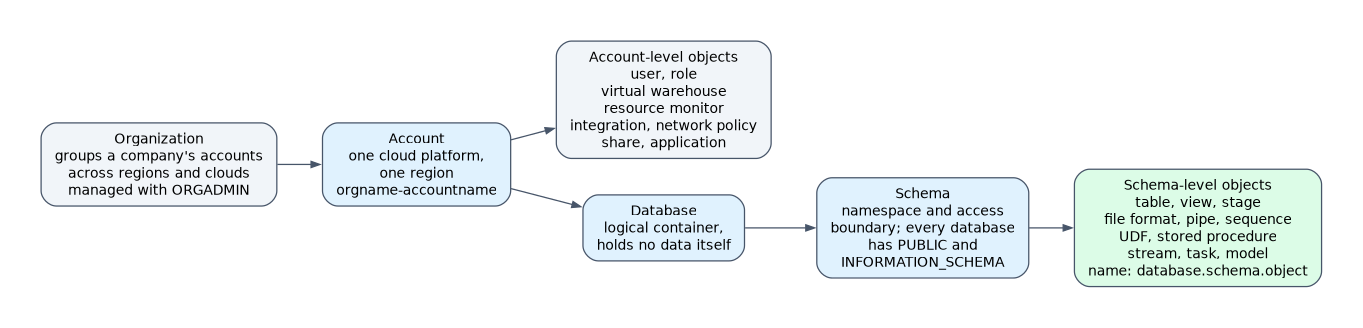
Organization and account objects
An organization groups the accounts a company owns, across regions and cloud platforms. It is managed with the ORGADMIN role (or from the organization account), which can create accounts and view organization-wide usage.
Each account lives in one cloud platform and one region. An account is identified as orgname-accountname (the preferred format) or by its legacy account locator.
Objects created directly in the account, not inside a database, are account-level objects:
| Account-level object | Purpose |
|---|---|
| User | An identity that can log in |
| Role | A set of privileges granted to users or other roles |
| Virtual warehouse | Compute for running queries |
| Database | Top-level container for schemas |
| Resource monitor | Credit quotas and alerts for warehouses |
| Integration | Connection to an outside service (storage, API, notifications, security) |
| Network policy | Allowed and blocked IP addresses |
| Share | Grants a consumer account read access to selected objects |
| Application | An installed Snowflake Native App |
Database objects
A database is a logical container; it holds no data by itself. Everything that holds data or code sits one level lower, inside a schema. Every new database contains two schemas automatically: PUBLIC and INFORMATION_SCHEMA.
INFORMATION_SCHEMA is a read-only set of views and table functions describing the objects in that database. It is generated by Snowflake and cannot be dropped.
Schemas
A schema is a namespace inside a database. It groups related objects and is a common boundary for access control: granting USAGE on a database and on a schema is required before a role can use the objects inside.
A schema can be created as a managed access schema. In a managed access schema, object owners cannot grant privileges on their objects; only the schema owner (or a role with MANAGE GRANTS) can. This centralizes grant decisions.
Schema-level objects
| Schema-level object | Holds or does |
|---|---|
| Table | Stores data in rows and columns |
| View | Stores a query, not data |
| Stage | A location for data files |
| File format | Named settings for parsing files |
| UDF and stored procedure | Custom code |
| Pipe | A COPY INTO statement used by Snowpipe |
| Sequence | Generates unique numbers |
| Stream and task | Change tracking and scheduling |
| Model | A versioned ML model in the Model Registry |
Objects are referenced by their fully qualified name database.schema.object. If you leave out parts, Snowflake fills them from the session's current database and schema.
Tables
Tables store data in micro-partitions. Snowflake offers several table types that differ in Time Travel, Fail-safe and where the data lives:
| Table type | Short description |
|---|---|
| Permanent | Default; full Time Travel and 7 days of Fail-safe |
| Transient | Persists until dropped, no Fail-safe |
| Temporary | Exists only for the session that created it |
| External | Metadata over files in an external stage |
| Apache Iceberg | Data in Apache Iceberg format, often in your own cloud storage |
| Dynamic | Results of a query kept fresh automatically |
The storage concepts and each table type are covered in detail on the storage pages of this chapter.
Views
A view is a named query. Querying a view runs its definition against the underlying tables at that moment.
| View type | Key point |
|---|---|
| Standard | Stores only the query; definition visible to authorized users |
| Secure | Hides the definition and blocks optimizations that could expose hidden data; used for sharing |
| Materialized | Stores precomputed results, maintained by Snowflake; Enterprise Edition or higher |
If a question asks which object "stores no data and runs its query at read time", the answer is a standard view. If it "stores precomputed results", it is a materialized view.
How the exam asks about this
- "Which of these is an account-level object: warehouse, stage, table, view?" -> Warehouse. The other three are schema-level.
- "A practitioner creates a table without specifying a database or schema" -> it is created in the session's current database and schema; it fails if none is set.
- "Only the security team should decide grants on objects in a schema" -> make it a managed access schema.
Common mistakes
Placing warehouses inside databases. Warehouses, users, roles, resource monitors and integrations are account-level. They do not belong to any database or schema.
Thinking a database holds tables directly. A table always belongs to a schema. If you do not name one, the PUBLIC schema is a common default context, but the table is still in a schema.
Assuming the owner of a table can always grant on it. In a managed access schema, grant decisions move to the schema owner or a role with MANAGE GRANTS.
What to remember for the exam
- Hierarchy: Organization -> Account -> Database -> Schema -> schema-level objects.
- ORGADMIN manages the organization and its accounts.
- Account-level: users, roles, warehouses, databases, resource monitors, integrations, network policies, shares, applications.
- Schema-level: tables, views, stages, file formats, UDFs, procedures, pipes, sequences, streams, tasks, models.
- New databases contain PUBLIC and INFORMATION_SCHEMA schemas.
- Fully qualified name:
database.schema.object. - Managed access schemas centralize grant control.
Shares are listed among database objects in the exam outline, but a share is created at the account level. It contains grants on a database and its objects, which is why it appears near them.
Check yourself
Is a virtual warehouse a database object or an account object?
An account-level object. It is not stored in any database or schema.
Which two schemas does every new database contain?
PUBLIC and INFORMATION_SCHEMA, where INFORMATION_SCHEMA holds read-only metadata views for that database.
What does a managed access schema change?
Object owners can no longer grant privileges on their objects; only the schema owner or a role with MANAGE GRANTS can.
Topic 3 of 17 in Snowflake AI Data Cloud Features & Architecture
Test yourself on Snowflake AI Data Cloud Features & Architecture
The full Snowflake SnowPro Core COF-C03 question bank has 845 questions, with timed practice exams and an explanation for every answer.
This study guide is independent and is not affiliated with, endorsed by, or sponsored by Snowflake. Vendor names, certification names and exam codes are trademarks of their respective owners and are used for identification only.