Snowflake AI Data Cloud Features & Architecture · Topic 11 of 17
Storage Concepts, Micro-partitions and Data Clustering
How Snowflake stores table data in micro-partitions, how pruning uses their metadata, and when a clustering key and Automatic Clustering help.
- 6 min
- Includes a diagram
- Micro-partitions hold 50 MB to 500 MB of uncompressed data, stored compressed and columnar.
- Metadata per micro-partition includes the value range and distinct value count per column.
- Pruning skips micro-partitions using that metadata, before data is read.
What it is
Snowflake stores every table in its own optimized format in the Database Storage layer, on the cloud provider's object storage. You never see files, folders or blocks. You see tables, and Snowflake manages how the data is laid out underneath.
The unit of storage is the micro-partition. Snowflake splits each table into micro-partitions automatically as data arrives, stores each one in a compressed columnar format, and keeps metadata about every column in it. That metadata is what makes queries fast without indexes.
Data clustering describes how well rows with similar values sit together in the same micro-partitions. Good clustering means a filter touches few micro-partitions. Poor clustering means the query must scan many of them.
How it works
Storage concepts
| Concept | What the exam expects you to know |
|---|---|
| Columnar and compressed | Each column is stored and compressed separately inside a micro-partition, so a query reads only the columns it selects |
| Managed by Snowflake | Customers cannot see or access the underlying storage files directly; only SQL and Snowflake features reach the data |
| Billed on compressed size | Storage cost is based on the average compressed data stored per month, including Time Travel and Fail-safe data |
| Immutable micro-partitions | An UPDATE, DELETE or MERGE writes new micro-partitions; the old ones are kept as long as Time Travel and Fail-safe need them |
| Shared by clones | A zero-copy clone points at the same micro-partitions, so it costs no extra storage until either table changes |
Micro-partitions
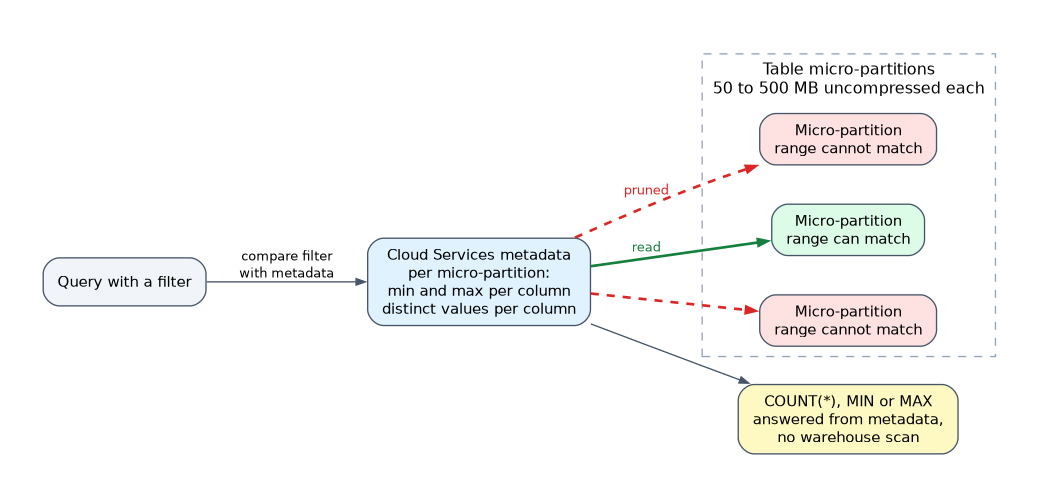 Each micro-partition holds between 50 MB and 500 MB of uncompressed data. The stored size is smaller because the data is compressed. Snowflake creates micro-partitions in the order data is inserted or loaded, with no partition key for you to define.
For every micro-partition, the Cloud Services layer records metadata such as:
- The range of values (minimum and maximum) for each column.
- The number of distinct values for each column.
- Other properties used for optimization and efficient query processing.
When a query has a filter, the optimizer compares the filter with this metadata and skips every micro-partition whose range cannot match. This is called pruning. Pruning happens before any data is read, so a well pruned query on a huge table reads only a small fraction of it.
Because metadata already holds counts and ranges, some queries such as SELECT COUNT(*) or MIN and MAX on a column can be answered from metadata without running a warehouse scan.
Data clustering
Data loaded in date order is usually naturally clustered by date, because each micro-partition covers a narrow date range. Over time, updates and loads in random order spread values across many micro-partitions, and their value ranges start to overlap.
Snowflake measures this with clustering depth: the average depth of overlapping micro-partitions for the chosen columns. A lower depth means better clustering. A table with no overlap is in a constant state and cannot be improved further.
Two system functions report it:
SYSTEM$CLUSTERING_INFORMATIONreturns JSON with the average depth, average overlaps and a partition depth histogram.SYSTEM$CLUSTERING_DEPTHreturns the average clustering depth for the table or for specified columns.
Clustering keys and Automatic Clustering
A clustering key is one or more columns or expressions that Snowflake should keep co-located. You define it with CLUSTER BY on CREATE TABLE or ALTER TABLE.
Once a table has a clustering key, Automatic Clustering reclusters it in the background as data changes. It is a serverless service: it uses Snowflake-managed compute, not your warehouse, and consumes credits. You can pause and resume it with ALTER TABLE ... SUSPEND RECLUSTER and RESUME RECLUSTER.
A clustering key is worth it when all of these hold:
| Condition | Why it matters |
|---|---|
| The table is very large, typically multiple terabytes | Small tables already prune well or scan quickly |
| Queries filter or join on the same few columns | The key only helps queries that filter on it |
| Query performance has degraded or clustering depth is high | Otherwise you pay reclustering credits for no gain |
| The table is queried often relative to how often it changes | Frequent changes mean frequent, costly reclustering |
Snowflake suggests keeping a key to a small number of columns, usually three or four at most, and ordering them from lower to higher cardinality. A column with extremely high cardinality, such as a raw timestamp, can be wrapped in an expression like TO_DATE(event_ts) to make it a useful key.
When a question asks how to check whether a large table is well clustered, the answer is SYSTEM$CLUSTERING_INFORMATION or SYSTEM$CLUSTERING_DEPTH, then look at the average depth.
Common mistakes
Thinking you must define partitions. Snowflake creates micro-partitions automatically. There is no partition key, index or distribution key to set when you create a table.
Adding a clustering key to every table. Most tables never need one. Clustering keys cost credits for reclustering and help only large tables with consistent filter columns.
Believing Automatic Clustering runs on your warehouse. It is serverless and billed separately, so suspending a warehouse does not stop it. Use SUSPEND RECLUSTER for that.
Assuming DML edits a micro-partition in place. Micro-partitions are immutable. Changes create new micro-partitions, which is why heavy updates also add Time Travel storage.
What to remember for the exam
- Micro-partitions hold 50 MB to 500 MB of uncompressed data, stored compressed and columnar.
- Metadata per micro-partition includes the value range and distinct value count per column.
- Pruning skips micro-partitions using that metadata, before data is read.
- Clustering depth measures overlap; lower is better.
SYSTEM$CLUSTERING_INFORMATIONandSYSTEM$CLUSTERING_DEPTHreport clustering.- Clustering keys suit very large tables with consistent filter columns; Automatic Clustering is serverless and uses credits.
Changing or adding a clustering key on a large table can trigger a lot of reclustering work at first, so expect a credit spike after the change.
Check yourself
What does Snowflake use to skip micro-partitions during a query?
The metadata stored for each micro-partition, such as the minimum and maximum value of each column, which the optimizer uses to prune.
What does a high clustering depth tell you?
Many micro-partitions overlap in value range for those columns, so filters on them prune poorly.
Which compute does Automatic Clustering use?
Serverless compute managed by Snowflake, billed in credits, not a customer virtual warehouse.
Topic 11 of 17 in Snowflake AI Data Cloud Features & Architecture
Test yourself on Snowflake AI Data Cloud Features & Architecture
The full Snowflake SnowPro Core COF-C03 question bank has 845 questions, with timed practice exams and an explanation for every answer.
This study guide is independent and is not affiliated with, endorsed by, or sponsored by Snowflake. Vendor names, certification names and exam codes are trademarks of their respective owners and are used for identification only.