Data Loading, Unloading, and Connectivity · Topic 4 of 7
Snowpipe and Snowpipe Streaming
Compare bulk COPY, Snowpipe auto ingest and Snowpipe Streaming: event notifications, pipes, serverless billing, load metadata and when to pick each one.
- 5 min
- Includes a diagram
- Snowpipe = files, event driven or REST driven, serverless, about a minute of latency.
- Snowpipe Streaming = rows from SDK, REST API or the Kafka connector, serverless, seconds of latency, no files.
- A pipe wraps a single COPY INTO statement;
AUTO_INGEST = TRUEuses cloud event notifications.
What it is
Automated ingestion loads data continuously without anyone running COPY by hand. Snowflake offers two serverless services for it.
Snowpipe loads files soon after they land in a stage, usually within about a minute. Snowpipe Streaming writes rows straight into tables from an application or from Kafka, with no files and no stage, for latency measured in seconds.
How it works
Bulk COPY vs Snowpipe vs Snowpipe Streaming
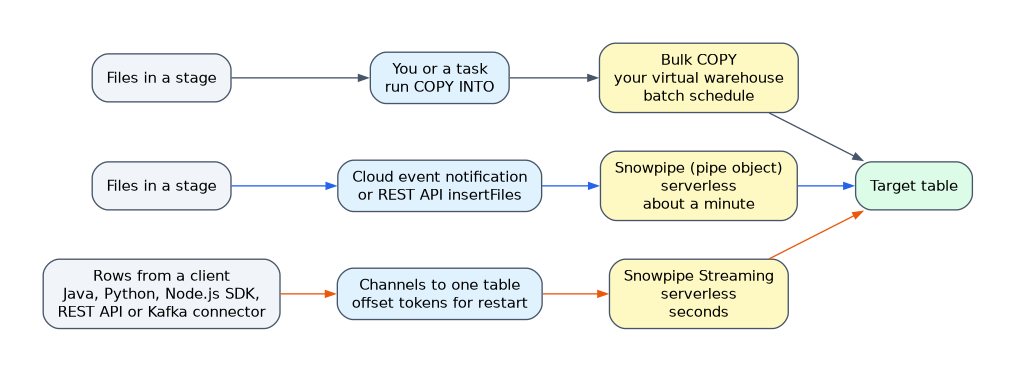
| Bulk COPY | Snowpipe | Snowpipe Streaming | |
|---|---|---|---|
| Unit of data | Files in a stage | Files in a stage | Rows from a client |
| Trigger | You or a task run COPY | Cloud event notification or REST API call | The client calls the SDK or REST API |
| Compute | Your virtual warehouse | Serverless, managed by Snowflake | Serverless, managed by Snowflake |
| Typical latency | Batch schedule | About a minute after the file arrives, not guaranteed | Seconds |
| Load metadata | 64 days, per table | 14 days, per pipe | Offset tokens per channel |
Default ON_ERROR | ABORT_STATEMENT | SKIP_FILE | Not applicable |
Snowpipe: the pipe object
A pipe is a named object that wraps one COPY INTO statement.
CREATE PIPE sales_pipe
  AUTO_INGEST = TRUE
AS
  COPY INTO sales
  FROM @s3_stage/sales/
  FILE_FORMAT = (TYPE = PARQUET)
  MATCH_BY_COLUMN_NAME = CASE_INSENSITIVE;
Snowpipe learns about new files in one of two ways.
- Auto ingest (
AUTO_INGEST = TRUE): cloud event notifications announce new files. On Amazon S3 they arrive through Amazon SQS, SNS or EventBridge; on Google Cloud Storage through Pub/Sub with a notification integration; on Azure through Event Grid with a notification integration. For S3,SHOW PIPESlists thenotification_channelSQS queue ARN that you add to the bucket's event notification. - REST API: the client calls the
insertFilesendpoint with a list of staged files, authenticated with key pair authentication.insertReportandloadHistoryScanreturn load status. This is the classic way to use Snowpipe with internal stages; auto ingest for internal stages is a preview feature on AWS only.
Snowpipe behavior to know
- No warehouse. Snowpipe uses Snowflake managed compute, billed by Snowflake per GB loaded. You never size a warehouse for it.
- Deduplication. Each pipe keeps load metadata for 14 days and skips files it already loaded.
- Order is not guaranteed. Snowpipe generally loads older files first, but files can load out of order.
- Errors. The default
ON_ERRORisSKIP_FILE, andABORT_STATEMENTis not supported in a pipe. - Backfill.
ALTER PIPE ... REFRESHqueues files staged in the last 7 days that the pipe has not loaded, useful after creating a pipe over existing files. - Status.
SYSTEM$PIPE_STATUS('sales_pipe')shows whether the pipe is running and how many files are pending. Load history is in theCOPY_HISTORYtable function and view; credit use is in thePIPE_USAGE_HISTORYview. - Pause.
ALTER PIPE ... SET PIPE_EXECUTION_PAUSED = TRUEpauses it.
You cannot change the COPY statement of an existing pipe with ALTER PIPE. Recreate the pipe, and remember that CREATE OR REPLACE PIPE starts with empty load history, so files could load again. Pause the pipe and plan the switch.
File sizing still matters. Aim for 100 to 250 MB compressed, and if data arrives slowly, create a new file about once per minute rather than many tiny files.
Snowpipe Streaming
Snowpipe Streaming skips files entirely. A client SDK or the REST API opens channels to a table and appends rows. Snowflake buffers and commits them, and rows become queryable within seconds.
| Concept | Meaning |
|---|---|
| Channel | A logical, ordered connection from a client to one target table |
| Offset token | A marker the client stores with each batch, so after a restart it knows the last committed row and resumes without gaps or duplicates |
| Pipe object | In the high-performance architecture, rows flow through a PIPE that can reorder, cast and transform columns before commit |
| SDKs | Java, Python and Node.js SDKs, plus a REST API for lightweight clients |
The Snowflake Connector for Kafka can ingest with Snowpipe Streaming, which gives lower latency than its file based Snowpipe mode. Snowpipe Streaming can also write to Snowflake managed Apache Iceberg tables.
Look at the source. "Files land in S3 and must load automatically" is Snowpipe with auto ingest. "IoT devices or Kafka send rows and need data in seconds" is Snowpipe Streaming. "Load last night's export at 2 a.m." is bulk COPY, often in a task.
Common mistakes
Assigning a warehouse to Snowpipe. Pipes have no warehouse parameter; compute is serverless.
Expecting files in order. Snowpipe does not guarantee load order. If order matters, sort with a timestamp column after loading.
Expecting ALTER PIPE REFRESH to load old files. It only looks at files staged within the last 7 days. Use a bulk COPY for older history.
Staging files for streaming. Snowpipe Streaming needs no stage and no files; rows go straight from the client to the table.
What to remember for the exam
- Snowpipe = files, event driven or REST driven, serverless, about a minute of latency.
- Snowpipe Streaming = rows from SDK, REST API or the Kafka connector, serverless, seconds of latency, no files.
- A pipe wraps a single COPY INTO statement;
AUTO_INGEST = TRUEuses cloud event notifications. - Pipe load metadata lasts 14 days (bulk COPY: 64 days). Default
ON_ERRORisSKIP_FILE. ALTER PIPE ... REFRESHloads files staged in the last 7 days.SYSTEM$PIPE_STATUSshows pipe health.- Channels and offset tokens let streaming clients resume without duplicates.
Check yourself
What tells an auto ingest pipe on S3 that a new file has arrived?
An S3 event notification delivered to the SQS queue that Snowflake provides for the pipe.
What is the default ON_ERROR setting for Snowpipe?
SKIP_FILE, which skips any file with errors and loads the others.
Which service fits sensors that send rows that must be queryable within seconds?
Snowpipe Streaming, which appends rows through channels without staging files.
Topic 4 of 7 in Data Loading, Unloading, and Connectivity
Test yourself on Data Loading, Unloading, and Connectivity
The full Snowflake SnowPro Core COF-C03 question bank has 845 questions, with timed practice exams and an explanation for every answer.
This study guide is independent and is not affiliated with, endorsed by, or sponsored by Snowflake. Vendor names, certification names and exam codes are trademarks of their respective owners and are used for identification only.