Data Collaboration · Topic 1 of 5
Time Travel and Fail-safe
How Snowflake Time Travel and Fail-safe protect data: retention periods by edition and table type, AT and BEFORE queries, UNDROP, and who can recover.
- 6 min
- Includes a diagram
- DATA_RETENTION_TIME_IN_DAYS default is 1 day. Standard Edition: 0 or 1. Enterprise Edition or higher: up to 90 days for permanent objects. Transient and temporary: 0 or 1.
- MIN_DATA_RETENTION_TIME_IN_DAYS is set by ACCOUNTADMIN at account level; the effective retention is the larger value.
- AT and BEFORE take TIMESTAMP, OFFSET or STATEMENT. BEFORE(STATEMENT => query ID) undoes a bad statement.
What it is
Snowflake protects data without manual backups through two layers of history. Time Travel lets you query, clone and restore data as it was in the past, for a retention period you control. Fail-safe is a further 7-day period after Time Travel ends, when only Snowflake can recover the data.
Together with cloning, replication and sharing, these features make up the "collaboration and protection" part of the exam. This page covers the protection side: what history exists, how long it lasts, and who can use it.
How it works
Time Travel retention
Every change to a table creates new micro-partitions, and the old ones are kept for the retention period. The parameter DATA_RETENTION_TIME_IN_DAYS sets that period and can be set on the account, database, schema or table. Lower levels override higher ones.
| Edition and object | Allowed retention | Default |
|---|---|---|
| Standard Edition, any table | 0 or 1 day | 1 day |
| Enterprise Edition or higher, permanent objects | 0 to 90 days | 1 day |
| Enterprise Edition or higher, transient and temporary tables | 0 or 1 day | 1 day |
Setting the value to 0 turns Time Travel off for that object. Dropped objects with 0 retention cannot be restored with UNDROP.
MIN_DATA_RETENTION_TIME_IN_DAYS is an account-level parameter that only ACCOUNTADMIN can set. It does not replace DATA_RETENTION_TIME_IN_DAYS. The effective retention for an object is the larger of the two values, so it stops anyone from setting a dangerously short period.
Querying the past
Add an AT or BEFORE clause to the FROM clause or to a CLONE statement. Three ways to name the point in time exist:
| Clause option | Meaning | Example |
|---|---|---|
| TIMESTAMP | A specific date and time | AT(TIMESTAMP => '2026-11-01 09:00:00'::TIMESTAMP_LTZ) |
| OFFSET | Seconds back from now, as a negative number | AT(OFFSET => -3600) for one hour ago |
| STATEMENT | A query ID | BEFORE(STATEMENT => '<query_id>') for the state just before that query ran |
SELECT * FROM orders AT(OFFSET => -60*30);
CREATE TABLE orders_restore CLONE orders BEFORE(STATEMENT => '01b2c3d4-0000-1111-0000-000000000000');
BEFORE with STATEMENT is the classic answer when someone ran a bad UPDATE or DELETE and you need the table exactly as it was just before that query.
Restoring dropped objects
Dropped objects stay in Time Travel for their retention period. UNDROP restores them: UNDROP TABLE, UNDROP SCHEMA and UNDROP DATABASE are the ones to know. SHOW TABLES HISTORY lists dropped tables still in retention.
UNDROP fails if an object with the same name already exists. Rename the current object first, then run UNDROP.
Fail-safe
!Data protection timeline: changed or dropped data stays in Time Travel for the retention period, where users can query, clone or UNDROP it; permanent objects then spend 7 fixed days in Fail-safe, recoverable only by Snowflake Support, before being purged; transient and temporary tables skip Fail-safe. When Time Travel retention ends for a permanent object, its historical data moves into Fail-safe for 7 days. This period is fixed and cannot be changed or turned off for permanent tables.
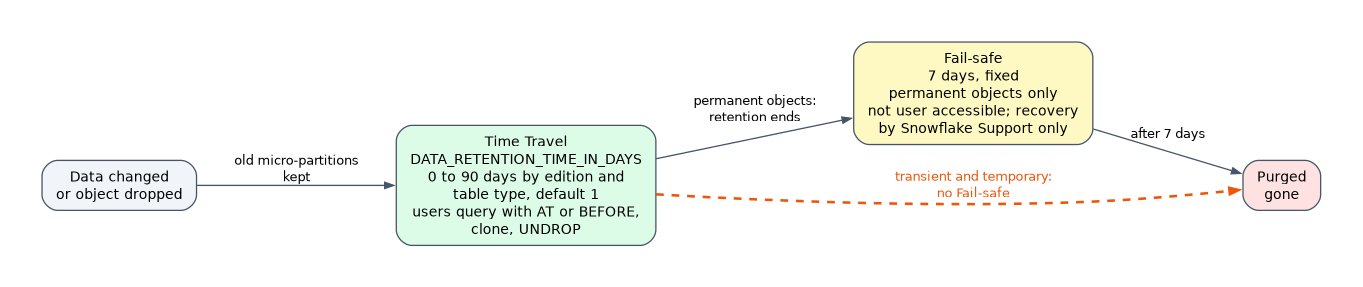
- Fail-safe is not user accessible. You cannot query it, clone from it or UNDROP from it.
- Recovery is a best-effort service done by Snowflake after you open a case with Snowflake Support, and it can take hours to days.
- Transient and temporary tables have no Fail-safe. That is the main reason to choose them for staging or easily rebuilt data.
Fail-safe is a last-resort disaster recovery net, not a backup you can use. If a question asks how a user can restore yesterday's data themselves, the answer is Time Travel, never Fail-safe.
Storage cost
Both layers hold real micro-partitions, so both add to storage cost. A table with heavy updates and 90-day retention can store several times its active size. Long retention on high-churn tables is a common cost trap, and transient tables (0 or 1 day of Time Travel and no Fail-safe) reduce it.
| Feature | Duration | Who can access | Set by |
|---|---|---|---|
| Time Travel | 0 to 90 days (edition and table type limits) | Users with privileges on the object | DATA_RETENTION_TIME_IN_DAYS |
| Fail-safe | 7 days, permanent objects only | Snowflake only, through Support | Fixed |
Common mistakes
Thinking Fail-safe extends Time Travel for users. The 7 days after Time Travel are invisible to you. A user query with AT or BEFORE past the retention period fails.
Assuming 90 days on Standard Edition. Standard Edition allows only 0 or 1 day. Extended Time Travel up to 90 days needs Enterprise Edition or higher, and only for permanent objects.
Expecting Fail-safe on transient tables. Transient and temporary tables never have Fail-safe, whatever the edition.
Forgetting the name conflict on UNDROP. If a new table with the same name was created after the drop, UNDROP fails until you rename the new one.
Using a positive OFFSET. OFFSET is seconds in the past, written as a negative number such as -3600.
What to remember for the exam
- DATA_RETENTION_TIME_IN_DAYS default is 1 day. Standard Edition: 0 or 1. Enterprise Edition or higher: up to 90 days for permanent objects. Transient and temporary: 0 or 1.
- MIN_DATA_RETENTION_TIME_IN_DAYS is set by ACCOUNTADMIN at account level; the effective retention is the larger value.
- AT and BEFORE take TIMESTAMP, OFFSET or STATEMENT. BEFORE(STATEMENT => query ID) undoes a bad statement.
- UNDROP works for tables, schemas and databases while they are in Time Travel.
- Fail-safe is 7 days, starts after Time Travel ends, applies to permanent objects only, and only Snowflake Support can recover from it.
- Both Time Travel and Fail-safe consume storage and add to cost.
When a scenario says "without contacting Snowflake" or "the user must restore", eliminate every option that mentions Fail-safe.
Check yourself
A table was dropped 3 days ago and has DATA_RETENTION_TIME_IN_DAYS = 1. Can the user restore it with UNDROP?
No. Time Travel ended after 1 day, so the data is in Fail-safe and only Snowflake Support can attempt recovery.
What is the longest Time Travel retention for a transient table on Enterprise Edition?
One day. Transient and temporary tables allow only 0 or 1 day and have no Fail-safe.
How do you see a table exactly as it was before a faulty DELETE ran?
Query or clone it with BEFORE(STATEMENT => '<query_id>') using the query ID of the DELETE.
Topic 1 of 5 in Data Collaboration
Test yourself on Data Collaboration
The full Snowflake SnowPro Core COF-C03 question bank has 845 questions, with timed practice exams and an explanation for every answer.
This study guide is independent and is not affiliated with, endorsed by, or sponsored by Snowflake. Vendor names, certification names and exam codes are trademarks of their respective owners and are used for identification only.