Performance Optimization · Topic 2 of 9
Warehouse Configuration - Queuing, Spilling, Resizing and Multi-Cluster
Tune virtual warehouses: queuing and concurrency, spilling, auto suspend and resume, scale up versus scale out, and multi-cluster scaling policies.
- 5 min
- Includes a diagram
- Scale up for complex queries and spilling; scale out for concurrency and queuing.
MAX_CONCURRENCY_LEVELdefault 8; queued timeout default 0; statement timeout default 172800 seconds.- Auto suspend default is 600 seconds in SQL; billing minimum is 60 seconds per start; suspend clears the data cache.
What it is
A virtual warehouse is the compute that runs queries. Its size sets how much power and memory each query gets. Its cluster count sets how many queries can run at the same time. These are two different dials, and the exam often asks which one fits the symptom.
How it works
Size versus clusters
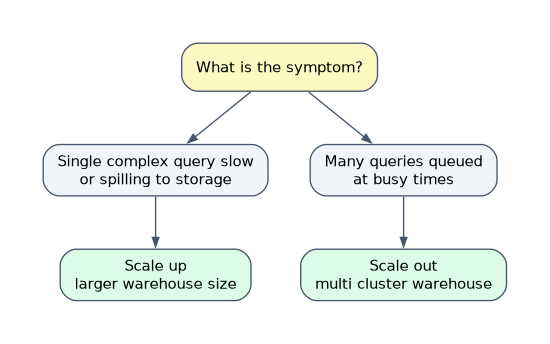
| Symptom | Dial | Action |
|---|---|---|
| One heavy query is slow, or it spills | Size | Scale up (resize the warehouse) |
| Many concurrent queries are queued | Cluster count | Scale out (multi-cluster warehouse) |
| A query is slow and the warehouse is idle otherwise | Size | Scale up |
| Load varies from quiet to bursts | Cluster count | Multi-cluster in auto-scale mode |
Each size up doubles the credits per hour and gives roughly double the compute. A query that scales well may finish in half the time, so the total credits stay about the same while the wait falls.
Scale up and down (resizing)
ALTER WAREHOUSE wh SET WAREHOUSE_SIZE = 'LARGE' changes the size at any time.
- Queries already running keep the old resources; new queries use the new size.
- Resizing helps most for large, complex queries and spilling. It does not help concurrency much.
- Suspending the warehouse clears its local disk cache.
- Small queries gain nothing from a very large warehouse. They only cost more.
Queuing
When a warehouse has no free capacity, new queries wait in a queue.
MAX_CONCURRENCY_LEVEL(default 8) is the number of statements that can run in parallel on a cluster. Lowering it gives each query more resources.STATEMENT_QUEUED_TIMEOUT_IN_SECONDS(default 0, no limit) cancels queries that wait too long.STATEMENT_TIMEOUT_IN_SECONDS(default 172800, two days) cancels queries that run too long.QUEUED_OVERLOAD_TIMEin query history shows time spent waiting because the warehouse was busy;QUEUED_PROVISIONING_TIMEshows time spent waiting for the warehouse to start.- The
WAREHOUSE_LOAD_HISTORYview showsAVG_RUNNING,AVG_QUEUED_LOADandAVG_QUEUED_PROVISIONING.
Queuing means "not enough concurrency", so the first answer is more clusters or a separate warehouse for the workload. A larger size only helps queuing if queries finish faster as a result.
Spilling
When an operator needs more memory than the warehouse has, data spills first to local disk and then to remote storage. Remote spilling is much slower.
| Fix | When |
|---|---|
| Larger warehouse | The standard first response; more memory per query |
| Smaller batches or more selective filters | Reduces data held in memory |
| Remove needless sorts and wide joins | Less to hold |
| Snowpark-optimized warehouse | Memory heavy jobs such as ML training; 16 times the memory per node of a standard warehouse |
Spilling shows in the Query Profile and in the BYTES_SPILLED_TO_LOCAL_STORAGE and BYTES_SPILLED_TO_REMOTE_STORAGE columns.
Auto suspend and auto resume
| Property | Default and meaning |
|---|---|
AUTO_SUSPEND | Seconds of idle time before suspending. SQL default is 600; a value of 0 or NULL means never suspend |
AUTO_RESUME | TRUE by default; the next query starts the warehouse |
| Minimum billing | 60 seconds each time the warehouse starts |
Short suspend times save credits for bursty work. They lose the warehouse data cache each time. For repeated queries over the same data, such as dashboards, a longer suspend time can be cheaper because the cache stays warm. Use short values for ETL warehouses that run in batches.
Multi-cluster warehouses
A multi-cluster warehouse runs between MIN_CLUSTER_COUNT and MAX_CLUSTER_COUNT clusters of the same size. The maximum depends on size, from 300 clusters for X-Small to Medium down to 10 for 4X-Large and above, and Snowsight allows at most 10, so higher counts are set in SQL. It needs Enterprise Edition or higher.
| Mode | Setting | Behavior |
|---|---|---|
| Maximized | MIN equals MAX | All clusters run whenever the warehouse is running |
| Auto-scale | MIN less than MAX | Clusters start and stop as load changes |
| Scaling policy | Behavior | Choose it for |
|---|---|---|
| STANDARD (default) | Starts a cluster as soon as queries queue or resources look short; shuts down the least loaded cluster after a sustained period of low load | Minimal waiting |
| ECONOMY | Starts a cluster only if there is enough work to keep it busy for about six minutes | Saving credits, tolerating some queuing |
Multi-cluster adds throughput for many users, not speed for one query. Each cluster has its own cache, so a query on a new cluster starts cold.
Choosing a configuration
- Separate warehouses for ETL, BI and data science so one workload does not queue another.
- Start small, measure queue and spill, then size or scale accordingly.
- Use resource monitors so a large or multi-cluster warehouse cannot run unchecked.
Common mistakes
Scaling up to fix queuing. Add clusters; resize only if queries become fast enough to clear the queue.
Using multi-cluster for one slow query. It does not make a single query faster.
Setting auto suspend to 60 seconds for a dashboard warehouse. The cache is lost between loads and credits may not fall.
Forgetting the edition. Multi-cluster warehouses need Enterprise Edition or higher.
What to remember for the exam
- Scale up for complex queries and spilling; scale out for concurrency and queuing.
MAX_CONCURRENCY_LEVELdefault 8; queued timeout default 0; statement timeout default 172800 seconds.- Auto suspend default is 600 seconds in SQL; billing minimum is 60 seconds per start; suspend clears the data cache.
- Multi-cluster: maximum cluster count depends on size (10 in Snowsight, more in SQL for smaller sizes), Enterprise or higher, STANDARD or ECONOMY policy, maximized or auto-scale.
- Snowpark-optimized warehouses give much more memory for memory bound jobs.
Check yourself
Fifty analysts run short queries at 9 a.m. and many queue. What is the fix?
Use a multi-cluster warehouse in auto-scale mode with the STANDARD policy, which adds clusters when queries queue.
A single report query spills to remote storage. What first?
Scale up the warehouse for more memory, or use a Snowpark-optimized warehouse if the job is memory heavy.
Why can a very short auto suspend raise cost?
Each restart bills at least 60 seconds and clears the cache, so repeated queries rescan storage.
Topic 2 of 9 in Performance Optimization
Test yourself on Performance Optimization
The full Snowflake ARA-C01 question bank has 687 questions, with timed practice exams and an explanation for every answer.
This study guide is independent and is not affiliated with, endorsed by, or sponsored by Snowflake. Vendor names, certification names and exam codes are trademarks of their respective owners and are used for identification only.