Data Engineering · Topic 12 of 16
Dynamic Tables and Staging Layers
Design declarative pipelines with dynamic tables: target lag, refresh modes, downstream lag and cost, plus raw, staging and curated table layers.
- 5 min
- Includes a diagram
- Dynamic table: query plus TARGET_LAG plus WAREHOUSE; minimum lag is 60 seconds;
DOWNSTREAMlets upstream tables follow dependents. - Refresh modes: INCREMENTAL, FULL and AUTO; AUTO is decided at creation.
- Shorter lag means more refreshes and more credits.
What it is
A dynamic table is a table defined by a query. You declare the query and how stale the result may be, and Snowflake refreshes it for you. It replaces hand built streams, tasks and MERGE statements when the logic is a SELECT.
Staging layers are the tables a pipeline passes through on the way from raw files to reporting. An Architect decides how many layers there are, what each stores and which table type each uses.
How it works
Creating a dynamic table
CREATE OR REPLACE DYNAMIC TABLE orders_clean
  TARGET_LAG = '5 minutes'
  WAREHOUSE = transform_wh
  REFRESH_MODE = AUTO
AS
  SELECT o.id, o.amount, c.region
FROM raw_orders o JOIN customers c ON o.customer_id = c.id;- TARGET_LAG is the maximum staleness you accept. It is a time such as seconds, minutes, hours or days, with a 60 second minimum, or
DOWNSTREAM. - WAREHOUSE runs the refreshes. You pay for that compute, plus storage for the stored result.
- REFRESH_MODE is
AUTO,FULLorINCREMENTAL. - INITIALIZE is
ON_CREATE(default) orON_SCHEDULE.
Refresh modes
| Mode | What happens | Choose it when |
|---|---|---|
| INCREMENTAL | Only changes in the sources are processed | Few rows change between refreshes and the query is supported |
| FULL | The whole query is rerun | The query is not supported incrementally, or most rows change |
| AUTO | Snowflake picks incremental if it can, otherwise full | You are unsure, but check which mode it chose |
AUTO is decided when the table is created. If it picks full, the table can become expensive as the source grows, so check SHOW DYNAMIC TABLES or the refresh history for the mode in use.
Target lag and chains
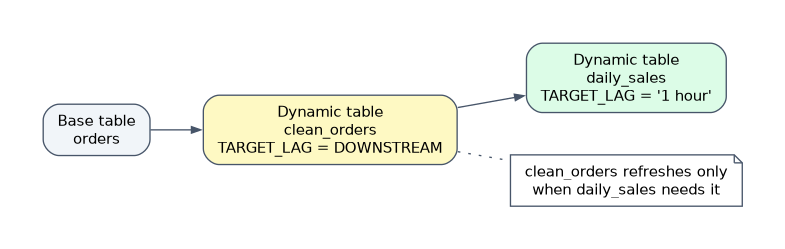
DOWNSTREAM means "refresh only as often as the tables that depend on me need". In a chain, set a real lag on the final table and DOWNSTREAM on the ones upstream. Snowflake then schedules the whole chain to meet the final lag, and no layer refreshes more often than needed.
A shorter lag means more refreshes and more warehouse credits. A refresh with nothing new in the sources does very little work, but a very short lag on a large full refresh table is costly.
Lag is a target, not a guarantee. If refreshes take longer than the lag, the table falls behind, so size the warehouse for refresh duration.
Operating dynamic tables
ALTER DYNAMIC TABLE ... SUSPENDstops refreshes andRESUMErestarts them.ALTER DYNAMIC TABLE ... REFRESHforces a manual refresh.- Refresh history is available through the
DYNAMIC_TABLE_REFRESH_HISTORYtable function in INFORMATION_SCHEMA and the matching ACCOUNT_USAGE view. - A dynamic table is read only. You cannot run INSERT, UPDATE or DELETE on it, because the query defines the content.
- Dynamic tables can read other dynamic tables, views and tables, so they form a graph.
| Need | Better fit |
|---|---|
| Declarative SELECT with joins and aggregates, freshness in minutes | Dynamic table |
| Procedural logic, calls to external systems, custom error handling | Streams, tasks and stored procedures |
| Single table aggregate read often, no warehouse to manage | Materialized view |
A streams and tasks pipeline gives full control over timing and logic. A dynamic table gives less code and automatic dependency handling, but only for what a query can express.
Staging layers and tables
A common design uses three layers, often called raw, staging (or refined) and curated.
| Layer | Content | Typical table type | Why |
|---|---|---|---|
| Raw | Files landed as is, often a VARIANT column plus load metadata | Transient or permanent | Keep the original for replay |
| Staging | Typed, deduplicated, cleaned data | Transient | Can be rebuilt from raw, so skip Fail safe cost |
| Curated and consumption | Business models, aggregates, secure views | Permanent | Needs Time Travel and Fail safe protection |
Design points an Architect weighs:
- Replay. Keep raw data long enough to rebuild downstream layers after a logic bug.
- Cost. Transient tables and a Time Travel retention of 0 or 1 day on staging remove most storage overhead.
- Isolation. Separate schemas per layer make grants simple: loaders write to raw, analysts read only curated.
- Load method. Snowpipe or COPY fills raw. Dynamic tables, or streams with tasks, move data between later layers.
- Stage versus table. A stage holds files; a staging table holds rows. Data that is queried repeatedly belongs in a table.
Common mistakes
Setting a short lag on every table in a chain. Use DOWNSTREAM for the upstream tables.
Trusting AUTO without checking. It may fall back to full refresh and cost far more than expected.
Expecting to edit a dynamic table. It is read only, and changing the content means changing the query.
Making every layer permanent. Staging is rebuildable and does not need Fail safe storage.
What to remember for the exam
- Dynamic table: query plus TARGET_LAG plus WAREHOUSE; minimum lag is 60 seconds;
DOWNSTREAMlets upstream tables follow dependents. - Refresh modes: INCREMENTAL, FULL and AUTO; AUTO is decided at creation.
- Shorter lag means more refreshes and more credits.
- Use streams and tasks for procedural logic; use dynamic tables for declarative SQL.
- Raw, staging and curated layers: transient for rebuildable staging, permanent for curated.
Check yourself
Three dynamic tables feed each other and only the last one needs a 10 minute lag. What lag do the first two use?
DOWNSTREAM, so they refresh only as often as the final table needs.
Which refresh mode must you use if the query cannot be maintained incrementally?
FULL. AUTO would also fall back to full in that case.
Why make the staging layer transient?
The data can be rebuilt from raw, and transient tables avoid Fail safe storage cost.
Topic 12 of 16 in Data Engineering
Test yourself on Data Engineering
The full Snowflake ARA-C01 question bank has 687 questions, with timed practice exams and an explanation for every answer.
This study guide is independent and is not affiliated with, endorsed by, or sponsored by Snowflake. Vendor names, certification names and exam codes are trademarks of their respective owners and are used for identification only.