Data Engineering · Topic 1 of 16
Choosing Loading and Unloading Solutions and Data Sources
Pick the right Snowflake loading or unloading design from the data source: data at rest, data in motion, external sources and formats, and latency needs.
- 5 min
- Includes a diagram
- Start from source kind (at rest or in motion) and latency, then pick the path.
- Batch files: COPY. Arriving files: Snowpipe. Rows in seconds: Snowpipe Streaming. No copy: external or Iceberg table.
- Database changes (CDC) need a connector or Openflow, then streams and MERGE to apply them.
What it is
An Architect is rarely asked how a single command works. The question is "files land in S3 every night", "a bank needs card events in seconds" or "a partner wants a monthly extract", and you pick the design that fits the business need. The decision starts from the data source, then latency, volume, cost and who owns the files.
Think of every scenario as three choices: where the data starts, how fast it must be queryable, and whether Snowflake must own a copy. The loading and unloading solutions are different answers to those three choices.
How it works
Data at rest and data in motion
Data at rest is data that already sits in files or databases and waits to be read: files in cloud storage, a nightly export, a historical archive. Data in motion is data that is still being produced: application events, IoT readings, change records from a database log.
| Source kind | Typical examples | Natural Snowflake path |
|---|---|---|
| At rest, files | CSV, JSON, Parquet in S3, Azure Blob or GCS | Bulk COPY INTO, or Snowpipe when files keep arriving |
| At rest, you want no copy | Data lake files owned by another team | External table or Iceberg table |
| In motion, files | Micro batches dropped every minute | Snowpipe with auto ingest |
| In motion, rows | Kafka topics, application events, IoT | Snowpipe Streaming, often through the Kafka connector |
| In motion, database changes | CDC from an OLTP database | Change connector or Openflow, then streams and MERGE |
External sources and formats
Snowflake reads delimited text (CSV, TSV), JSON, Avro, ORC, Parquet and XML. Semi-structured formats load into a VARIANT column or are mapped to typed columns while loading.
Column based formats such as Parquet and ORC carry their own schema and load efficiently. JSON and CSV are flexible but cost more to parse and give no type guarantees. When a team controls the producer, Parquet is usually the better contract.
Unstructured files (images, PDFs, audio) are not loaded as rows. They stay in a stage and are read through directory tables and file URLs, or processed with Snowpark or Cortex functions.
Which solution meets which need
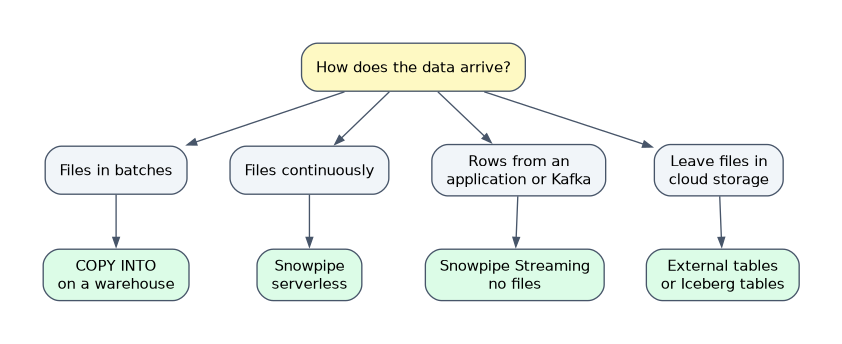
| Business need | Choose | Why |
|---|---|---|
| Nightly warehouse refresh from files | Bulk COPY INTO on a virtual warehouse | Predictable batch, you control the warehouse size |
| Files arrive all day, a few minutes of delay is fine | Snowpipe with auto ingest | Serverless, no warehouse to keep running |
| Rows needed in seconds from an application | Snowpipe Streaming | Row level ingestion with no files |
| Keep data in the lake, query occasionally | External table or Iceberg table | No load step, no copy of the data |
| Replicate an operational database | CDC connector or Openflow | Captures inserts, updates and deletes |
| Give data to a partner outside Snowflake | COPY INTO <location> unload, or sharing if they have Snowflake | Files for non Snowflake consumers |
For unloading, the main tool is COPY INTO <location>, which writes query results as files to an internal or external stage. If the consumer also has Snowflake, Secure Data Sharing avoids files altogether, so an unload is the answer only when the consumer needs files.
When the scenario names a latency (seconds, minutes, nightly), match it directly: seconds point to Snowpipe Streaming, minutes to Snowpipe, nightly to bulk COPY.
Trade-offs an Architect weighs
- Latency against cost. A warehouse that runs COPY every minute costs more than a pipe for a trickle of data, because each resume bills at least 60 seconds of warehouse time.
- Copy against query in place. External and Iceberg tables avoid duplication and load jobs, but queries are generally slower than on native tables unless you add materialized views or use managed Iceberg tables.
- Simplicity against control. Snowpipe is simple, but you cannot tune its compute. COPY lets you pick a warehouse size and run transformations in the statement.
- Format against reliability. A self describing format such as Parquet reduces type surprises compared with CSV.
Common mistakes
Choosing streaming for a nightly file. Snowpipe Streaming is for rows that need low latency. A nightly file is a bulk COPY job.
Loading when you only need to query. If the files belong to another system and are read rarely, an external or Iceberg table avoids a pointless copy.
Unloading when sharing would do. If the receiver has a Snowflake account, sharing gives live data with no files to manage.
Treating unstructured data as table data. Images and documents stay in stages; only extracted results become rows.
What to remember for the exam
- Start from source kind (at rest or in motion) and latency, then pick the path.
- Batch files: COPY. Arriving files: Snowpipe. Rows in seconds: Snowpipe Streaming. No copy: external or Iceberg table.
- Database changes (CDC) need a connector or Openflow, then streams and MERGE to apply them.
- Unload with
COPY INTO <location>; use Secure Data Sharing when the consumer is on Snowflake. - Parquet, ORC and Avro carry a schema; CSV and JSON do not.
Check yourself
Files land in S3 all day and a delay of a few minutes is acceptable. Which loading path fits?
Snowpipe with auto ingest, because it is serverless and loads files as they arrive.
A partner on its own Snowflake account needs a monthly dataset. Unload or share?
Share it with Secure Data Sharing, because no files or copies are needed.
A data lake team owns Parquet files and analysts query them rarely. What avoids a load job?
An external table or an Iceberg table over the files, which reads the data in place.
Topic 1 of 16 in Data Engineering
Test yourself on Data Engineering
The full Snowflake ARA-C01 question bank has 687 questions, with timed practice exams and an explanation for every answer.
This study guide is independent and is not affiliated with, endorsed by, or sponsored by Snowflake. Vendor names, certification names and exam codes are trademarks of their respective owners and are used for identification only.