Accounts and Security · Topic 13 of 17
Private Connectivity - AWS PrivateLink, Azure Private Link, Google PSC
Keep Snowflake traffic off the public internet with AWS PrivateLink, Azure Private Link or Google Private Service Connect, and block the public path.
- 5 min
- Includes a diagram
- AWS PrivateLink, Azure Private Link and Google PSC all need Business Critical or higher.
- The sequence is: get config, create endpoint, authorize, set DNS, then block public access with a network policy.
SYSTEM$GET_PRIVATELINK_CONFIG,SYSTEM$AUTHORIZE_PRIVATELINK,SYSTEM$GET_PRIVATELINKandSYSTEM$REVOKE_PRIVATELINKare run by ACCOUNTADMIN.
What it is
Private connectivity lets a customer network reach the Snowflake service over the cloud provider's private backbone, without the public internet. Each cloud has its own service: AWS PrivateLink, Azure Private Link and Google Cloud Private Service Connect (PSC).
All three need Business Critical Edition or higher. The pattern is the same everywhere: create a private endpoint in your network, authorize it in Snowflake, point DNS at it, and then block the public path with a network policy.
How it works
The common steps
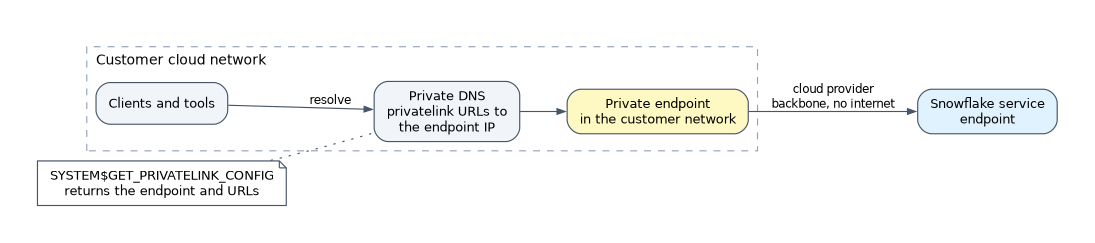
- As ACCOUNTADMIN, call
SYSTEM$GET_PRIVATELINK_CONFIGto get the values for your account: the endpoint identifier and the URLs that DNS must resolve. - Create the private endpoint in your cloud network, using the identifier from step 1.
- As ACCOUNTADMIN, call
SYSTEM$AUTHORIZE_PRIVATELINKwith your cloud account identifier and a token from your cloud, so Snowflake accepts the endpoint. - Create DNS records so the account URL and related URLs resolve to the endpoint's private IP address. Snowflake does not manage your DNS or firewalls.
- Test, then block public access with a network policy.
SYSTEM$GET_PRIVATELINK verifies the authorization and SYSTEM$REVOKE_PRIVATELINK removes it.
Authorization proves that you own the cloud account that owns the endpoint. That is why each cloud asks for a short lived token or identity from your own cloud account.
Differences between the three clouds
| Item | AWS PrivateLink | Azure Private Link | Google PSC |
|---|---|---|---|
| Edition | Business Critical or higher | Business Critical or higher | Business Critical or higher |
Endpoint value from SYSTEM$GET_PRIVATELINK_CONFIG | privatelink-vpce-id | privatelink-pls-id (alias) | Service attachment |
| What you create | VPC interface endpoint | Private endpoint (by alias or resource ID) | Reserved IP address plus a forwarding rule |
What you give to SYSTEM$AUTHORIZE_PRIVATELINK | 12 digit AWS account ID and a federation token | Private endpoint resource ID and an access token | GCP project ID and an access token |
| Where the token comes from | aws sts get-federation-token (valid 12 hours) | az account get-access-token | gcloud auth print-access-token (1 hour by default) |
| Rule type in network policy | AWSVPCEID | AZURELINKID | GCPPSCID |
On Azure the new endpoint shows a Pending connection state until you authorize it, after which it becomes Approved. On AWS the VPC and Snowflake can be in different regions if you enable the cross-region option for the endpoint.
DNS and URLs
With private connectivity the account is reached through a privatelink URL, such as <account>.<region>.privatelink.snowflakecomputing.com. Snowsight and the OCSP certificate checks also have private URLs, and SYSTEM$GET_PRIVATELINK_CONFIG lists them.
Some clients (JDBC, ODBC and the Spark connector) need the full privatelink host name. Many other clients accept <account_identifier>.privatelink and add the domain suffix themselves.
Internal stages and storage
Internal stage files live in cloud storage owned by Snowflake, so the client also needs a private path to that storage. On AWS, an S3 interface endpoint in your VPC is the recommended route. On Azure, register your subscription with the Azure Storage resource provider before connecting from the private endpoint.
Blocking the public path
Creating a private endpoint does not turn off the public one. Public access stays open until you restrict it.
CREATE NETWORK RULE private_only
  MODE = INGRESS TYPE = AWSVPCEID
  VALUE_LIST = ('vpce-0123456789abcdef0');

CREATE NETWORK RULE block_all_public
  MODE = INGRESS TYPE = IPV4
  VALUE_LIST = ('0.0.0.0/0');

CREATE NETWORK POLICY private_only_policy
  ALLOWED_NETWORK_RULE_LIST = ('private_only')
  BLOCKED_NETWORK_RULE_LIST = ('block_all_public');
Private endpoint rules and IP rules are evaluated separately, so blocking the public path needs its own rule. The policy must then be activated at account or user level.
Related uses
Private connectivity is also used for other traffic paths. SSO with SAML2 or OIDC, External OAuth and Snowflake OAuth for Tableau work with private connectivity. Outbound external access can use the same three services. Snowflake lists the limits of each cloud in its documentation. For example, Google PSC allows a limited number of connections per project and per account.
Common mistakes
Believing the endpoint blocks the public internet. It does not. You must add a network policy to block the public path.
Confusing the Business Critical requirement. All three services need Business Critical or higher. Enterprise cannot use them.
Skipping authorization. The endpoint stays unusable (Pending on Azure) until SYSTEM$AUTHORIZE_PRIVATELINK runs.
Forgetting DNS. Without DNS records that resolve to the private IP, clients still go to the public address.
Forgetting the storage path. Stage and storage traffic needs its own private endpoint, otherwise stage reads use the public path.
What to remember for the exam
- AWS PrivateLink, Azure Private Link and Google PSC all need Business Critical or higher.
- The sequence is: get config, create endpoint, authorize, set DNS, then block public access with a network policy.
SYSTEM$GET_PRIVATELINK_CONFIG,SYSTEM$AUTHORIZE_PRIVATELINK,SYSTEM$GET_PRIVATELINKandSYSTEM$REVOKE_PRIVATELINKare run by ACCOUNTADMIN.- Network rule types for private endpoints:
AWSVPCEID,AZURELINKID,GCPPSCID. - A private endpoint does not by itself disable public access.
Check yourself
A company on Enterprise Edition wants PrivateLink. What is required?
An upgrade to Business Critical or higher, because private connectivity is not available on Enterprise.
After the private endpoint works, users can still log in from home over the internet. Why?
Public access stays open until a network policy blocks it. Add a blocked rule for the public range and an allowed private endpoint rule.
What does
SYSTEM$AUTHORIZE_PRIVATELINKdo?It tells Snowflake to accept the private endpoint from your cloud account, using an account identifier and a token that proves you own it.
Topic 13 of 17 in Accounts and Security
Test yourself on Accounts and Security
The full Snowflake ARA-C01 question bank has 687 questions, with timed practice exams and an explanation for every answer.
This study guide is independent and is not affiliated with, endorsed by, or sponsored by Snowflake. Vendor names, certification names and exam codes are trademarks of their respective owners and are used for identification only.