Accounts and Security · Topic 2 of 17
Snowflake Parameters - Account, Object, Session and the Hierarchy
Learn the three Snowflake parameter types, how account, object and session parameters override each other, and how to set them centrally across accounts.
- 5 min
- Includes a diagram
- Three types: account, object, session; the lower level overrides the higher one.
- Session parameters: account, then user, then session. Object parameters follow object containment.
- For timeout parameters set in more than one place, the lower value wins.
What it is
Parameters control how Snowflake behaves. Some are set once for the whole account, some belong to a user, a warehouse, a database or a table, and some change only the current session. The exam tests which type a parameter is, who can set it, and which value wins when the same parameter is set at several levels.
There are three types: account parameters, object parameters and session parameters. Every parameter has a default, and a value set lower in the hierarchy overrides the one above it.
How it works
The three parameter types
| Type | Scope | Set with | Examples |
|---|---|---|---|
| Account | The whole account only | ALTER ACCOUNT SET | PERIODIC_DATA_REKEYING, REQUIRE_STORAGE_INTEGRATION_FOR_STAGE_CREATION, PREVENT_UNLOAD_TO_INLINE_URL, MIN_DATA_RETENTION_TIME_IN_DAYS |
| Object | A specific object (and its children) | ALTER <object> SET or at creation | DATA_RETENTION_TIME_IN_DAYS, MAX_CONCURRENCY_LEVEL, STATEMENT_TIMEOUT_IN_SECONDS, STATEMENT_QUEUED_TIMEOUT_IN_SECONDS, DEFAULT_DDL_COLLATION |
| Session | One session, a user or the account default | ALTER SESSION SET, ALTER USER SET, ALTER ACCOUNT SET | TIMEZONE, QUERY_TAG, USE_CACHED_RESULT, AUTOCOMMIT, DATE_OUTPUT_FORMAT |
Account parameters apply to the account as a whole and cannot be set on a user or session. Many are security controls, so they are usually changed by ACCOUNTADMIN.
Object parameters are set on an object such as a warehouse, database, schema, table or user. They can also be set on the account, where they act as the default for every object of that kind.
Session parameters change query behavior. They can be set for the whole account, for a user, or inside a running session.
The hierarchy
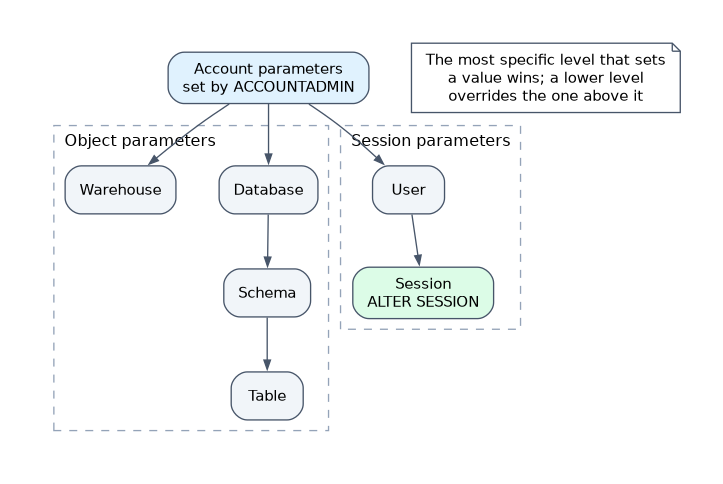 For session parameters the order is account, then user, then session. A value on the user overrides the account value, and a value in the session overrides both.
For object parameters the order follows containment. For example, DATA_RETENTION_TIME_IN_DAYS can be set on the account, a database, a schema and a table, and the closest one to the object wins.
Some parameters are both object and session parameters. STATEMENT_TIMEOUT_IN_SECONDS can be set on a warehouse and in a session; when both exist, the lower value is used. The same rule applies to STATEMENT_QUEUED_TIMEOUT_IN_SECONDS.
A few object parameters have a floor set at account level. MIN_DATA_RETENTION_TIME_IN_DAYS is an account parameter: the effective retention for an object is the larger of its own DATA_RETENTION_TIME_IN_DAYS and this minimum.
Working with parameters
SHOW PARAMETERS LIKE 'DATA_RETENTION%' IN DATABASE sales;
ALTER ACCOUNT SET STATEMENT_TIMEOUT_IN_SECONDS = 3600;
ALTER WAREHOUSE etl_wh SET STATEMENT_TIMEOUT_IN_SECONDS = 7200;
ALTER USER analyst1 SET TIMEZONE = 'Europe/London';
ALTER SESSION SET QUERY_TAG = 'nightly_load';
ALTER ACCOUNT UNSET STATEMENT_TIMEOUT_IN_SECONDS;
SHOW PARAMETERS lists the value, the default and the level at which each value was set, so it shows where an override comes from. UNSET returns the parameter to the next level up.
Central account and additional accounts
Parameters are per account. In a multi account design, set the same security and cost controls in every account, for example a network policy, a statement timeout, storage integration requirements and retention minimums. The central (admin) account is where the standards are decided; each additional account must still be configured, because nothing is inherited across accounts.
Defaults worth knowing. DATA_RETENTION_TIME_IN_DAYS is 1 by default and up to 90 on Enterprise Edition or higher. STATEMENT_TIMEOUT_IN_SECONDS defaults to 172800 (two days). STATEMENT_QUEUED_TIMEOUT_IN_SECONDS defaults to 0, meaning no timeout.
A warehouse level STATEMENT_TIMEOUT_IN_SECONDS does not replace the session value; Snowflake takes the lower of the two. A long running job can still be cut off by a lower session setting.
Common mistakes
Setting an account parameter on a lower level. Account parameters exist only at account level. Session and object parameters are the ones you can place lower.
Assuming account values are inherited by other accounts. Each account holds its own parameters.
Forgetting where an override came from. When a query behaves oddly, run SHOW PARAMETERS and read the level column instead of guessing.
Setting retention too low at the object and expecting it to win. A higher MIN_DATA_RETENTION_TIME_IN_DAYS at account level still raises the effective value.
What to remember for the exam
- Three types: account, object, session; the lower level overrides the higher one.
- Session parameters: account, then user, then session. Object parameters follow object containment.
- For timeout parameters set in more than one place, the lower value wins.
SHOW PARAMETERS ... IN <scope>shows value, default and level;UNSETfalls back to the parent.MIN_DATA_RETENTION_TIME_IN_DAYSraises the effective retention above a lower object setting.- In multi account designs every account must be configured; nothing carries across.
Check yourself
Retention is 1 day on the account and 14 on one table. Which applies to the table?
14 days, because the setting closest to the object wins.
A warehouse timeout is 7200 seconds and the session timeout is 3600. What is used?
3600 seconds, because the lower of the two values is used.
Which parameter type applies to the whole account and cannot be set on a user or in a session?
Account parameters, such as
PERIODIC_DATA_REKEYING, which apply to the whole account only.
Topic 2 of 17 in Accounts and Security
Test yourself on Accounts and Security
The full Snowflake ARA-C01 question bank has 687 questions, with timed practice exams and an explanation for every answer.
This study guide is independent and is not affiliated with, endorsed by, or sponsored by Snowflake. Vendor names, certification names and exam codes are trademarks of their respective owners and are used for identification only.