Accounts and Security · Topic 11 of 17
Network Security, Network Policies and Their Privileges
Restrict who can reach Snowflake with network policies: allowed and blocked lists, precedence, activation safeguards, internal stages and privileges.
- 5 min
- Includes a diagram
- Network policies are inbound controls; outbound control is external network access.
- The blocked list wins over the allowed list.
- Precedence: security integration, then user, then account.
What it is
Network security in Snowflake means deciding which networks may connect to the account. A network policy controls inbound traffic to the Snowflake service and, when configured, to internal stages. Outbound traffic is a different feature, covered on the external access page.
By default an account accepts connections from anywhere, and credentials are the only barrier. A network policy adds a second barrier: even a correct password fails from an address that is not allowed.
How it works
Allowed and blocked lists
A network policy has two lists of network rules: ALLOWED_NETWORK_RULE_LIST and BLOCKED_NETWORK_RULE_LIST. A network rule groups identifiers such as IPv4 ranges, and the list a rule sits in decides whether it allows or blocks.
The older ALLOWED_IP_LIST and BLOCKED_IP_LIST parameters still work, but new policies should use network rules, and one policy should not mix both styles.
CREATE NETWORK RULE corp_ips
  MODE = INGRESS TYPE = IPV4
  VALUE_LIST = ('203.0.113.0/24');

CREATE NETWORK POLICY corp_only
  ALLOWED_NETWORK_RULE_LIST = ('corp_ips');

ALTER ACCOUNT SET NETWORK_POLICY = corp_only;
Two evaluation rules matter most:
- If an identifier is in both lists, it is blocked. The blocked list wins.
- Allowing one range implicitly blocks everything else of that type, so a blocked list is only needed to carve an exception out of an allowed range.
Precedence
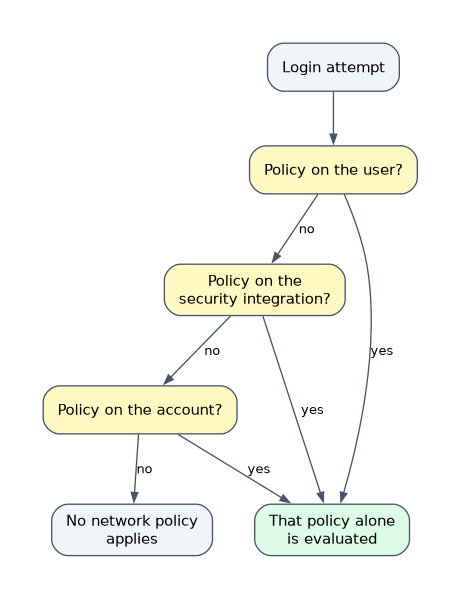 A network policy can be activated at three levels, and the most specific one wins.
| Level | How it is set | Effect |
|---|---|---|
| Security integration | On a SCIM, Snowflake OAuth or External OAuth integration | Overrides user and account for that integration |
| User | ALTER USER ... SET NETWORK_POLICY | Overrides the account policy |
| Account | ALTER ACCOUNT SET NETWORK_POLICY | Default for everyone else |
Only one policy is active at each level. The policies do not add up: the most specific active policy replaces the more general one.
A service account that connects from a fixed address gets its own user level policy. A contractor who needs a wider range gets a user policy too, without loosening the account policy.
Activation safeguards
When you activate a policy, Snowflake checks that your own current IP address is in the allowed list and not in the blocked list. This prevents you locking yourself out.
Network policies also apply together with other policy types. A request is evaluated against the network policy first, then the authentication policy, then password and session policies.
Internal stages
By default a network policy does not protect internal stage traffic with network rules. On AWS, an ACCOUNTADMIN can set ENFORCE_NETWORK_RULES_FOR_INTERNAL_STAGES = TRUE so that rules are enforced for internal stages as well.
Once that parameter is on, only the network rule lists are evaluated for stage access, and the legacy IP lists are ignored. Rebuild old IP ranges as IPv4 rules first, or clients such as JDBC drivers can start to fail with 403 errors. Rules written only for stages use MODE = INTERNAL_STAGE with TYPE = AWSVPCEID (VPC endpoint IDs).
On Azure, network rules cannot restrict internal stages. Use Azure Private Link and block public access instead.
Access control privileges
| Task | Who can do it |
|---|---|
| Create a network policy | SECURITYADMIN or higher, or a role with the global CREATE NETWORK POLICY privilege |
| Create a network rule | A role with CREATE NETWORK RULE on the schema (held by default by ACCOUNTADMIN, SECURITYADMIN and the schema owner) |
| Activate a policy on the account | SECURITYADMIN or higher, or a role with the global ATTACH POLICY privilege |
| Activate a policy on a user | A role with OWNERSHIP on the user and USAGE on the policy |
Ownership of a network policy can be transferred. Network policies and rules, including their assignments, can be replicated with replication and failover groups.
A network policy activated on a security integration does not restrict internal stage access, and it does not replace the account policy for ordinary logins.
Common mistakes
Putting the same range in both lists. The blocked list wins, so the range is blocked.
Expecting policies to stack. Only one policy is active per account, per user and per integration, and the most specific wins.
Forgetting stages. A policy that protects logins does not automatically protect internal stage access until the stage enforcement parameter is set.
Using IP rules to block private connectivity. Private endpoint rules and public IP rules are separate. To block the public path while allowing a private endpoint, use separate rules for each.
What to remember for the exam
- Network policies are inbound controls; outbound control is external network access.
- The blocked list wins over the allowed list.
- Precedence: security integration, then user, then account.
- Use
ALLOWED_NETWORK_RULE_LISTandBLOCKED_NETWORK_RULE_LISTfor new policies; IP lists are legacy. - Creating a policy needs
CREATE NETWORK POLICY; activating on the account needsATTACH POLICY. - Internal stage enforcement needs
ENFORCE_NETWORK_RULES_FOR_INTERNAL_STAGES(AWS).
Check yourself
An account policy allows only the office range, but one service user connects from a cloud address. What is the cleanest fix?
Create a separate network policy for that user and set it at user level. The user policy overrides the account policy.
An IP address appears in both the allowed and blocked lists. Can it connect?
No. The blocked list takes precedence.
Which privilege lets a custom role activate a network policy on the whole account?
The global
ATTACH POLICYprivilege, which SECURITYADMIN and higher already have.
Topic 11 of 17 in Accounts and Security
Test yourself on Accounts and Security
The full Snowflake ARA-C01 question bank has 687 questions, with timed practice exams and an explanation for every answer.
This study guide is independent and is not affiliated with, endorsed by, or sponsored by Snowflake. Vendor names, certification names and exam codes are trademarks of their respective owners and are used for identification only.