Accounts and Security · Topic 16 of 17
Federated Authentication, SSO and OAuth
Design SSO with SAML2 or OIDC and choose between Snowflake OAuth and External OAuth: security integrations, roles, token lifetimes and client flows.
- 5 min
- Includes a diagram
- SSO uses a
SAML2security integration (or OIDC); browser clients useauthenticator=externalbrowser. - Native SSO is Okta only and cannot do MFA.
- OAuth integrations:
TYPE = OAUTHfor Snowflake OAuth,TYPE = EXTERNAL_OAUTHfor External OAuth.
What it is
Federated authentication means Snowflake trusts an external identity provider (IdP) to verify the user, instead of keeping its own password. The IdP could be Okta, Microsoft Entra ID, Ping or another system that speaks SAML 2.0 or OpenID Connect (OIDC).
Single sign-on (SSO) is what the user experiences: sign in once with the company identity and reach Snowflake without a separate password. OAuth is a related but different pattern in which an application receives a token that lets it act on behalf of a user.
How it works
SSO with a SAML2 security integration
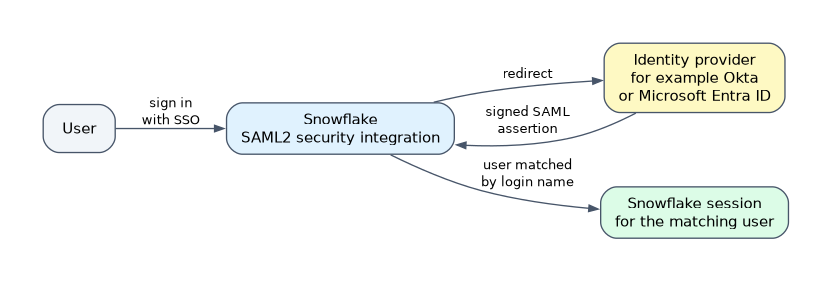 SSO is configured with a security integration of
TYPE = SAML2. The key parameters tell Snowflake how to trust the IdP.
CREATE SECURITY INTEGRATION my_saml
  TYPE = SAML2
  ENABLED = TRUE
  SAML2_ISSUER = 'http://idp.example.com/issuer'
  SAML2_SSO_URL = 'https://idp.example.com/sso'
  SAML2_PROVIDER = 'CUSTOM'
  SAML2_X509_CERT = '...';
SAML2_ISSUER identifies the IdP, SAML2_SSO_URL is where Snowflake sends the user to sign in, and SAML2_X509_CERT is the IdP's signing certificate used to verify assertions. SAML2_PROVIDER names the IdP (for example OKTA, ADFS or CUSTOM).
An account can have more than one SAML2 integration, and the login page offers each of them. An authentication policy can limit which ones are visible to which users.
How clients use SSO
Browser-based SSO opens the IdP's page in a browser and then starts the Snowflake session. Clients select it with authenticator=externalbrowser. It needs a browser on the user's machine, so it fits tools like Snowsight, the Snowflake CLI and SnowSQL, not unattended servers.
Okta also offers native SSO, where the driver authenticates to Okta programmatically with no browser. Native SSO does not support MFA, so Okta MFA must be off for those users.
SSO is for people. Anything that runs unattended should use key-pair authentication or OAuth, not browser-based SSO.
Good practices for federated accounts
- Create users without a Snowflake password, so they can only sign in through the IdP.
- Keep at least one ACCOUNTADMIN with a Snowflake password as a break glass account, in case the IdP fails.
- SSO users can still have Snowflake MFA enforced, with
ENFORCE_MFA_ON_EXTERNAL_AUTHENTICATION = 'ALL'in an authentication policy. By default the IdP is responsible for MFA. - A disabled or dropped Snowflake user can still sign in at the IdP but gets an error when connecting to Snowflake.
- Set the account parameter
ALLOW_ID_TOKEN = TRUEto cache connections and reduce repeated browser prompts.
SSO works with private connectivity on AWS, Azure and Google Cloud.
OAuth
OAuth 2.0 in Snowflake is also configured through a security integration. The client sends the user to an authorization page, receives an access token, and presents it to Snowflake with authenticator=oauth and the token. Successful logins show OAUTH_ACCESS_TOKEN in login history.
| Aspect | Snowflake OAuth | External OAuth |
|---|---|---|
| Authorization server | Snowflake itself | An external server such as Okta, Microsoft Entra ID, Ping Federate or a custom one |
| Integration | TYPE = OAUTH | TYPE = EXTERNAL_OAUTH |
| Flow | Authorization code grant; needs a browser | Any flow the external server supports; no browser required by Snowflake |
| Best for | Partner tools such as Tableau and Looker, and custom clients | Programmatic clients and organizations that already run an authorization server |
| Token issued by | Snowflake | The external server, validated by Snowflake |
Snowflake OAuth settings worth knowing
OAUTH_CLIENT accepts TABLEAU_DESKTOP, TABLEAU_SERVER (Tableau Cloud), LOOKER and CUSTOM. Other values you may see in scenarios:
| Setting | Default | Meaning |
|---|---|---|
OAUTH_ISSUE_REFRESH_TOKENS | TRUE | Client may exchange a refresh token for a new access token |
OAUTH_REFRESH_TOKEN_VALIDITY | 7776000 seconds (90 days) | Lifetime of a refresh token |
OAUTH_ACCESS_TOKEN_VALIDITY | 600 seconds (10 minutes) | Lifetime of an access token; 60 to 3600 allowed |
OAUTH_USE_SECONDARY_ROLES | NONE | IMPLICIT enables default secondary roles |
BLOCKED_ROLES_LIST | Privileged roles | ACCOUNTADMIN, ORGADMIN, GLOBALORGADMIN and SECURITYADMIN cannot be used by default |
The blocked roles protect powerful roles from being used through a third party application. For partner applications an account administrator can change this with the account parameter OAUTH_ADD_PRIVILEGED_ROLES_TO_BLOCKED_LIST; for custom clients it needs Snowflake Support.
Role scope
A token carries the role the session will use. Snowflake OAuth tokens request a role through a scope such as session:role:ANALYST, and the user must be granted that role. This lets one user hold different tokens for different roles.
Choosing between them
| Scenario | Answer |
|---|---|
| Employees sign in to Snowsight with the corporate login | SSO with a SAML2 integration |
| Tableau Desktop connects as the user | Snowflake OAuth with OAUTH_CLIENT = TABLEAU_DESKTOP |
| A custom app uses tokens from Entra ID | External OAuth |
| A server job with no user present | Key-pair, not browser SSO |
Common mistakes
Using browser SSO for a scheduled job. There is no browser, so use key-pair or External OAuth.
Letting SSO users keep passwords. Remove the password so the IdP is the only path.
Forgetting a break glass administrator. If the IdP is down and every admin is federated, nobody can fix the integration.
Mixing up the two OAuth types. Snowflake OAuth uses Snowflake as the authorization server; External OAuth trusts an outside one.
What to remember for the exam
- SSO uses a
SAML2security integration (or OIDC); browser clients useauthenticator=externalbrowser. - Native SSO is Okta only and cannot do MFA.
- OAuth integrations:
TYPE = OAUTHfor Snowflake OAuth,TYPE = EXTERNAL_OAUTHfor External OAuth. - Access tokens last 10 minutes by default; refresh tokens last 90 days by default.
- ACCOUNTADMIN, ORGADMIN, GLOBALORGADMIN and SECURITYADMIN are blocked from OAuth by default.
Check yourself
Which OAuth type fits an app that already gets tokens from Microsoft Entra ID?
External OAuth, with
TYPE = EXTERNAL_OAUTH, because the authorization server is external.Why does an administrator keep one account with a Snowflake password in an SSO setup?
As a break glass account to repair the integration if the IdP is unavailable.
Can a user choose ACCOUNTADMIN as the role when connecting through Tableau with Snowflake OAuth?
Not by default. Privileged roles are on the blocked list for OAuth.
Topic 16 of 17 in Accounts and Security
Test yourself on Accounts and Security
The full Snowflake ARA-C01 question bank has 687 questions, with timed practice exams and an explanation for every answer.
This study guide is independent and is not affiliated with, endorsed by, or sponsored by Snowflake. Vendor names, certification names and exam codes are trademarks of their respective owners and are used for identification only.