Accounts and Security · Topic 5 of 17
Data Access, Storage Integrations and Secure Views
Control data access in Snowflake: storage integrations for cloud storage without credentials, secure views that hide logic and data, and their trade-offs.
- 6 min
- Includes a diagram
- A storage integration holds an identity and allowed locations, creates no secrets in stages, and one integration serves many stages.
- Setup order: create the integration, run
DESC, update the cloud trust, create stages. REQUIRE_STORAGE_INTEGRATION_FOR_STAGE_CREATIONenforces integrations account wide.
What it is
Data access covers every path by which data enters or leaves Snowflake and every way a user can reach it. Two tools dominate the exam: storage integrations, which let Snowflake reach cloud storage without storing secrets, and secure views, which expose a controlled slice of a table and protect how that slice is defined.
An Architect chooses them to meet requirements like "no credentials in SQL", "consumers must not see the view logic" or "share only some rows with a partner".
How it works
Storage integrations
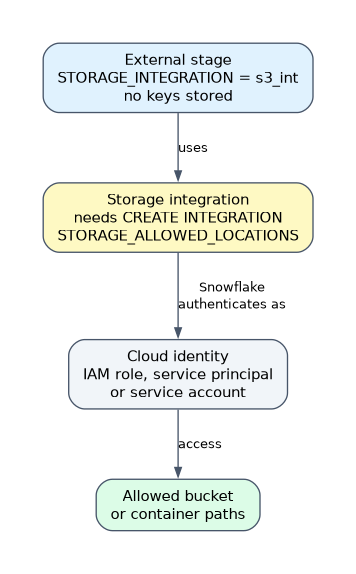 A storage integration is an account level object that stores a generated identity for your Snowflake account and a list of allowed storage locations. Stages then refer to the integration instead of embedding keys.
CREATE STORAGE INTEGRATION s3_int
  TYPE = EXTERNAL_STAGE
  STORAGE_PROVIDER = 'S3'
  ENABLED = TRUE
  STORAGE_AWS_ROLE_ARN = 'arn:aws:iam::123456789012:role/snowflake_access'
  STORAGE_ALLOWED_LOCATIONS = ('s3://mybucket/raw/')
  STORAGE_BLOCKED_LOCATIONS = ('s3://mybucket/raw/private/');

DESC STORAGE INTEGRATION s3_int;

CREATE STAGE raw_stage
  URL = 's3://mybucket/raw/'
  STORAGE_INTEGRATION = s3_int;
The setup is a handshake between the two clouds.
- Create the integration in Snowflake.
- Run
DESC STORAGE INTEGRATIONand copy the identity values (for S3STORAGE_AWS_IAM_USER_ARNandSTORAGE_AWS_EXTERNAL_ID). - Put those values in the trust policy of the cloud role.
- Create stages that use the integration.
| Provider | STORAGE_PROVIDER | What you configure in the cloud |
|---|---|---|
| Amazon S3 | 'S3' | An IAM role and trust policy with the Snowflake user ARN and external ID |
| Azure Blob Storage | 'AZURE' | Grant consent for the Snowflake application (tenant ID required) and give it a role on the storage account |
| Google Cloud Storage | 'GCS' | Give the generated service account access to the bucket |
Key points:
- One integration can serve many stages, and stages inherit its allowed and blocked locations.
- A role creating stages needs
USAGEon the integration. Creating the integration needsCREATE INTEGRATION(normallyACCOUNTADMIN). - It is the standard way to meet "no keys in code", because nothing secret is stored in the stage definition.
- Account parameters
REQUIRE_STORAGE_INTEGRATION_FOR_STAGE_CREATIONandREQUIRE_STORAGE_INTEGRATION_FOR_STAGE_OPERATIONforce every external stage to use an integration. - Related parameters
PREVENT_UNLOAD_TO_INLINE_URLandPREVENT_UNLOAD_TO_INTERNAL_STAGESblock unloading data to places outside the approved stages.
When a question asks how to give Snowflake access to a bucket "without sharing credentials" or "limited to one path", the answer is a storage integration with STORAGE_ALLOWED_LOCATIONS.
Other data access paths
| Need | Mechanism |
|---|---|
| Users in the account | Roles and grants |
| Another Snowflake account | Secure Data Sharing, listings, replication |
| Someone without a Snowflake account | A reader account created by the provider (the provider pays for its compute) |
| Files in cloud storage | External stages with storage integrations; external tables or Iceberg tables to query in place |
Data security with secure views
A secure view is a view created with the SECURE keyword. It behaves like a normal view for queries but adds two protections.
- The definition is hidden. Only the role that owns the view sees the SQL text (in
SHOW VIEWS,GET_DDLand similar). Other roles who may query the view cannot read the logic. - The optimizer is more cautious. Snowflake will not push user filters below the view's own filters or let user functions touch rows the view hides. This stops users from inferring hidden data from error messages or timing.
CREATE SECURE VIEW sales.public.my_region_orders AS
SELECT order_id, amount, region
FROM sales.public.orders
WHERE region = (SELECT region FROM sales.public.user_regions
WHERE user_name = CURRENT_USER());Where secure views are used:
- Sharing. By default (
SECURE_OBJECTS_ONLY = TRUEon the share) a view added to a share must be secure. The provider joins to a mapping table withCURRENT_ACCOUNT()to give each consumer different rows. - Row and column restriction inside an account, when a role should reach a view but not the table.
- Materialized views and some functions (such as UDFs) can be created as secure too.
| Aspect | Standard view | Secure view |
|---|---|---|
| Definition visible to roles that query it | Yes, if they have the privilege to see it | No, only to the owner |
| Optimizer | Full optimization, may push filters | Restricted to protect hidden data |
| Allowed in a share | Only if the share sets SECURE_OBJECTS_ONLY = FALSE | Yes |
| Query speed | Faster | Can be slower |
Because the optimizer is restricted, a secure view can be slower than the same standard view. Use it where data protection is the requirement, not for every view.
Secure views versus policies
Secure views filter by writing the logic into a view. Row access policies and masking policies attach the logic to the table itself, so every path to the data is covered, including views you did not write. Policies are easier to manage at scale; secure views remain necessary for sharing views and for hiding query logic.
Common mistakes
Putting access keys in CREATE STAGE. Keys end up in definitions and history. Use an integration.
Forgetting the trust step. Creating the integration is not enough; the cloud role must trust the identity shown by DESC STORAGE INTEGRATION.
Using a standard view for a share or for sensitive logic. Shares accept only secure views by default, and standard views reveal their definition.
Granting the base table and the secure view. If the role can read the table, the view protects nothing. Grant only the view.
What to remember for the exam
- A storage integration holds an identity and allowed locations, creates no secrets in stages, and one integration serves many stages.
- Setup order: create the integration, run
DESC, update the cloud trust, create stages. REQUIRE_STORAGE_INTEGRATION_FOR_STAGE_CREATIONenforces integrations account wide.- Secure views hide their definition and use a cautious optimizer; they are required for sharing views unless a share is created with
SECURE_OBJECTS_ONLY = FALSE. - Secure views cost some performance; policies attach to the table, secure views to the view.
Check yourself
How can several external stages reach a bucket without credentials in each stage?
Create one storage integration with the allowed locations and reference it from every stage.
Why should a view in a share be secure?
By default a share accepts only secure views, because the share must not reveal the view logic or let consumers infer hidden rows, which secure views guarantee.
Name one cost of a secure view.
The restricted optimizer can make it slower than an equivalent standard view.
Topic 5 of 17 in Accounts and Security
Test yourself on Accounts and Security
The full Snowflake ARA-C01 question bank has 687 questions, with timed practice exams and an explanation for every answer.
This study guide is independent and is not affiliated with, endorsed by, or sponsored by Snowflake. Vendor names, certification names and exam codes are trademarks of their respective owners and are used for identification only.