Snowflake Security, RBAC, and User Administration · Topic 15 of 16
Security Administration and SCIM Provisioning
Who administers Snowflake security, and how to set up, secure and monitor SCIM so an identity provider creates, updates and disables users and roles.
- 5 min
- Includes a diagram
- SCIM 2.0 provisions users and groups; IdP groups become Snowflake roles.
- Provisioner roles:
OKTA_PROVISIONER,AAD_PROVISIONER,GENERIC_SCIM_PROVISIONER. The provisioner must own SCIM-managed users and roles. - The integration uses
TYPE = SCIM,SCIM_CLIENTandRUN_AS_ROLE; the token comes fromSYSTEM$GENERATE_SCIM_ACCESS_TOKENand lasts six months.
What it is
Security administration is the work of creating users and roles, granting privileges, and configuring how people authenticate. Snowflake splits it across system roles so that no single role needs to be ACCOUNTADMIN.
SCIM (System for Cross-domain Identity Management, version 2.0) lets an identity provider (IdP) provision and deprovision users and groups in Snowflake automatically. The IdP is the source of truth and Snowflake is the service provider. IdP groups become Snowflake roles, and the mapping is one to one for both users and groups.
SCIM provisions identities only. It does not turn on single sign-on; Snowflake-initiated SSO is enabled separately.
How it works
Who administers what
| Role | Security duty |
|---|---|
USERADMIN | Holds CREATE USER and CREATE ROLE; manages users and roles it owns |
SECURITYADMIN | Holds MANAGE GRANTS; manages any grant and inherits USERADMIN; creates network policies |
ACCOUNTADMIN | Holds CREATE INTEGRATION by default and runs account-level steps such as private connectivity |
Day-to-day access control belongs to USERADMIN and SECURITYADMIN. Keep ACCOUNTADMIN for the few tasks that need it. Authorization to run a security task is always a privilege on an object or on the account, so the exam question is usually "which role or privilege is the smallest one that works".
SCIM use cases
- Joiner, mover, leaver automation. A new hire in the IdP appears in Snowflake; a leaver is disabled without a ticket.
- Group to role mapping. Membership changes in the IdP change which roles a user has.
- Single control point. Access is reviewed in the IdP, not in two places.
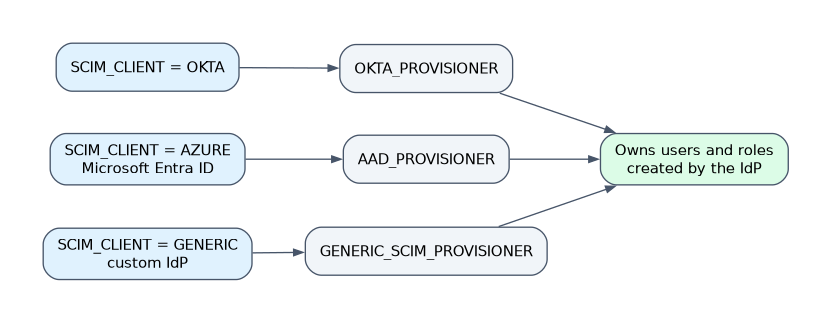
SCIM supports three IdP types, each with its own provisioner role:
| IdP | SCIM_CLIENT value | Provisioner role |
|---|---|---|
| Okta | OKTA | OKTA_PROVISIONER |
| Microsoft Entra ID | AZURE | AAD_PROVISIONER |
| Custom (neither) | GENERIC | GENERIC_SCIM_PROVISIONER |
Enable and configure the integration
For a custom IdP the setup follows this pattern:
CREATE ROLE IF NOT EXISTS generic_scim_provisioner;
GRANT CREATE USER ON ACCOUNT TO ROLE generic_scim_provisioner;
GRANT CREATE ROLE ON ACCOUNT TO ROLE generic_scim_provisioner;
GRANT ROLE generic_scim_provisioner TO ROLE accountadmin;

CREATE OR REPLACE SECURITY INTEGRATION generic_scim
  TYPE = SCIM
  SCIM_CLIENT = 'GENERIC'
  RUN_AS_ROLE = 'GENERIC_SCIM_PROVISIONER';

SELECT SYSTEM$GENERATE_SCIM_ACCESS_TOKEN('GENERIC_SCIM');
The token goes into the IdP. It is valid for six months, and you run the function again to get a new one. Dropping the integration invalidates its token, so a lost token is handled by dropping and recreating the integration and generating a new token.
Key behaviors to know:
- Ownership. Users and roles created by the IdP are owned by the provisioner role. That role must own any user or role imported from the IdP; otherwise updates from the IdP do not sync. Users that existed before SCIM need their ownership transferred.
- Run as role. The examples use
ACCOUNTADMIN. A lower role works if it has the globalMANAGE GRANTSprivilege or owns every role managed through SCIM; otherwise role management can fail. - Deactivation. Deactivating a user in the IdP sets
DISABLED = TRUEfor that user in Snowflake. Reactivation is supported. - Passwords.
SYNC_PASSWORDis supported only for Okta integrations, not custom ones. - Secondary roles. Setting
DEFAULT_SECONDARY_ROLESto'ALL'through SCIM lets users use secondary roles. - Tags. The
snowflakeTagsattribute can assign tags. GrantUSAGEon the tag's schema andAPPLYon the tag to the provisioner role. - Invitation emails. Snowflake sends them to SCIM-created users by default.
Secure and monitor SCIM
A network policy on the SCIM integration overrides the account policy for SCIM traffic only. That lets you allow the IdP's addresses without opening the account to everyone.
ALTER SECURITY INTEGRATION generic_scim SET NETWORK_POLICY = idp_only;
ALTER SECURITY INTEGRATION generic_scim UNSET NETWORK_POLICY;
To monitor, query the REST request history as ACCOUNTADMIN:
SELECT *
FROM TABLE(snowflake.information_schema.rest_event_history(
  'scim',
  DATEADD('minutes', -15, CURRENT_TIMESTAMP()),
  CURRENT_TIMESTAMP(),
  200))
ORDER BY event_timestamp;
Also check the IdP's own logs for the Snowflake application.
For private connectivity, SCIM uses the public endpoint (the URL without .privatelink). SCIM requests are limited to 500 concurrent requests per account per endpoint; extra requests get HTTP 429, which mostly affects large first syncs.
Common mistakes
Using a role that does not own the objects. If the provisioner role does not own an imported user or role, IdP changes silently fail to apply.
Expecting SCIM to provide SSO. It only manages identities. Set up SSO separately.
Managing SCIM roles by hand. Editing SCIM-managed users or roles in Snowflake fights the IdP. Make the change in the IdP.
Using account names with underscores in the IdP. If the same URL serves SAML SSO and SCIM, underscores are not supported; use the hyphenated form of the account identifier.
Ignoring token expiry. The token lasts six months. When provisioning suddenly fails with authentication errors, check the token first.
What to remember for the exam
- SCIM 2.0 provisions users and groups; IdP groups become Snowflake roles.
- Provisioner roles:
OKTA_PROVISIONER,AAD_PROVISIONER,GENERIC_SCIM_PROVISIONER. The provisioner must own SCIM-managed users and roles. - The integration uses
TYPE = SCIM,SCIM_CLIENTandRUN_AS_ROLE; the token comes fromSYSTEM$GENERATE_SCIM_ACCESS_TOKENand lasts six months. - A SCIM integration network policy overrides the account policy for SCIM traffic.
- Monitor with
REST_EVENT_HISTORY('scim', ...).
Check yourself
A user is deactivated in the IdP. What happens in Snowflake?
The user's
DISABLEDproperty is set toTRUE; reactivating the user in the IdP re-enables it.Why do IdP updates to an existing user stop syncing?
The SCIM provisioner role does not own that user, and it must own every user and role it manages.
How do you let only the IdP reach the SCIM endpoint while the account policy is stricter?
Attach a network policy to the SCIM security integration, which overrides the account policy for SCIM requests.
Topic 15 of 16 in Snowflake Security, RBAC, and User Administration
Test yourself on Snowflake Security, RBAC, and User Administration
The full Snowflake ADA-C02 question bank has 814 questions, with timed practice exams and an explanation for every answer.
This study guide is independent and is not affiliated with, endorsed by, or sponsored by Snowflake. Vendor names, certification names and exam codes are trademarks of their respective owners and are used for identification only.