Snowflake Security, RBAC, and User Administration · Topic 12 of 16
OAuth 2.0 in Snowflake - Snowflake OAuth, External OAuth and Custom Clients
Configure OAuth 2.0 in Snowflake: compare Snowflake OAuth with External OAuth, set up custom clients and see how network policies and private links apply.
- 4 min
- Includes a diagram
- Snowflake OAuth: Snowflake is the authorization server; External OAuth: Okta, Entra ID, PingFederate or custom.
- Custom client:
OAUTH_CLIENT = CUSTOM,OAUTH_CLIENT_TYPE,OAUTH_REDIRECT_URI. - Refresh token validity defaults to 90 days; access tokens are short.
What it is
OAuth 2.0 lets an application access Snowflake on behalf of a user without ever seeing the user's password. The user authorizes the application, the application receives an access token and, if allowed, a refresh token, and the token is used to open sessions. Access tokens are short lived (typically 10 minutes).
Snowflake supports two flavors. In Snowflake OAuth the Snowflake service is itself the authorization server. In External OAuth a separate authorization server, such as Okta, Microsoft Entra ID or PingFederate, issues the tokens and Snowflake only validates them.
How it works
Comparing the two
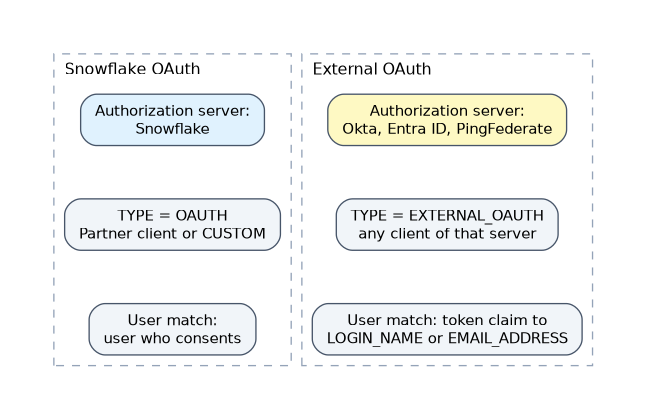
| Aspect | Snowflake OAuth | External OAuth |
|---|---|---|
| Authorization server | Snowflake | Okta, Microsoft Entra ID, PingFederate or custom |
| Integration | TYPE = OAUTH | TYPE = EXTERNAL_OAUTH |
| Client | Partner (Tableau, Looker) or CUSTOM | Any client of the external server |
| User match | The user who consents in Snowflake | Token claim mapped to LOGIN_NAME or EMAIL_ADDRESS |
| Role control | Role requested at consent; blocked list | Scope and role in the token; blocked list |
| Best fit | Tools that talk to Snowflake directly | One identity platform for all apps |
Both are created with CREATE SECURITY INTEGRATION, which needs the CREATE INTEGRATION account privilege (ACCOUNTADMIN by default).
Snowflake OAuth for custom clients
CREATE SECURITY INTEGRATION my_app_oauth
  TYPE = OAUTH
  ENABLED = TRUE
  OAUTH_CLIENT = CUSTOM
  OAUTH_CLIENT_TYPE = 'CONFIDENTIAL'
  OAUTH_REDIRECT_URI = 'https://app.example.com/callback'
  OAUTH_ISSUE_REFRESH_TOKENS = TRUE
  OAUTH_REFRESH_TOKEN_VALIDITY = 86400
  NETWORK_POLICY = app_policy;
SELECT SYSTEM$SHOW_OAUTH_CLIENT_SECRETS('MY_APP_OAUTH');
Parameters worth knowing:
OAUTH_CLIENT:CUSTOM, or a partner value such asTABLEAU_DESKTOP,TABLEAU_SERVERorLOOKER.OAUTH_CLIENT_TYPE:CONFIDENTIALfor clients that can keep a secret,PUBLICfor clients on user devices. Required for custom clients.OAUTH_REDIRECT_URI: required for custom clients; it must use TLS unlessOAUTH_ALLOW_NON_TLS_REDIRECT_URIis TRUE (not recommended).OAUTH_ISSUE_REFRESH_TOKENS: default TRUE; if FALSE users must reauthorize each time.OAUTH_REFRESH_TOKEN_VALIDITY: default 7776000 seconds (90 days).BLOCKED_ROLES_LIST: roles that cannot be consented to. By default ACCOUNTADMIN, ORGADMIN, GLOBALORGADMIN and SECURITYADMIN are blocked.PRE_AUTHORIZED_ROLES_LIST: roles users need not consent to; confidential clients only.OAUTH_USE_SECONDARY_ROLES:IMPLICITactivates default secondary roles;NONEis the default.
Privileged roles are blocked by default. A client that cannot use SECURITYADMIN or ACCOUNTADMIN is working as designed, not misconfigured.
External OAuth
CREATE SECURITY INTEGRATION ext_oauth_okta
  TYPE = EXTERNAL_OAUTH
  ENABLED = TRUE
  EXTERNAL_OAUTH_TYPE = OKTA
  EXTERNAL_OAUTH_ISSUER = 'https://example.okta.com/oauth2/aus123'
  EXTERNAL_OAUTH_JWS_KEYS_URL = 'https://example.okta.com/oauth2/aus123/v1/keys'
  EXTERNAL_OAUTH_TOKEN_USER_MAPPING_CLAIM = 'sub'
EXTERNAL_OAUTH_SNOWFLAKE_USER_MAPPING_ATTRIBUTE = 'LOGIN_NAME';EXTERNAL_OAUTH_TYPE:OKTA,AZURE,PING_FEDERATEorCUSTOM.- The token claim is mapped to the Snowflake user's
LOGIN_NAMEorEMAIL_ADDRESS, so the user must already exist. EXTERNAL_OAUTH_ANY_ROLE_MODE:DISABLE(default),ENABLE, orENABLE_FOR_PRIVILEGE(needs theUSE_ANY_ROLEprivilege on the integration).EXTERNAL_OAUTH_BLOCKED_ROLES_LISTblocks the same privileged roles by default.
Effects of federation, network policies and private connectivity
| Factor | Effect on Snowflake OAuth |
|---|---|
| Federated authentication (SSO) | The browser authorization step can hand off to the IdP, so users sign in with SSO during consent |
Network policy on the integration (NETWORK_POLICY) | Controls token requests, refresh and use of access tokens |
| Network policy on the user | Controls browser based authentication; it is not considered for token requests to custom clients |
| Local applications | The built in SNOWFLAKE$LOCAL_APPLICATION integration also checks the user policy on token requests; precedence is user, then integration, then account |
| Private connectivity | SaaS clients use the public account URL for token requests; USE_PRIVATELINK_FOR_AUTHORIZATION_ENDPOINT redirects the browser authorization step to the private URL |
When a scenario says OAuth works in the browser but token requests fail, check the integration network policy. Browser sign in follows the user policy, while token requests from a custom client follow the integration policy, or the account policy if none is set.
Common mistakes
Mixing up the two flavors. Snowflake issues the tokens in Snowflake OAuth; an external server issues them in External OAuth.
Forgetting to create users for External OAuth. The claim must map to an existing user.
Confusing refresh and access token lifetimes. OAUTH_REFRESH_TOKEN_VALIDITY governs the refresh token, not the short access token.
Expecting blocked roles to work. ACCOUNTADMIN and similar roles are blocked by default.
What to remember for the exam
- Snowflake OAuth: Snowflake is the authorization server; External OAuth: Okta, Entra ID, PingFederate or custom.
- Custom client:
OAUTH_CLIENT = CUSTOM,OAUTH_CLIENT_TYPE,OAUTH_REDIRECT_URI. - Refresh token validity defaults to 90 days; access tokens are short.
- Privileged roles are blocked by default in both flavors.
- OAuth network policies: the user policy governs browser sign in; the integration policy governs token requests and token use; local applications check user, then integration, then account.
Check yourself
Who issues tokens in External OAuth?
The external authorization server, such as Okta or Microsoft Entra ID.
What retrieves the client ID and secret of a Snowflake OAuth integration?
SYSTEM$SHOW_OAUTH_CLIENT_SECRETSwith the integration name.Which network policy governs browser sign in during Snowflake OAuth consent?
The policy on the user; the integration policy governs token requests and token use.
Topic 12 of 16 in Snowflake Security, RBAC, and User Administration
Test yourself on Snowflake Security, RBAC, and User Administration
The full Snowflake ADA-C02 question bank has 814 questions, with timed practice exams and an explanation for every answer.
This study guide is independent and is not affiliated with, endorsed by, or sponsored by Snowflake. Vendor names, certification names and exam codes are trademarks of their respective owners and are used for identification only.