Snowflake Security, RBAC, and User Administration · Topic 9 of 16
Snowflake Authentication, Federated SSO and Identity Provider Setup
Set up Snowflake authentication, configure a SAML 2.0 identity provider for federated SSO, and manage the integration, login flows and logout behavior.
- 4 min
- Includes a diagram
- Federation: the IdP authenticates, Snowflake is the service provider.
- SAML 2.0 integration with
CREATE SECURITY INTEGRATION TYPE = saml2; ACS URL ends in/fed/login. - IdP initiated needs no extra setup; SP initiated needs
SAML2_ENABLE_SP_INITIATED.
What it is
Authentication answers "who are you". Snowflake supports its own credentials (password, key pair, programmatic access tokens, MFA), OAuth, and federated authentication, where an external identity provider (IdP) verifies the user and Snowflake acts as the service provider (SP) that grants access.
The benefit of federation is one place for credentials, one place to enforce MFA and one place to disable a leaver. An authentication policy then decides which methods Snowflake accepts.
How it works
Authentication choices
| Method | Typical user |
|---|---|
| Password with MFA | People |
| SSO through an IdP (SAML 2.0 or OIDC) | People in a company with an IdP |
| Key pair, programmatic access token | Service users, scripts |
| OAuth | Applications acting for a user |
An authentication policy limits what is allowed. AUTHENTICATION_METHODS accepts values such as SAML, PASSWORD, OAUTH, KEYPAIR and PROGRAMMATIC_ACCESS_TOKEN. Other settings include CLIENT_TYPES, SECURITY_INTEGRATIONS and MFA_ENROLLMENT.
CREATE AUTHENTICATION POLICY sso_only
  AUTHENTICATION_METHODS = ('SAML')
  SECURITY_INTEGRATIONS = ('MY_IDP');
ALTER ACCOUNT SET AUTHENTICATION POLICY sso_only;
A policy set on a user overrides the account policy for that user. Test on a user before the account.
Applying an SSO only policy at account level without a working IdP can lock everyone out. Keep one emergency user on a separate policy that allows passwords with MFA.
Supported identity providers
- SAML 2.0 with native support: Okta and Microsoft Entra ID.
- SAML 2.0 other vendors: Google Workspace, OneLogin and Ping Identity PingOne, which need a custom application defined in the IdP.
- OIDC: managed for Google and Microsoft Entra ID, custom for providers such as Okta, PingFederate, Auth0 and Keycloak.
Configuring the IdP and Snowflake
The steps for SAML 2.0 are the same everywhere.
- In the IdP, create a Snowflake application. Use the Snowflake ACS URL (the account URL plus
/fed/login) and issuer URL. - In Snowflake, create the integration, preferably with the IdP's metadata URL.
- Create the users in Snowflake (or provision them with SCIM) with a login name that matches what the IdP sends.
- Choose the login flow.
CREATE SECURITY INTEGRATION my_idp
  TYPE = saml2
  ENABLED = true
  METADATA_URL = 'https://idp.example.com/metadata'
  SAML2_SNOWFLAKE_ISSUER_URL = 'https://myorg-myacct.snowflakecomputing.com'
  SAML2_SNOWFLAKE_ACS_URL = 'https://myorg-myacct.snowflakecomputing.com/fed/login';
ALTER SECURITY INTEGRATION my_idp SET SAML2_ENABLE_SP_INITIATED = true;
ALTER SECURITY INTEGRATION my_idp SET SAML2_SP_INITIATED_LOGIN_PAGE_LABEL = 'Company SSO';
Login flows
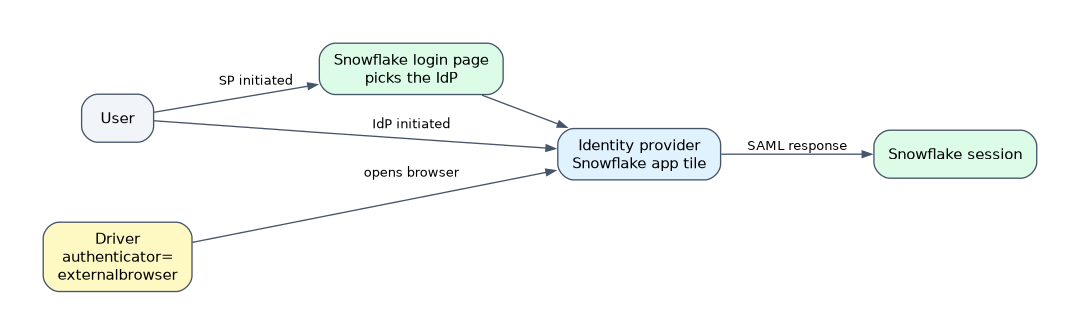
| Flow | How it starts | Snowflake setup |
|---|---|---|
| IdP initiated | The user picks the Snowflake app in the IdP portal | None beyond the integration |
| SP initiated | The user opens Snowflake and picks the IdP | SAML2_ENABLE_SP_INITIATED and a login page label |
| Drivers | authenticator=externalbrowser for SAML | Driver setting |
Managing federated authentication
- Certificate or metadata change at the IdP:
ALTER SECURITY INTEGRATION ... REFRESH METADATA_URLrefreshes IdP settings, or setSAML2_X509_CERTby hand. - Regenerating Snowflake's key with
REFRESH SAML2_SNOWFLAKE_PRIVATE_KEYstops SAML login until the IdP has the new certificate, so do it in a quiet period. - Logout: Snowflake initiated logout ends only the Snowflake session; the IdP session stays active, and global logout is not supported from within Snowflake.
- Timeouts: after Snowflake's inactivity timeout the user must authenticate again through the IdP; an IdP timeout does not end open Snowflake sessions.
- MFA: SSO users are not required to use Snowflake MFA by default. The IdP can enforce its own, or an authentication policy can require Snowflake MFA after the IdP step.
- Private connectivity: SSO works with only one account URL at a time, so set up private connectivity first.
- Replication: SAML2 and OIDC security integrations can be replicated with failover groups. Using several IdPs is supported only in the JDBC, ODBC and Python drivers.
"Users still log in with passwords after SSO is set up" means no authentication policy restricts the methods. SSO adds a path; it does not remove the password path.
Common mistakes
Believing SSO disables passwords. Only an authentication policy does.
Mismatched login names. Users fail to sign in because the IdP identifier does not match the Snowflake user.
Expecting logout to end the IdP session. It does not.
Changing the IdP certificate without refreshing. Login fails until Snowflake has the new value.
What to remember for the exam
- Federation: the IdP authenticates, Snowflake is the service provider.
- SAML 2.0 integration with
CREATE SECURITY INTEGRATION TYPE = saml2; ACS URL ends in/fed/login. - IdP initiated needs no extra setup; SP initiated needs
SAML2_ENABLE_SP_INITIATED. - Authentication policies restrict methods; SSO alone does not.
- Okta and Microsoft Entra ID have native SAML support.
Check yourself
How do you force all users to sign in through the IdP?
Attach an authentication policy with
AUTHENTICATION_METHODS = ('SAML').What must be done after the IdP certificate rotates?
Refresh the metadata URL or set the new
SAML2_X509_CERTon the integration.Does logging out of Snowflake end the IdP session?
No, global logout is not supported from within Snowflake.
Topic 9 of 16 in Snowflake Security, RBAC, and User Administration
Test yourself on Snowflake Security, RBAC, and User Administration
The full Snowflake ADA-C02 question bank has 814 questions, with timed practice exams and an explanation for every answer.
This study guide is independent and is not affiliated with, endorsed by, or sponsored by Snowflake. Vendor names, certification names and exam codes are trademarks of their respective owners and are used for identification only.