Disaster Recovery, Backup and Data Replication · Topic 8 of 9
Time Travel, Fail-safe, Retention Periods and Historical Queries
Manage Time Travel and Fail-safe, set data retention periods at each level, and query historical data with AT and BEFORE, including limits by table type.
- 5 min
- Includes a diagram
- Parameter:
DATA_RETENTION_TIME_IN_DAYS; default 1; 0 disables Time Travel; lower levels override higher levels. - Standard 0 or 1 day; Enterprise and above up to 90 days for permanent objects; transient and temporary 0 or 1 day.
- Fail-safe is 7 days for permanent tables, Snowflake only, none for transient and temporary tables.
What it is
Time Travel lets you see or restore data as it was at an earlier point inside a retention period. You can query old data, clone old data, and undrop objects. It is a self-service feature for the administrator and for users.
Fail-safe is a further, fixed period after Time Travel ends. Only Snowflake can recover data in it, and only as a last resort. It is not a feature you query or configure.
How it works
Retention periods
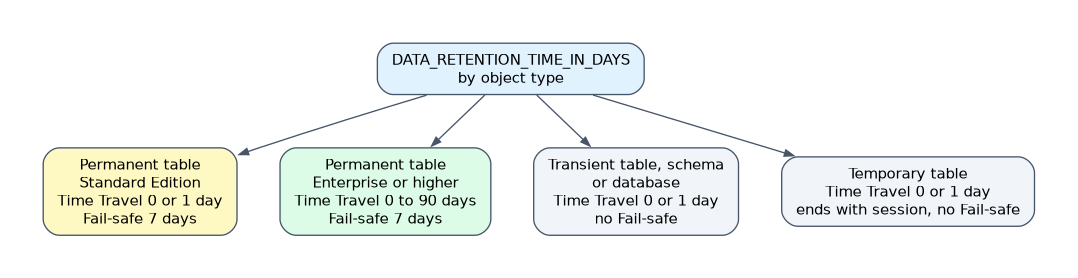 The parameter is
DATA_RETENTION_TIME_IN_DAYS. It can be set on the account, a database, a schema or a table, and a lower level overrides the level above it.
| Object type | Time Travel range | Fail-safe |
|---|---|---|
| Permanent table, Standard Edition | 0 or 1 day | 7 days |
| Permanent table, Enterprise Edition or higher | 0 to 90 days (default 1) | 7 days |
| Transient table, schema or database | 0 or 1 day | None |
| Temporary table | 0 or 1 day, ends with the session | None |
The default is 1 day. Setting the value to 0 turns Time Travel off for that object.
ALTER ACCOUNT SET DATA_RETENTION_TIME_IN_DAYS = 7;
ALTER DATABASE sales SET DATA_RETENTION_TIME_IN_DAYS = 30;
ALTER TABLE sales.public.orders SET DATA_RETENTION_TIME_IN_DAYS = 90;
Account level settings need ACCOUNTADMIN. The account parameter MIN_DATA_RETENTION_TIME_IN_DAYS sets a floor: the effective retention of an object is the larger of its own value and this minimum. An administrator uses it to stop teams from lowering retention below a policy value.
| Parameter | Level | Effect |
|---|---|---|
DATA_RETENTION_TIME_IN_DAYS | Account, database, schema, table | Sets the Time Travel period |
MIN_DATA_RETENTION_TIME_IN_DAYS | Account | Enforces a minimum; the larger value wins |
Changing retention has a direct effect. Raising it extends how far back data can be reached for data still in the period. Lowering it makes data older than the new value leave Time Travel, and for permanent tables it then moves into Fail-safe.
Long retention costs storage, because Snowflake keeps every changed micro-partition for the whole period. Use 90 days only for tables that need it, and keep staging or intermediate data transient with 0 or 1 day.
Fail-safe
Fail-safe lasts 7 days for permanent tables and starts when Time Travel ends. It cannot be changed, turned off or queried, and you recover from it only by contacting Snowflake Support.
- Transient and temporary tables have no Fail-safe.
- Fail-safe storage is billed as part of storage cost.
TABLE_STORAGE_METRICSinSNOWFLAKE.ACCOUNT_USAGEand inINFORMATION_SCHEMAshowsTIME_TRAVEL_BYTESandFAILSAFE_BYTESper table, so you can find where this storage sits.
| Compare | Time Travel | Fail-safe |
|---|---|---|
| Who recovers | You | Snowflake Support only |
| Length | Configurable | Fixed 7 days (permanent tables) |
| Access | AT, BEFORE, UNDROP, clone | None by SQL |
| Purpose | Self service restore | Last resort recovery |
Querying historical data
Use the AT or BEFORE clause in a SELECT. Choose one of three anchors.
-- a point in time
SELECT * FROM orders AT(TIMESTAMP => '2026-11-10 09:00:00'::TIMESTAMP_LTZ);

-- an offset in seconds before now (here 10 minutes)
SELECT * FROM orders AT(OFFSET => -60*10);

-- just before a statement ran
SELECT * FROM orders BEFORE(STATEMENT => '<query_id>');| Anchor | Meaning |
|---|---|
TIMESTAMP | Data as of that moment |
OFFSET | Data as of a number of seconds ago, as a negative number |
STATEMENT | Data as of a statement's query ID; AT includes its changes, BEFORE shows the state just before it |
You can also create a clone as of a past point, which is the usual way to recover without touching the live table.
CREATE TABLE orders_before_fix CLONE orders BEFORE(STATEMENT => '<query_id>');Rules and limits:
- The requested time must fall inside the retention period for that object. Older data returns an error.
- A query cannot reach back before the table was created.
- Cloning a database or schema as of a time can fail if a child table's Time Travel does not reach that point.
- Querying historical data of a dropped table works only until it is purged; undrop is easier (next page).
A fix that overwrites the live table with an old copy also removes valid changes made after the bad statement. Clone first, compare, then decide.
Common mistakes
Assuming 90 days on every edition. Standard Edition allows 0 or 1 day.
Expecting Fail-safe on transient tables. They have none, so recovery stops when Time Travel ends.
Trying to query Fail-safe data. It is reachable only through Snowflake Support.
Setting a schema to 90 days and expecting transient tables inside to follow. A transient object is limited to 1 day.
Reading OFFSET as positive. It is negative seconds into the past.
What to remember for the exam
- Parameter:
DATA_RETENTION_TIME_IN_DAYS; default 1; 0 disables Time Travel; lower levels override higher levels. - Standard 0 or 1 day; Enterprise and above up to 90 days for permanent objects; transient and temporary 0 or 1 day.
- Fail-safe is 7 days for permanent tables, Snowflake only, none for transient and temporary tables.
MIN_DATA_RETENTION_TIME_IN_DAYSis an account level floor.ATandBEFOREtakeTIMESTAMP,OFFSETorSTATEMENT.
Check yourself
What is the longest Time Travel for a permanent table on Standard Edition?
1 day, so the setting is 0 or 1.
Who can read data in Fail-safe?
Only Snowflake, through a request to Snowflake Support; users cannot query it.
How do you see a table as it was just before a bad statement ran?
Use
BEFORE(STATEMENT => '<query_id>')or clone with that clause.
Topic 8 of 9 in Disaster Recovery, Backup and Data Replication
Test yourself on Disaster Recovery, Backup and Data Replication
The full Snowflake ADA-C02 question bank has 814 questions, with timed practice exams and an explanation for every answer.
This study guide is independent and is not affiliated with, endorsed by, or sponsored by Snowflake. Vendor names, certification names and exam codes are trademarks of their respective owners and are used for identification only.