Disaster Recovery, Backup and Data Replication · Topic 6 of 9
Database Failover, Failback on Schemas and Client Redirect
Analyze failover and failback across accounts, what happens to schemas, and how Client Redirect connections keep applications working after a failover.
- 6 min
- Includes a diagram
- Failover and failback need Business Critical or higher; promotion is
ALTER FAILOVER GROUP ... PRIMARY. - A secondary cannot be promoted while a refresh runs; the old primary becomes a secondary.
- Failback is refresh back, then promote again.
What it is
Replication gives you a read only copy of data in another account. Failover is the act of promoting that copy to read write primary when the original account or region is lost. Failback is the move back to the original account once it is healthy again.
An administrator is judged on three things: what happens to the objects when roles flip, what the old primary becomes, and how applications find the new primary without a code change. The last one is Client Redirect.
How it works
Failover across multiple accounts
A failover group can name several target accounts in ALLOWED_ACCOUNTS. Any one of those accounts can be promoted, and only one account holds the primary group at a time.
-- in the secondary account that will take over
ALTER FAILOVER GROUP prod_fg PRIMARY;
Points the exam checks:
- Failover groups, and therefore failover and failback, need Business Critical or higher in every account involved. Database and share replication work on all editions but cannot fail over as a group.
- A secondary group cannot be promoted while a refresh is running. Suspend scheduled replication in the target account before the failover and resume it afterward.
- On promotion the former primary becomes a secondary, so the same group can be refreshed back later.
- Scheduled refreshes run as the role that owns the group. A user who refreshes by hand needs the
REPLICATEprivilege on the group. - Data changed in the old primary after the last refresh is not in the new primary. The refresh interval is your recovery point objective.
| Account | Before failover | After failover |
|---|---|---|
| Account A (original primary) | Read write | Secondary, read only |
| Account B (promoted) | Secondary, read only | Primary, read write |
| Account C (another target) | Secondary, read only | Still a target; refresh it from the new primary |
A failover group is one unit. All databases, users, roles, warehouses and other account objects in it switch together. You cannot fail over one database of the group on its own.
Failback and the impact on schemas
Replication scope is set per database (ALLOWED_DATABASES), so every schema in a replicated database is replicated.
A refresh makes the secondary match the primary. That has three effects on schemas.
- A schema created in the primary appears in the secondary at the next refresh.
- A schema dropped in the primary is dropped in the secondary at the next refresh.
- A schema that exists only in the secondary, such as one created in the old primary after its last refresh, is removed by the refresh. Do not build objects in a secondary and expect them to survive.
For failback the sequence is: refresh the original account from the new primary so it picks up everything written during the outage, then promote the original account again. Skipping the refresh would put old data back in charge and lose the work done during the outage.
Grants on schema level objects go to roles. If those roles are not replicated, users can be left without access. Replicate the roles in the same failover group so grants arrive with the data. Tasks and pipes are replicated with failover groups too, but check that scheduled work and external triggers are running where they should after promotion.
Client Redirect
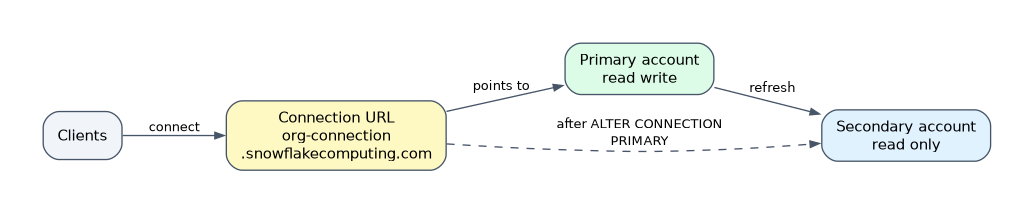 Applications that connect to the account locator URL break when the account is lost. Client Redirect adds a connection object with its own URL that follows the primary. It needs Business Critical or higher.
-- source account (ACCOUNTADMIN)
CREATE CONNECTION myconn;
ALTER CONNECTION myconn ENABLE FAILOVER TO ACCOUNTS myorg.dr_account;

-- target account
CREATE CONNECTION myconn AS REPLICA OF myorg.prod_account.myconn;

-- at failover, in the target account
ALTER CONNECTION myconn PRIMARY;
The URL has the form <organization_name>-<connection_name>.snowflakecomputing.com. It does not name an account; it points to whichever account holds the primary connection.
| Item | Rule |
|---|---|
| Edition | Business Critical or higher |
| Target region | Must differ from the primary region |
| Secondary name | Same name as the primary connection |
| Promote | ALTER CONNECTION <name> PRIMARY; the old primary becomes a secondary; the same command is used for failback |
| Privilege | Creating and altering connections needs ACCOUNTADMIN; GRANT FAILOVER ON CONNECTION lets another role promote |
| Check | SHOW CONNECTIONS shows the URL and which account is primary |
Other things that must be ready in the target account before a disaster:
- SSO: configure federated authentication in each account, and point the identity provider at the connection URL.
- OAuth: Snowflake OAuth tokens are valid only in the account that issued them, so clients sign in again unless the security integration is replicated. External OAuth integrations must be created in each target account with the same settings.
- Private connectivity: DNS CNAME records for the connection URL and its OCSP URL must be changed by hand during failover and failback.
Client Redirect does not copy users, roles or data. It only moves the URL. Without replicated account objects the clients reach an account where nobody can sign in.
Common mistakes
Promoting during a refresh. The promotion is refused. Suspend the schedule in the target first.
Expecting one database to fail over alone. Failover is per group.
Failing back without a refresh. The original account is then behind. Refresh it from the new primary first.
Using the account URL in applications. It does not move. Use the connection URL.
Forgetting security integrations. SSO and OAuth settings are per account unless replicated.
What to remember for the exam
- Failover and failback need Business Critical or higher; promotion is
ALTER FAILOVER GROUP ... PRIMARY. - A secondary cannot be promoted while a refresh runs; the old primary becomes a secondary.
- Failback is refresh back, then promote again.
- A refresh drops secondary only schemas and mirrors drops from the primary.
- Client Redirect:
CREATE CONNECTION,ENABLE FAILOVER TO ACCOUNTS,AS REPLICA OF,ALTER CONNECTION ... PRIMARY; the URL is<org>-<connection>.snowflakecomputing.com. - Target accounts of Client Redirect must be in a different region from the primary.
Check yourself
What must be done before promoting a secondary failover group?
Make sure no refresh is running, usually by suspending the replication schedule in the target account.
How do applications reach the new primary without a change?
They connect through the Client Redirect connection URL, and
ALTER CONNECTION ... PRIMARYmoves it to the promoted account.Why refresh the original account before failback?
It must receive the changes made in the new primary during the outage, or those changes would be lost when it is promoted.
Topic 6 of 9 in Disaster Recovery, Backup and Data Replication
Test yourself on Disaster Recovery, Backup and Data Replication
The full Snowflake ADA-C02 question bank has 814 questions, with timed practice exams and an explanation for every answer.
This study guide is independent and is not affiliated with, endorsed by, or sponsored by Snowflake. Vendor names, certification names and exam codes are trademarks of their respective owners and are used for identification only.