Disaster Recovery, Backup and Data Replication · Topic 2 of 9
Account Replication, Schedules, Replication Groups and Failover Groups
Perform account replication with replication and failover groups, schedule refreshes with REPLICATION_SCHEDULE and pick the right group type.
- 5 min
- Includes a diagram
- Replication group: read only copies. Failover group: read only until promoted with
ALTER FAILOVER GROUP ... PRIMARY. - Failover groups need Business Critical or higher.
REPLICATION_SCHEDULEtakes an interval or a cron expression; one refresh at a time; runs as the group owner.
What it is
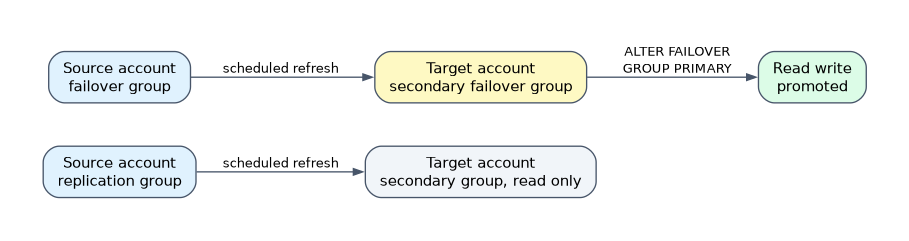 Account replication copies a chosen set of objects, in one consistent step, from a source account to one or more target accounts of the same organization. The unit is the group: you name the objects once, and Snowflake refreshes them together.
Two kinds of group exist. A replication group gives read only copies. A failover group gives read only copies that can also be promoted to read write when the source is lost.
How it works
Performing account replication
Replication is a two account job.
- In the source account, create the group and list the object types, databases, shares and target accounts.
- In each target account, create the secondary group as a replica of the source group.
- The secondary group runs an initial refresh automatically. After that, refreshes follow the schedule or are started by hand.
-- source account
CREATE REPLICATION GROUP rg_prod
  OBJECT_TYPES = DATABASES, ROLES, WAREHOUSES
  ALLOWED_DATABASES = prod
  ALLOWED_ACCOUNTS = myorg.acct_dr
  REPLICATION_SCHEDULE = '10 MINUTE';

-- target account
CREATE REPLICATION GROUP rg_prod
  AS REPLICA OF myorg.acct_src.rg_prod;

-- manual refresh in the target
ALTER REPLICATION GROUP rg_prod REFRESH;
A refresh gives point in time consistency across everything in the group: all databases, roles and other objects in one group reflect the same moment. Plain database replication of two databases does not give that, because each database refreshes on its own.
Monitor refreshes with SHOW REPLICATION GROUPS or SHOW FAILOVER GROUPS, and with the table function INFORMATION_SCHEMA.REPLICATION_GROUP_REFRESH_HISTORY.
Only ACCOUNTADMIN, or a role granted CREATE REPLICATION GROUP or CREATE FAILOVER GROUP, can create groups. The target accounts must be in the same organization.
Scheduled replication
You can refresh by hand with REFRESH, but Snowflake recommends scheduling with the REPLICATION_SCHEDULE parameter. Set it on CREATE or change it later with ALTER.
| Form | Example | Meaning |
|---|---|---|
| Interval | '10 MINUTE' | Start a refresh every 10 minutes |
| Cron | 'USING CRON 0 2 * * * UTC' | Refresh at 02:00 UTC every day |
Rules for scheduled refreshes:
- The next refresh time is based on the start of the previous refresh plus the interval. A 10 minute interval starting at 12:01 next runs at 12:11.
- Only one refresh runs at a time. If a refresh is due while another one is running, it starts when the running one finishes.
- A scheduled refresh runs as the role that owns the group.
- A secondary group cannot be promoted during a refresh, so suspend the schedule before a planned failover.
ALTER FAILOVER GROUP fg_prod SUSPEND;
ALTER FAILOVER GROUP fg_prod RESUME;
The interval is your recovery point objective (RPO). A 10 minute schedule can lose up to about 10 minutes of changes if the source fails. A shorter interval lowers the RPO and raises transfer and compute cost.
A scenario with an RPO such as "no more than 15 minutes of data loss" asks for a schedule of 15 minutes or less. It is not solved by a bigger warehouse or by Time Travel.
Replication groups against failover groups
| Point | Replication group | Failover group |
|---|---|---|
| Secondary access | Read only | Read only until promoted, then read write |
| Can fail over | No | Yes, any allowed target account can be promoted |
| Edition | Database and share objects on all editions; account objects need Business Critical or higher | Business Critical or higher, in source and targets |
| Typical purpose | Read replicas, regional distribution, data sharing across regions, migration | Disaster recovery and business continuity |
| Consistency | Point in time across the group | Point in time across the group |
| Promote command | Not available | ALTER FAILOVER GROUP ... PRIMARY |
Both group types can hold databases and shares. Which other object types they can hold, such as roles, users, warehouses, integrations and network policies, is listed in the replication documentation; with account objects, both need Business Critical.
A failover group can only be created in a Business Critical or higher account, so it can only replicate to Business Critical or higher accounts.
Choosing between them:
- Need read copies in other regions but no takeover: replication group.
- Need the target to become the working account after an outage: failover group.
- Standard or Enterprise account that only needs a database copy: database replication or a replication group with databases and shares.
Group privileges
| Privilege | Applies to |
|---|---|
OWNERSHIP, REPLICATE, MODIFY, MONITOR | Replication groups and failover groups |
FAILOVER | Failover groups |
Grant these in both accounts, because privileges on the group itself are not replicated.
Common mistakes
Choosing a replication group for disaster recovery. It cannot be promoted. Use a failover group.
Promoting during a refresh. Suspend the schedule first.
Reading the schedule as a guarantee. The interval is a target; a long refresh can delay the next one, and the RPO grows with it.
Putting each database in its own group and expecting cross database consistency. Consistency is per group.
What to remember for the exam
- Replication group: read only copies. Failover group: read only until promoted with
ALTER FAILOVER GROUP ... PRIMARY. - Failover groups need Business Critical or higher.
REPLICATION_SCHEDULEtakes an interval or a cron expression; one refresh at a time; runs as the group owner.- The schedule sets the RPO.
- Group privileges are
OWNERSHIP,REPLICATE,MODIFY,MONITORand, for failover groups,FAILOVER.
Check yourself
Which group type can be promoted to read write?
A failover group, with
ALTER FAILOVER GROUP ... PRIMARY.How is the next scheduled refresh time worked out?
From the start of the previous refresh plus the interval, or the next matching time of a cron expression.
What should an admin do with the schedule before a planned failover?
Suspend it, because a secondary group cannot be promoted while a refresh runs.
Topic 2 of 9 in Disaster Recovery, Backup and Data Replication
Test yourself on Disaster Recovery, Backup and Data Replication
The full Snowflake ADA-C02 question bank has 814 questions, with timed practice exams and an explanation for every answer.
This study guide is independent and is not affiliated with, endorsed by, or sponsored by Snowflake. Vendor names, certification names and exam codes are trademarks of their respective owners and are used for identification only.