Data Sharing and Snowflake Marketplace · Topic 1 of 10
Implementing Data Sharing, Sharing Models and Editions
Implement and manage Secure Data Sharing, choose between one to one, one to many, private and public models, and share across Snowflake editions.
- 5 min
- Includes a diagram
- Provider pays storage; consumer pays compute; no data is copied and changes are live.
- Provider needs
CREATE SHARE; grant order is databaseUSAGE, schemaUSAGE, objectSELECT. - Direct share means same region and cloud; listings reach other regions.
What it is
Secure Data Sharing gives other Snowflake accounts read only access to your data without copying it. The account that owns the data is the provider. The account that uses it is the consumer. The consumer queries the data with its own warehouse, so the provider pays storage and the consumer pays only compute.
An administrator picks the sharing model that fits the audience and then makes it work: the right objects, the right grants, the right edition settings. The exam gives a scenario and asks which model is the simplest correct one.
How it works
The share and the steps to implement it
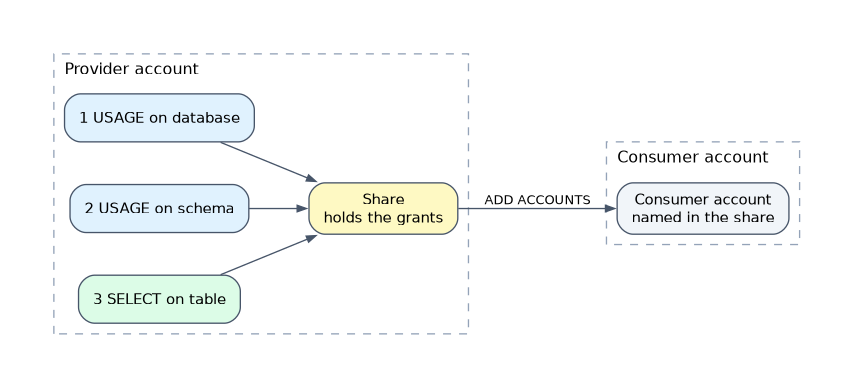 A share is a named object that holds grants. The provider needs
ACCOUNTADMIN or a role with the CREATE SHARE privilege. Container privileges go first, then the objects.
CREATE SHARE sales_share;
GRANT USAGE ON DATABASE sales TO SHARE sales_share;
GRANT USAGE ON SCHEMA sales.public TO SHARE sales_share;
GRANT SELECT ON TABLE sales.public.orders TO SHARE sales_share;
ALTER SHARE sales_share ADD ACCOUNTS = myorg.partner_acct;
Day to day management uses a few commands:
| Task | Command |
|---|---|
| List shares in the account | SHOW SHARES |
| Check what a share holds | SHOW GRANTS TO SHARE sales_share |
| Add or remove consumers | ALTER SHARE ... ADD ACCOUNTS and REMOVE ACCOUNTS |
| Remove an object from a share | REVOKE SELECT ON TABLE ... FROM SHARE ... |
| Stop sharing | DROP SHARE |
Changes are live. When the provider adds data or revokes a grant, consumers see it at once. New objects are not shared automatically; each one needs its own grant.
To find out who can see what, SHOW GRANTS OF SHARE lists the consumer accounts, and SHOW GRANTS TO SHARE lists the objects.
The sharing models
Four words describe the audience and the visibility of a share.
| Model | Audience | How it is built |
|---|---|---|
| One to one | One named consumer account | Direct share, or a private listing to one account |
| One to many | Several named accounts | One share with many accounts added, or a private listing to a list of accounts |
| Private | Only accounts the provider names; invisible to others | Direct share, private listing, or a Data Exchange |
| Public | Any Snowflake customer who finds it | Snowflake Marketplace listing |
A direct share is the simplest. It works only for consumers in the same region and on the same cloud as the provider, and it has no discovery page. A listing adds a description, sample queries and request handling, and can reach other regions through Cross-Cloud Auto-Fulfillment (covered on the next page).
| Need | Choose |
|---|---|
| One partner, same region, no frills | Direct share |
| Many named customers, any region | Private listing |
| Every account in the organization | Organizational listing |
| Anyone can discover, free or paid | Marketplace listing |
| Closed group of partners, admin controlled | Data Exchange |
| Consumer has no Snowflake account | Reader account (see later page) |
For a one to many design with different data per consumer, either create a share per consumer, or use one share with a secure view that filters on CURRENT_ACCOUNT() and a mapping table. The second form is easier to maintain.
Sharing among editions
Sharing works across Snowflake editions. A Standard, Enterprise, Business Critical or Virtual Private Snowflake account can be a provider or a consumer of the others, with one restriction aimed at sensitive data.
- A Business Critical provider cannot add a Standard or Enterprise consumer by default. The
SHARE_RESTRICTIONSoption onALTER SHARE ... ADD ACCOUNTSdefaults toTRUEand blocks it. - The provider can set
SHARE_RESTRICTIONS = FALSEto allow the add. This needs theOVERRIDE SHARE RESTRICTIONSprivilege, whichACCOUNTADMINholds by default. This is a conscious choice, because the data leaves the stronger security tier. - Virtual Private Snowflake and government deployments are isolated environments with their own separate infrastructure, so do not assume a normal share path to or from them.
ALTER SHARE sales_share
  ADD ACCOUNTS = myorg.std_partner
SHARE_RESTRICTIONS = FALSE;| Provider edition | Consumer edition | Result |
|---|---|---|
| Any | Same or higher | Allowed |
| Standard or Enterprise | Business Critical | Allowed |
| Business Critical | Standard or Enterprise | Blocked until SHARE_RESTRICTIONS = FALSE |
Setting SHARE_RESTRICTIONS = FALSE does not protect the data. It only removes the guard. Use it only when the business accepts the lower security tier.
Common mistakes
Using a direct share for another region. It works only inside the same region and cloud. Use a listing with auto fulfillment or replicate first.
Sharing before granting USAGE. An object grant without database and schema USAGE exposes nothing.
Expecting new tables to appear. Every new object needs its own grant.
Trying to consume a share in the same account. A share is for other accounts. Inside one account use roles and policies.
Forgetting the Business Critical restriction. The add fails until SHARE_RESTRICTIONS is set to FALSE.
What to remember for the exam
- Provider pays storage; consumer pays compute; no data is copied and changes are live.
- Provider needs
CREATE SHARE; grant order is databaseUSAGE, schemaUSAGE, objectSELECT. - Direct share means same region and cloud; listings reach other regions.
- Private versus public: direct share, private listing and Data Exchange are private; Marketplace is public.
SHARE_RESTRICTIONSdefaults toTRUEand guards Business Critical data.
Check yourself
Which model fits one partner in the same region with no discovery needs?
A direct share.
Why does adding a Standard consumer to a Business Critical share fail?
SHARE_RESTRICTIONSisTRUEby default; setting it toFALSEallows the add.How can one share serve many consumers with different rows?
Use a secure view that filters on
CURRENT_ACCOUNT()against a mapping table.
Topic 1 of 10 in Data Sharing and Snowflake Marketplace
Test yourself on Data Sharing and Snowflake Marketplace
The full Snowflake ADA-C02 question bank has 814 questions, with timed practice exams and an explanation for every answer.
This study guide is independent and is not affiliated with, endorsed by, or sponsored by Snowflake. Vendor names, certification names and exam codes are trademarks of their respective owners and are used for identification only.