Data and Object Management · Topic 2 of 11
Multi-Cluster Warehouses - Use Cases, Scaling Policy and Monitoring
Manage multi-cluster warehouses: when they help, Maximized versus Auto-scale mode, Standard and Economy scaling policy, cluster limits and monitoring.
- 5 min
- Includes a diagram
- Multi-cluster warehouses fix concurrency and need Enterprise Edition or higher.
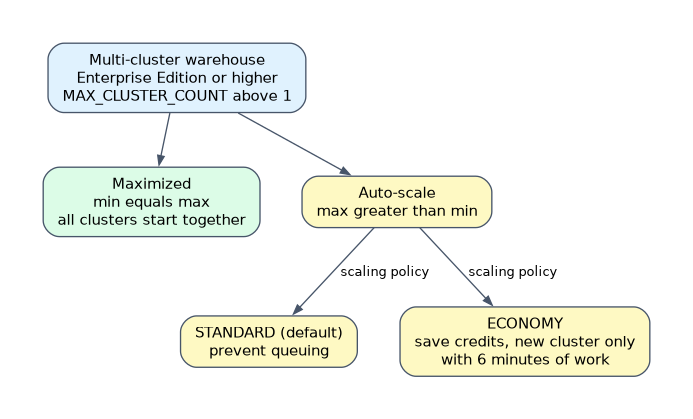
- Maximized: min equals max. Auto-scale: max greater than min.
- Scaling policy applies to Auto-scale only;
STANDARDis the default andECONOMYkeeps clusters full (6 minutes of work).
What it is
A multi-cluster warehouse is one warehouse that can run several clusters of the same size at the same time. Snowflake adds clusters when queries queue and removes them when load drops.
It solves concurrency: many users or many short queries at once. It does not make one large query faster. It needs Enterprise Edition or higher.
How it works
Use cases and benefits
| Situation | Multi-cluster? | Why |
|---|---|---|
| Hundreds of BI users at peak hours | Yes | Queries run in parallel instead of waiting |
| One huge nightly transform | No | A larger size helps, more clusters do not |
| Unpredictable user load | Yes, Auto-scale | Pay only for clusters that run |
| Load that is always high | Yes, Maximized | All clusters are ready, no ramp up delay |
Benefits are steady response time at high concurrency and cost that follows demand. The warehouse still bills per second for each running cluster.
Configuration and modes
Cluster count is set with MIN_CLUSTER_COUNT and MAX_CLUSTER_COUNT. Max must be greater than 1 for a multi-cluster warehouse, and min must be equal to or less than max.
| Mode | Setting | Behavior |
|---|---|---|
| Maximized | min equals max (greater than 1) | All clusters start when the warehouse starts |
| Auto-scale | max greater than min | Snowflake starts and stops clusters based on load |
CREATE WAREHOUSE reporting_wh
  WAREHOUSE_SIZE = 'MEDIUM'
  MIN_CLUSTER_COUNT = 1
  MAX_CLUSTER_COUNT = 4
  SCALING_POLICY = 'STANDARD';
The maximum allowed depends on the size: 300 for X-Small, Small and Medium, falling to 10 for 4X-Large and above. Snowsight allows at most 10; higher values need SQL. You can change min and max at any time, even while the warehouse is running. Scaling down removes the extra clusters only after they finish their statements.
Scaling policy (Auto-scale mode only)
| Policy | Goal | Starts a new cluster | Shuts a cluster down |
|---|---|---|---|
STANDARD (default) | Prevent queuing | Soon after queries start to queue | After a sustained period of low load |
ECONOMY | Save credits, keep clusters full | Only if there is enough work to keep it busy for at least 6 minutes | When less than 6 minutes of work remains for it |
Economy accepts some queuing in return for fewer started clusters. Choose it for workloads where a short wait is fine and credits matter. Choose Standard when response time matters.
To change the policy: ALTER WAREHOUSE reporting_wh SET SCALING_POLICY = 'ECONOMY';. The policy has no effect in Maximized mode, because every cluster is already running.
A scenario that says "minimize cost, queries may wait a little" points to Economy. "Users must never wait" points to Standard, or to Maximized if the load is always high.
Credit use
The most a multi-cluster warehouse can use in an hour is the credit rate of its size multiplied by the maximum cluster count. A Medium warehouse with 3 clusters can use 12 credits in a full hour. Actual use depends on how many clusters ran and for how long.
Docs recommend Auto-scale for most cases, a minimum of 1 unless high availability needs more, and a maximum as high as your cost limits allow.
Monitoring
| Where | What you see |
|---|---|
| Snowsight Compute, Warehouses | Min, max and running cluster counts, running and queued queries |
SHOW WAREHOUSES | min_cluster_count, max_cluster_count, started_clusters |
| Query History in Snowsight | Cluster number for each query when filtered by warehouse |
WAREHOUSE_LOAD_HISTORY | Running and queued load per interval |
WAREHOUSE_EVENTS_HISTORY | Cluster start and stop events |
WAREHOUSE_METERING_HISTORY | Credits used by the warehouse |
If the warehouse is always at its maximum cluster count and queries still queue, raise the maximum or split the workload. If it never goes above the minimum, the maximum is too high or the minimum is wasting credits.
Common mistakes
Using multi-cluster for one slow query. Clusters do not split a single query. Use a larger size.
Expecting Economy to behave like Standard. Economy waits for 6 minutes of work before adding a cluster, so queuing is normal.
Choosing Maximized for spiky load. All clusters run and bill from the start. Auto-scale fits spikes.
Forgetting the edition. On Standard Edition, multi-cluster warehouses are not available.
What to remember for the exam
- Multi-cluster warehouses fix concurrency and need Enterprise Edition or higher.
- Maximized: min equals max. Auto-scale: max greater than min.
- Scaling policy applies to Auto-scale only;
STANDARDis the default andECONOMYkeeps clusters full (6 minutes of work). - Maximum hourly credits are rate times maximum cluster count.
- Monitor with Snowsight,
SHOW WAREHOUSES, load history and metering history.
Check yourself
Which mode starts every cluster when the warehouse starts?
Maximized, where min and max cluster counts are equal and greater than 1.
A team wants the fewest credits and can tolerate some queuing. Which scaling policy?
ECONOMY.A Large warehouse (8 credits per hour) is set to max 3 clusters. What is the most it can use in an hour?
24 credits, the size rate times the maximum cluster count.
Topic 2 of 11 in Data and Object Management
Test yourself on Data and Object Management
The full Snowflake ADA-C02 question bank has 814 questions, with timed practice exams and an explanation for every answer.
This study guide is independent and is not affiliated with, endorsed by, or sponsored by Snowflake. Vendor names, certification names and exam codes are trademarks of their respective owners and are used for identification only.